=base:build-info.json
{"layout":"article"
,"publicationStatus":"Archived"
}
=base:preamble.json
{"author": "Lucas DiCioccio"
,"date": "2022-04-25T01:00:00Z"
,"title": "Static site + Halogen demo"
}
=base:topic.json
{"topics":["purescript", "web", "functional programming"]
,"keywords":["purescript", "web", "functional programming", "spa", "javascript"]
,"imageLink":"/gen/images/blog-phases-purescript-pushed.dot.png"
}
=base:social.json
{"twitter": "lucasdicioccio"
,"linkedin": "lucasdicioccio"
,"github": "lucasdicioccio"
,"cohost": "lucasdicioccio"
,"mastodon": "https://fosstodon.org/@lucasdicioccio"
}
=base:summary.cmark
Halogen is a web-application framework like React or Elm for writing
applications in PureScript. This page demonstrates an interesting
integration between my static-site blog-engine and Halogen.
=base:main-content.cmark
If you've followed closely my blog, you know that I've recently written my own
blogging engine. This article demonstrates how I plan to use some
[PureScript](https://www.purescript.org) (and, in particular,
[Halogen](https://github.com/purescript-halogen/purescript-halogen)) when I
need some client-based interactivity or dynamic-content.
# Context
My blog engine is a static-site generator that reads a lot of different files.
You may want to catch-up reading the [dedicated article with a high-level
overview](/how-this-blog-works.html).
## state of affairs
A short summary would be that my
static-blog generator has layouts in __Haskell__ and in __CommonMark__. Two
steps are required to generate my blog: a compilation of the Haskell code with
`ghc` into a `binary` that can then compiles CommonMark via a series of
read/assemble/production steps.
Pictorially, the following pipeline shows this two-binary process.
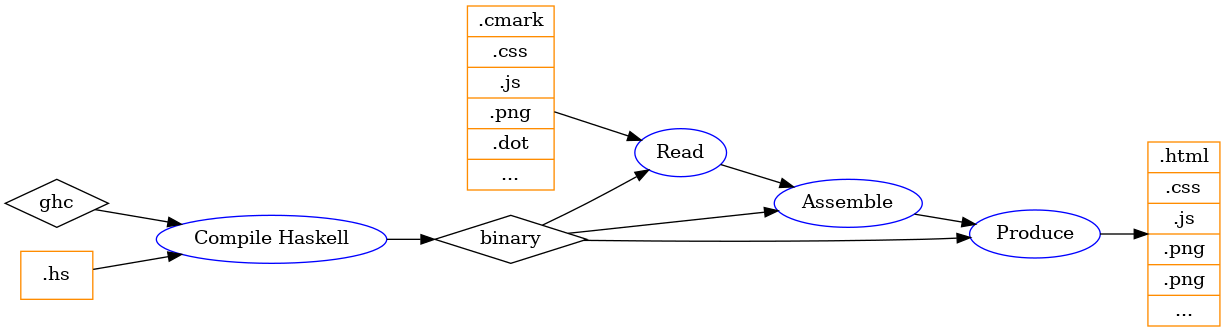
In addition to HTML files, the `binary` produces a number of other _targets_,
generally in JSON format but somewhat-arbitrary file generation is also
supported. Among these extra files, the blog engine generates a sibling
metadata file for each article, a listing of all targets, and a graph of how
articles, topics, and images are linked with each other.
For reasons, I want to consume and use of these extra-files __on the blog files
you are reading__ (e.g., on the [home](/) I want to display a graphical view of
how articles relate). To achieve these interactions, I need to use some
JavaScript to run in browsers. Alas, JavaScript is not my cup of tea. For
simple interactions such as performing a
[fetch](https://developer.mozilla.org/en-US/docs/Web/API/Fetch_API) and add an
[ECharts](https://echarts.apache.org/) graph I find JavaScript tolerable.
However, as I generate more-and-more complex objects on the Haskell-side, I
need to make sense of these objects on the frontend-side.
For translating API-types into in-memory values, I fint that the usual
monadic-parsing approaches we find in Haskell-like languages is much more
pragmatic than the sloppy "trust this opaque JSON blob has this JS shape"
approach pervasive in the JavaScript ecosystem. We even can get
generic-deriving in Haskell-like languages. On the frontend-side, the two most
popular Haskell-like languages are PureScript and [Elm](https://elm-lang.org).
I've used and enjoyed both, however I find Elm more focused on full-page
application. Whereas I find that for this blog where each post will have
different scripts maps more-naturally to the PureScript approach.
## next step: PureScript
I settled on generating some `.js` input file from `spago` (the build tool I
prefer to run the PureScript compiler).
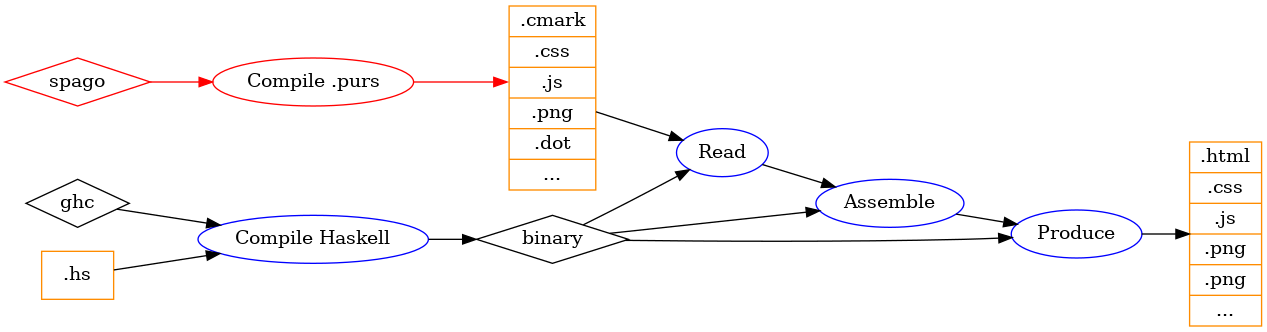
Given that `spago` has a "watch-mode", I can still benefit from live-reloading
the rendered page, even after changing some PureScript source code. Indeed,
`spago` watches the source PureScript, then bundles a `.js` file in the
blog-source files, which re-loads my browser. Overall, even if this file-watch
sequences feels like a brittle [Rube-Goldberg machine](https://en.wikipedia.org/wiki/Rube_Goldberg_machine), it works well enough for my needs.
An _alternative option_ would have been to drive `spago` or the PureScript
compiler as a _production rule_ in my blog-engine. This approach would be a bit
cleaner and be more direct than the implementation I've picked so far. A key
benefit, would be that a closer-embedding would result in faster reload times.
However, this #alternative option would give me less-direct access to
compilation error messages.
Later I'll probably support both modes. The implmentation I've settled on
required no changes to the blog-engine and is likely to work as long as the
auto-reload works (i.e., forever as auto-reload was one key reason for writing
my own blog-engine).
# the demo
The goal of the demo is to somewhat _dynamically_ fetch the list of targets in
the blog and render this list in some form of filterable list. Such a demo
would prove that I can write some PureScript that is inserted as a small
JavaScript in the page, and which interacts with a structure inspecting the
data from the blog engine. There is nothing especially surprising or hard in
this demo, so the demonstration is more useful as an assessment of whether the
friction is low-enough to my taste or not.
For this assessment, I need to write some Halogen code in PureScript, and some
Commonmark file for the blog with enough to insert the JavaScript.
### Halogen code
You can look directly at the [Halogen source code](gen/out/halogen-demo.cmark__Main.purs).
In this source code you'll find some incantation to attach the `QuerySelector "#halogen-routes"`.
The code itself is pretty standard Halogen code that uses some libraries for
fetching data using an Ajax request and then renders the data to HTML. The
filtered-list is not really a component because there is not `Output` nor
`Query` to extract information out of the component. However, the filtered-list
has a `State` that contains a modifyiable `filter` string, the whole set of
routes is passed as `Input` and stored in the state but never modifier. The
`rendering function` applies the filtering logic (i.e., the trimmed list is
transient). The rendering function is typed by the `Action` that bound
DOM-handlers can generate, which is limited to updating the filter.
I've put everything in a single file for the purpose of the demo (see below: I
use some trick for you to see the source of the PureScript file).
### Blog-source in Commonmark
You can also look at the [CommonMark file with sections source
code](gen/out/halogen-demo.cmark__source-cmark).
The actual CommonMark content has two purposes. On one hand, the file contains the meaty-content, that is, the text you are reading right now. On the other hand we need to prepare the HTML content to have some DOM Node ready to accept the Halogen application. The latter is feasible as follows in CommonMark:
```markdown
::: {#halogen-routes}
:::
```
The above CommonMark will generate some `div` with the `id` tag that the
Halogen expects to find (the `#halogen-routes` from the `QuerySelector` in
previous sectoin). Whereas the `script` tag is a normal HTML tag that gets
integrated as raw HTML.
The CSS is then specialized to the page as a content-section of the `.cmark`
source file, as follows.
=base:main-css.css
@import "/css/main.css";
#halogen-routes ul {
list-style: none;
border: 1px solid #eeeeee;
border-radius: 5px;
padding: 0.2em;
max-height: 50vh;
overflow: scroll;
}
// ... more stuff
And that's about it. You'll also notice some `=generator:cmd.json` sections at the bottom of the file, which contain commands to `cat` the source code (and hence this is how I make available the sources for the blog-article and for the Halogen script).
## live-running Halogen code
::: {#halogen-routes}
:::
# Conclusion
I appreciate the feeling I got when editing this demo article.
The combination of strong types that do not get in the way on the blog-engine
as well as on the PureScript sides is pleasing and pragmatic. I only need to
edit a few files and I can easily adapt the "size" of the PureScript logic from
simple decorations to moderately-large web applications with it. I think this
combination achieves pretty well my desire of having a "fluid" experience
between a static-site and a single-page-app.
The code I wrote for the demo could serve in dev-mode, and could also be the
basis for some menu-navigation.
=base:main-css.css
@import "/css/main.css";
#halogen-routes {
border: 1px solid #eeeeee;
border-radius: 5px;
padding: 1em;
}
#halogen-routes input {
border: 1px solid lightblue;
padding: 0.3em;
font-size: 22px;
background-color: lightblue;
margin-bottom: 8px;
}
input::placeholder {
color: black;
font-style: italic;
opacity: 1;
}
#halogen-routes ul {
list-style: none;
margin: 0;
padding: 0.2em;
max-height: 40vh;
overflow: scroll;
border-top: 1px solid #cccccc;
}
#halogen-routes ul li {
margin-top: 14px;
padding: 0.5em;
}
#halogen-routes ul li a {
font-family: system-ui;
}
#halogen-routes ul li:nth-child(odd) {
background: #eeeeee;
}
=generator:cmd.json
{"cmd":"bash"
,"args":["-c", "cat ./purescript/halogen-demo/src/Main.purs"]
,"target":"Main.purs"
}
=generator:cmd.json
{"cmd":"bash"
,"args":["-c", "cat ./site-src/halogen-demo.cmark"]
,"target":"source-cmark"
}