Getting started with salmon
On Fri, 25 Sep 2026, by @lucasdicioccio, 898 words, 4 code snippets, 3 links, 2images.
Getting started with salmon
Salmon is a Haskell library and toolkit, not a hosted service: you write a small binary over the recipes you need, and that binary provisions things. This page gets you from a checkout to a running graph.
Build
git clone https://github.com/lucasdicioccio/salmon
cd salmon
cabal build all
cabal build salmon-core salmon-ops salmon-ops-recipes salmon-apps   # individual packages
cabal build salmon-migrator                                          # a single executable
The project is layered strictly bottom-to-top:

salmon-core— the algebraicGraph, and theOpGraph/Track/Evalabstractions that let “create a file” and “turn a server up” be the same type. No IO-heavy dependencies, kept minimal on purpose.salmon-ops— IO-heavy primitives (files, systemd, Debian packages, podman, postgres, wireguard, certificates, ssh, netfilter, cron, rsync, qemu, GCP, …), the drivers that execute a graph (one-shotup/down, and the long-runningserveloop with its supervision, HTTP API, web UI and pull mode), and the CLI plumbing every salmon binary shares.salmon-ops-recipes— higher-level, opinionated compositions of the builtins, where project conventions get enforced. Has the real test suite.salmon-ops-recipes-experimental— recipes needing heavier or less stable dependencies (kitchen-sink site generation, ACME certificates). Not in the default package set.salmon-apps— the shipped binaries, each a smallMainover a recipe.
Some git dependencies in cabal.project point at the author’s other
repositories, pinned by commit; they are not on Hackage.
Test
cabal test salmon-ops-recipes
Tests are tiered by IO cost and blast radius: cheap in-process assertions on
graph shape and traversal, up through tests that dogfood the project’s own
Podman builtins to run real recipes against disposable containers, and a
few that build qemu VMs. The container and VM tiers need podman or qemu
on the machine and are skipped loudly otherwise. See
Writing ops, §10 for the breakdown.
Using a salmon binary
Every salmon binary speaks the same two-step protocol: config turns
human-facing command-line arguments (a seed) into a JSON directive, and
run reads that directive on standard input and acts on the graph it
expands to.
my-salmon config <seed-args...>                        # seed -> JSON directive on stdout
my-salmon config <seed-args...> | my-salmon run up     # converge the graph
my-salmon config <seed-args...> | my-salmon run down   # tear it down
my-salmon config <seed-args...> | my-salmon run tree   # print the dependency tree (run dag: Graphviz)
my-salmon config <seed-args...> | my-salmon query show --select '/some/path/**'
my-salmon run serve                                    # read seed declarations as commands, keep converging
run tree prints the dependency tree the directive expands to. This is the
repository’s own salmon-ops-serve-fixture, run at page-build time (not
pasted by hand — it is regenerated whenever the fixture’s output changes),
declaring a tiny bundle of two files under a directory:
salmon-ops-serve-fixture config --dir /tmp/demo --name web --file index.html --file style.css \
  | salmon-ops-serve-fixture run tree
(loading the actual output…)
Two file nodes share the directory node that has to exist “before” either of
them (Ref-deduped, so it is walked once); the bundle node on top is what a
seed declares up or down. This is the shape every graph in the repo has,
whether it is a handful of files or a clustered database: nodes with a
before edge, walked in dependency order, deduped by Ref.
The split keeps the possibly-impure “decide what I want” step separate from
the hermetic “make it so” step, which is meant to run unattended, often on
another machine. run up/run down/run serve take --json for one JSON
object per report. query targets a subset of the graph: query plan --exclude PATTERN writes a plan that run up --plan FILE honours.
run serve is the long-running mode. It reads up/down/only/clear/
converge/status/… lines, keeps a world of every declared seed,
converges after each one, and between commands tends the nodes,
re-applying what goes missing under a per-node supervision policy. The same
loop can be driven over a unix socket, over HTTP with an event stream and a
web UI (or TLS and a token over TCP), from a terminal client, or pull its
declarations from a registry — a directory, git, HTTPS, DNS or a bucket,
optionally signed — and report back through a status file that
salmon-fleet status folds. All of that is
run serve: convergence and supervision.
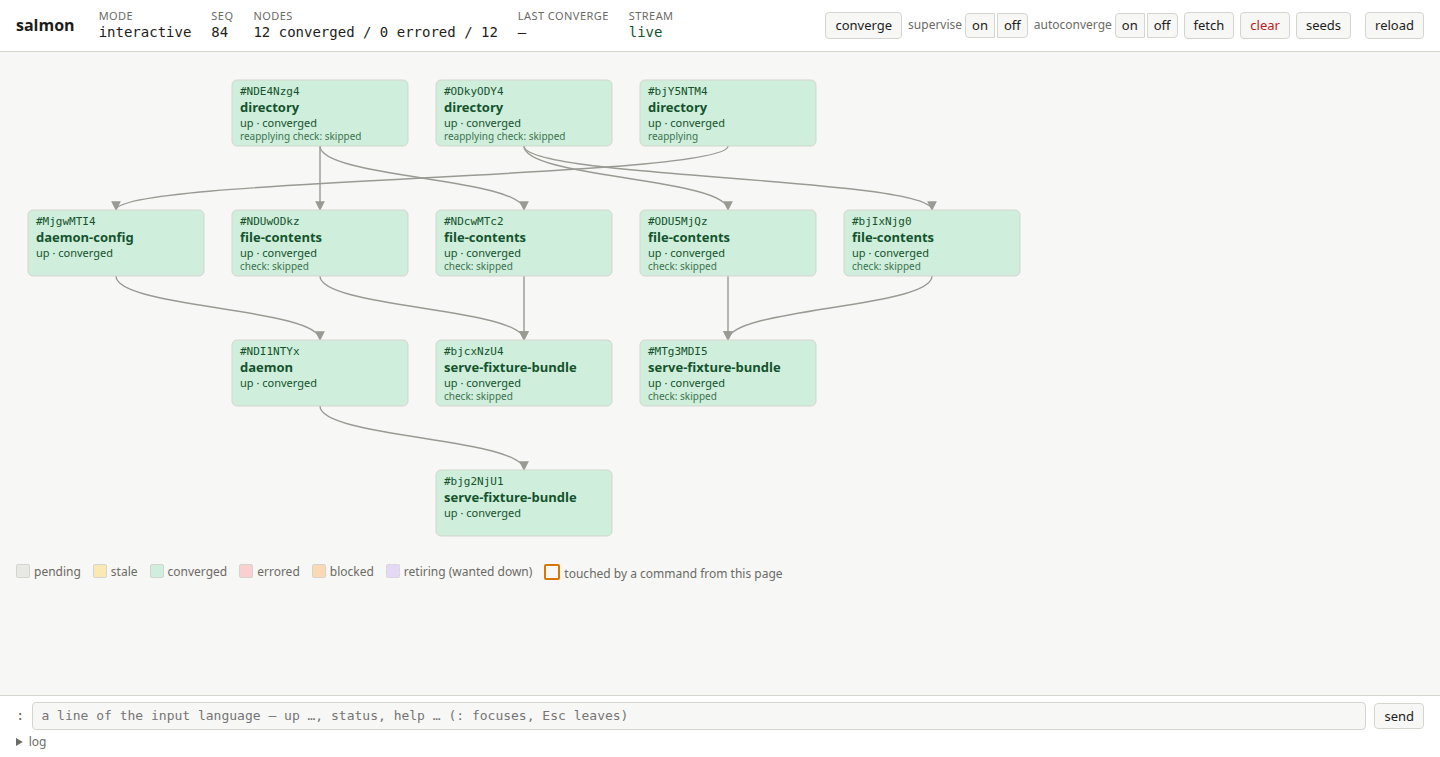
With --http PATH the same process also serves a web page (and a JSON API,
and an event stream) on a second socket, which salmon-tui and a browser
can attach to. The repository’s fixture binary, salmon-ops-serve-fixture,
is the quickest way to see it: run serve --http /tmp/x.http, declare a seed
or two, and open the page:
The model, in one paragraph
An Op is a graph node centered on itself, with an effectful recipe for
finding its own predecessors — this is what lets a one-line filesystem op
and a whole clustered-database-with-replication setup type-check
identically. Every op carries up/down (bring the effect into being /
undo it), check (a CheckResult answering “is my effect already in
place”, which is what makes a node idempotent to re-run), and a Ref that
gives it a stable identity so the traversal can dedupe a resource reached
via several graph paths. The drivers collapse the materialized graph into a
DAG with one node per Ref, walk it in dependency order (or the reverse,
for teardown), contain real failures (a thrown exception marks a node
Failed and blocks everything depending on it rather than being swallowed),
and report exactly what happened, node by node.
Write your own binary
Define a seed type, a directive type (FromJSON/ToJSON), a
Configure IO seed directive, and a Track' directive that turns a
directive into an Op by composing builtin nodes and recipes; then hand the
four to Salmon.Builtin.CommandLine.execCommandOrSeed. The
cookbook walks through each piece with a worked
example, and salmon-apps/src/Migrator.hs in the repository is a complete
one.