Printing a tramaj tree: the PDF fold, and what we added to HPDF
On Sat, 07 Nov 2026, by @lucasdicioccio, 1099 words, 10 code snippets, 14 links, 0images.
Printing a tramaj tree: the PDF fold, and what we added to HPDF
A tramaj template is evaluated against a context into a tree of nodes. What
the tree looks like is decided later, by a fold: tramaj-react and
tramaj-halogen fold it into HTML in the browser.
tramaj-hpdf
is a new fold, from the same tree to a PDF document, written in Haskell over
HPDF.
One template and one context, then: a report you show on a page can also be printed, without a second template written in a print language.
This post has two parts. The first is the fold, with two example documents. The second is what we added to HPDF to make it possible, with a document made with HPDF alone.
The fold
What a node becomes
| nodes | on the page |
|---|---|
h1–h6 | bold headings, 22pt down to 11pt |
p, blockquote, pre, hr | paragraphs, indented quotes, preformatted monospace text, rules |
ul, ol, li | bulleted and numbered lists, nested |
strong, em, code, small, … | styled text inside a paragraph; br breaks the line |
table | a grid: columns sized to their content, wrapping cells, numbers right-aligned, the header repeated at the top of each new page |
img | a PNG or JPEG, scaled to its width/height or to the text width |
Any other tag is a plain container, so its content still shows. Actions are
ignored: a page has nothing to wire them to. The layout is pure Haskell
(Tramaj.Hpdf.Layout), tested with a fixed-width fake font, and every node
of the conformance corpus must fold to a PDF.
The command-line tool takes a template and a context, or an evaluated node in the normative Node JSON:
tramaj-hpdf report.tramaj report.json report.pdf
tramaj-hpdf --node node.json out.pdf
Example: a report
report.tramaj
rendered against a small JSON context. It has headings, inline styles,
nested lists, a quote, a pre block, a table with a wrapped column, a PNG
image, and a last line with characters the font does not have.
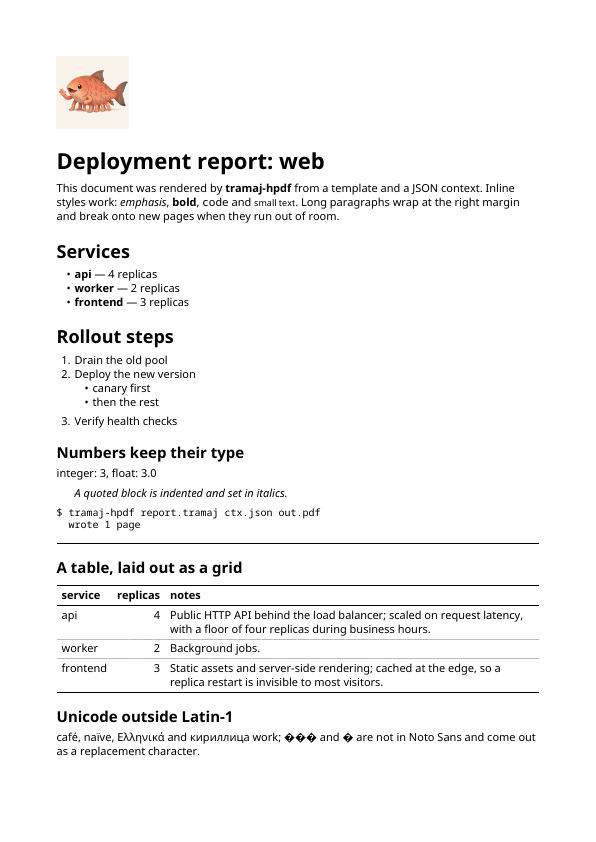
Download the PDF (61 KB, one A4 page).
Fonts: every EU language, Greek and Cyrillic
Text is set in Noto Sans and Noto Sans Mono (Regular, Bold, Italic, Bold
Italic, under the SIL Open Font License), bundled with the package and
compiled into it: nothing is read from the system. The PDF embeds a subset
of each face it uses, with a ToUnicode map, so Latin with every EU
language’s accents, Greek, Cyrillic and the euro sign render, and copy out
of the PDF as the text they are.
What the fonts do not have (CJK, Arabic, Indic scripts, some symbols) is never dropped silently. It is drawn as U+FFFD, the replacement character, and listed on stderr:
tramaj-hpdf: warning: no glyph for U+2192 '→' (Regular), U+65E5 '日' (Regular), …; drawn as a replacement character
For a document where a replacement character must not go out, such as an
invoice, --missing-glyphs error (optMissingGlyphs = FailOnMissingGlyphs
in Haskell) makes it an error, and no file is written.
Example: a Factur-X invoice
Factur-X (ZUGFeRD in Germany) is a Franco-German format for electronic invoices: a PDF/A-3
document that people read, with the same invoice attached as XML that
software reads. tramaj can write XML as well as HTML, so the XML comes from
a second template over the same JSON context. A tag cannot contain a
:, so a namespace prefix is written with a - (ram-ID is written
ram:ID):
.rsm-ExchangedDocument(
  .ram-ID($ctx.number),
  .ram-TypeCode($ctx.typeCode),
  .ram-IssueDateTime(.udt-DateTimeString(format: "102", $ctx.issueDate))
)
tramaj-hpdf --factur-x factur-x.tramaj --xml-out factur-x.xml \
  invoice.tramaj invoice.json invoice.pdf
The PDF is PDF/A-3b, with factur-x.xml attached and the Factur-X metadata
(BASIC profile). The example passes
veraPDF (PDF/A-3b, compliant) and
Mustang 2.26.0 (valid, 0 errors and 0
warnings). The companies and identifiers in it are made up.
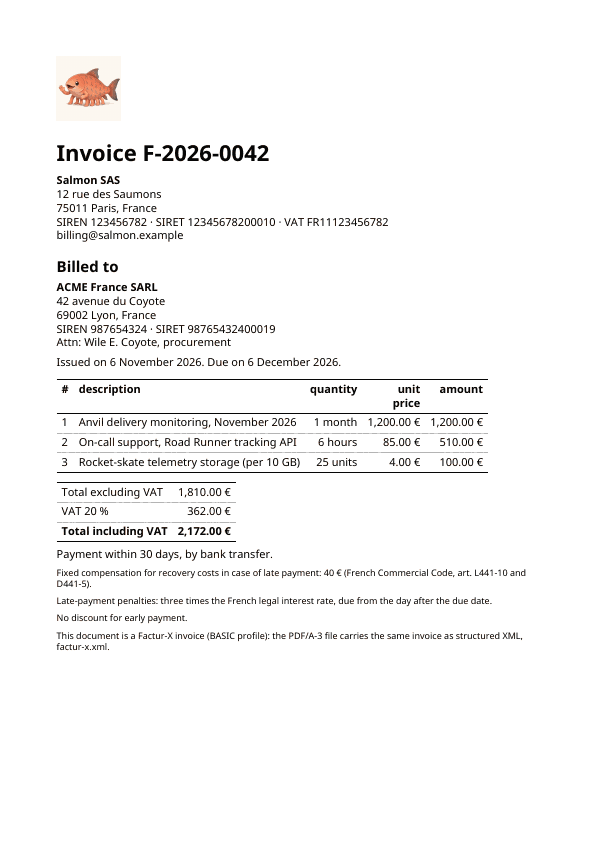
Download the PDF (64 KB; pdfdetach -list
shows the attached XML). The templates and the context are in
examples/invoice/.
What we added to HPDF
HPDF is a pure-Haskell PDF library: pages, drawing, text, images,
typesetting. Out of the box its text uses the PDF standard 14 fonts, which
are not embedded and only cover a Western European character set, and it
has no PDF/A output. A fold that prints invoices in any EU language needed
four changes. They are on two branches of a fork,
lucasdicioccio/HPDF:
unicode-truetype (the fonts) and factur-x (PDF/A-3 and attached files,
built on the first), and they are proposed upstream in
hsyl20/HPDF#22. Output with the
standard 14 and Type 1 fonts is unchanged: the library’s demo PDF comes out
byte-identical.
All the snippets below are plain HPDF, no tramaj. Together they make this page:
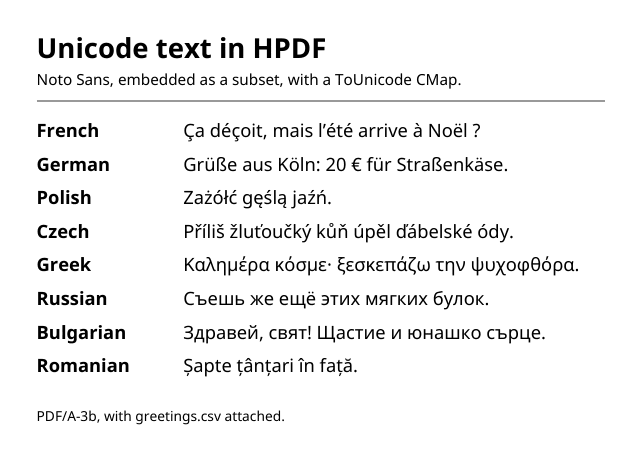
Download the PDF (36 KB). It passes veraPDF
as PDF/A-3b, pdffonts lists both faces as embedded subsets with a Unicode
map, pdftotext gets the text back, and pdfdetach -list shows
greetings.csv.
1. TrueType fonts with Unicode text
Graphics.PDF.Fonts.TrueType reads a TrueType file (a small pure parser for
the tables a PDF needs: head, hhea, hmtx, maxp, cmap formats 4 and
12, OS/2, post, name) and embeds it as a Type0 font over a
CIDFontType2, with Identity-H encoding, /W widths and a ToUnicode CMap.
Glyph codes widen to 16 bits; a font says how many bytes a code takes, so
the standard fonts keep writing one.
import Graphics.PDF
import Graphics.PDF.Fonts.TrueType

main = do
  Right regular <- readTrueTypeFont "NotoSans-Regular.ttf"
  runPdf "cyrillic.pdf" standardDocInfo (PDFRect 0 0 420 300) $ do
    font <- mkTrueTypeFont regular
    page <- addPage Nothing
    drawWithPage page $
drawText $ text (PDFFont font 12) 24 150 "Съешь же ещё этих мягких булок."text, displayText and the typesetting code (paragraphs, line breaking)
work with these fonts as with the others.
2. Subsetting
A font file is large: Noto Sans Regular is about 500 KB. mkTrueTypeFont
now embeds a subset. While the pages are drawn, the glyphs each font shows
are recorded; when the document is saved, the font program keeps only those
(plus glyph 0 and the parts of composite glyphs), with their ids unchanged
so the content streams need no rewriting. /W and ToUnicode cover the
glyphs kept, and the font name takes a subset tag (ZPBQAA+NotoSans-Regular).
| document | whole fonts | subset |
|---|---|---|
| the HPDF page above, two faces | 584 KB | 36 KB |
| tramaj-hpdf's Cyrillic sample, five faces | 1.4 MB | 45 KB |
The subset renders pixel-identically. mkTrueTypeFontWith EmbedWhole keeps
the whole file.
3. PDF/A-3b
Graphics.PDF.Archive writes a document as PDF/A, the ISO profile for
archiving. One call, anywhere in the document:
import Graphics.PDF.Archive

document icc = do
  setPDFA (pdfa3b icc) { pdfaTitle = "Unicode text in HPDF" }
  -- ... pages drawn with embedded fonts only
When the document is saved this adds XMP metadata (the PDF/A part and
conformance, Dublin Core title and creator, the producer, and any extension
schema with its description), an sRGB output intent, a PDF 1.7 header with
its binary comment line, and no image interpolation. Every document, PDF/A
or not, now gets a trailer /ID, a hash of its objects, so the same input
still gives the same bytes. PDF/A requires every font to be embedded:
pdfByteStringE returns the document, or the reasons it is not the PDF/A it
was asked to be, such as a standard 14 font.
4. Associated files
PDF/A-3 lets a document carry files that belong with it. embedAssociatedFile
writes an EmbeddedFile stream (MIME type, size, optional dates) and a file
specification with its /AFRelationship, listed in the catalog’s /AF and
in the EmbeddedFiles name tree, where viewers show attachments:
_ <- embedAssociatedFile
       (associatedFile "greetings.csv" "text/csv" greetings)
         { afRelationship = Data, afDescription = "The greetings on the page" }
Factur-X is this plus its own XMP properties, which facturXExtension gives:
setPDFA (pdfa3b icc) { pdfaTitle = "Invoice 42"
                     , pdfaExtensions = [facturXExtension "BASIC"] }
_ <- embedAssociatedFile (associatedFile "factur-x.xml" "text/xml" xml)
       { afRelationship = Alternative }
The whole program
The page above, fonts, PDF/A and attachment together. Run with the two Noto Sans files next to it, it writes the PDF linked above, byte for byte:
{-# LANGUAGE OverloadedStrings #-}
import Graphics.PDF
import Graphics.PDF.Archive
import Graphics.PDF.Fonts.TrueType
import qualified Data.ByteString.Lazy as BL
import qualified Data.Text as T
import qualified Data.Text.Encoding as TE

main :: IO ()
main = do
  Right regular <- readTrueTypeFont "NotoSans-Regular.ttf"
  Right bold <- readTrueTypeFont "NotoSans-Bold.ttf"
  icc <- BL.readFile "/usr/share/color/icc/colord/sRGB.icc"
  let info = standardDocInfo { author = "HPDF demo", compressed = True }
  case pdfByteStringE info (PDFRect 0 0 420 300) (document regular bold icc) of
    Left problems -> mapM_ putStrLn problems
    Right bytes -> BL.writeFile "hpdf-unicode-pdfa.pdf" bytes

document :: TrueTypeFontData -> TrueTypeFontData -> BL.ByteString -> PDF ()
document regularData boldData icc = do
  setPDFA (pdfa3b icc) { pdfaTitle = "Unicode text in HPDF" }
  _ <- embedAssociatedFile
         (associatedFile "greetings.csv" "text/csv" greetings)
           { afRelationship = Data, afDescription = "The greetings on the page" }
  regular <- mkTrueTypeFont regularData
  bold <- mkTrueTypeFont boldData
  page <- addPage Nothing
  drawWithPage page $ do
    drawText $ text (PDFFont bold 18) 24 262 "Unicode text in HPDF"
    drawText $ text (PDFFont regular 10) 24 244
      "Noto Sans, embedded as a subset, with a ToUnicode CMap."
    strokeColor (Rgb 0.6 0.6 0.6)
    stroke (Line 24 234 396 234)
    sequence_
      [ do drawText $ text (PDFFont bold 12) 24 y lang
           drawText $ text (PDFFont regular 12) 120 y line
      | ((lang, line), y) <- zip samples [210, 188 ..] ]
    drawText $ text (PDFFont regular 9) 24 24
      "PDF/A-3b, with greetings.csv attached."

samples :: [(T.Text, T.Text)]
samples =
  [ ("French", "Ça déçoit, mais l’été arrive à Noël ?")
  , ("German", "Grüße aus Köln: 20 € für Straßenkäse.")
  , ("Polish", "Zażółć gęślą jaźń.")
  , ("Czech", "Příliš žluťoučký kůň úpěl ďábelské ódy.")
  , ("Greek", "Καλημέρα κόσμε· ξεσκεπάζω την ψυχοφθόρα.")
  , ("Russian", "Съешь же ещё этих мягких булок.")
  , ("Bulgarian", "Здравей, свят! Щастие и юнашко сърце.")
  , ("Romanian", "Șapte țânțari în față.")
  ]

greetings :: BL.ByteString
greetings = BL.fromStrict . TE.encodeUtf8 $
  "language,greeting\nFrench,Bonjour\nGreek,Γειά σου\nRussian,Привет\n"
Still missing, in HPDF and so in the fold: kerning, shaping for complex scripts, font fallback, and CFF-flavoured OpenType fonts.
Status
tramaj-hpdf is released as a git tag, tramaj-hpdf-v0.3.0.0. It is not on
Hackage: it depends on the HPDF changes above, which for now live only in
the fork, and Hackage packages cannot depend on a fork. The repository’s
cabal.project pins the fork by commit, so a clean checkout builds as is.
To depend on it, pin the tag and copy the HPDF stanza from tramaj’s
cabal.project:
source-repository-package
  type: git
  location: https://github.com/lucasdicioccio/tramaj.git
  tag: tramaj-hpdf-v0.3.0.0
  subdir: tramaj-hpdf

-- plus the HPDF source-repository-package stanza from tramaj's cabal.project
Once HPDF has the changes in a release, tramaj-hpdf can go to Hackage like
tramaj-hs. Not done yet in the fold itself: links, colspan and
rowspan, table rows taller than a page, images inside text or table
cells, and page headers and footers. The
README
and the
changelog
have the details.