agents-server: agents over HTTP
On Tue, 06 Oct 2026, by @lucasdicioccio, 6615 words, 28 code snippets, 20 links, 1images.
Generated from documentation/agents-server.md, the repository is the canonical source and may be ahead of this page.
agents-server: agents over HTTP
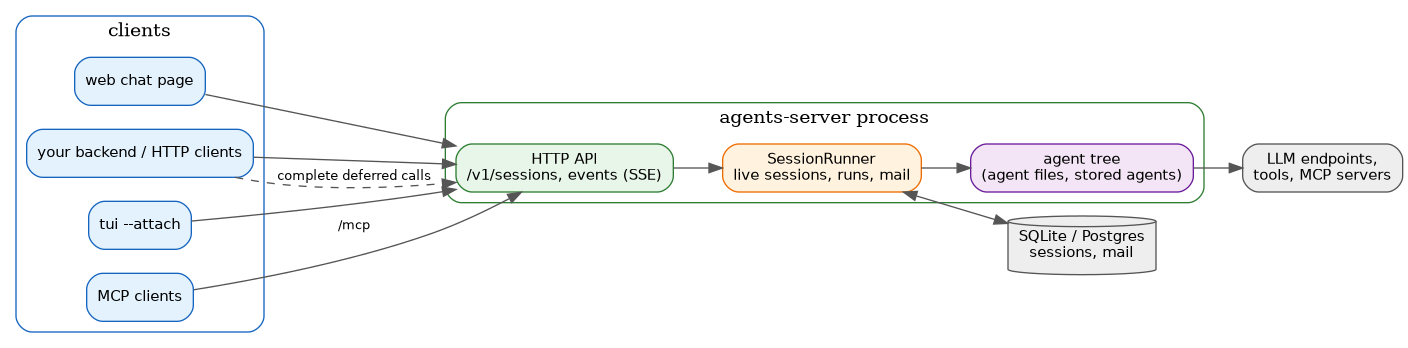
agents-server runs agents as a long-lived HTTP service. Sessions live in a
SQLite database rather than in files, so a web application can start
conversations, follow them live, complete deferred tool calls from its own
workers, and pick sessions up again after a restart.
It uses the same agent files as agents-exe, and the same durable-session
machinery as the session CLI commands (see
durable-workflows-howto.md): an agent can pause on
deferred tool calls, and the server resumes it when the results arrive.
Authentication is off by default. Without
--auth-tokens, anyone who can reach the server can run its agents, with its API keys. It binds to127.0.0.1by default. See Authentication before exposing it.
Running the server
cabal build agents-server
cabal run agents-server -- \
    --agent-file ./weather.json \
    --api-keys ./secrets/keys.json \
    --db ./agents-server.db \
--port 8080| Flag | Default | Meaning |
|---|---|---|
--agent-file FILE | (required) | A root agent file. Repeat it to serve several agents; each is addressed by its slug, which must be unique. |
--api-keys FILE | (required) | The API keys file, as for agents-exe. |
--db FILE\|URL | agents-server.db | Where sessions and continuation tokens live: a SQLite file, or a postgresql:// URL (see [Postgres](#postgres)). Created or migrated on start. |
--bind HOST | 127.0.0.1 | Address to listen on. |
--port PORT | 8080 | Port to listen on. |
--live-session-ttl SECONDS | 900 | How long an idle session keeps its in-memory state (including background tool calls) before it is dropped. It is reloaded from the database on next use. |
--shutdown-grace SECONDS | 10 | How long open requests get to finish on shutdown. |
--auth-tokens FILE | (none) | Bearer tokens and their owners. See [Authentication](#authentication). |
--admin-owners OWNER,… | (none) | Owners allowed to store and delete agents over the API. Needs --auth-tokens. See [Storing agents](#storing-agents). |
--stream-tokens | off | Stream LLM answers: the events stream gets text.delta events as the text arrives. See [Streaming answers](#streaming-answers). |
--no-ui | off | Do not serve the chat page at /. See [Finding your way around](#finding-your-way-around). |
--cors-origin ORIGIN | (none) | Allow this origin to call the server cross-origin (a browser page on another host or port). Repeatable, or * for any origin — refused at startup together with --auth-tokens. See [Authentication](#authentication). |
--socket PATH | (none) | Also listen on this Unix domain socket, in addition to --bind/--port. A stale file at the path is removed at start; the socket is created with mode 0600. Requests over it carry no Origin header and need no bearer token beyond what --auth-tokens imposes elsewhere: the socket, and who can reach it on the filesystem, is the trust boundary. Closed and unlinked on shutdown. |
--owner-api-keys OWNER=FILE | (none) | This owner's sessions call the LLM with the keys in FILE instead of the ones in --api-keys. Repeatable. Needs --auth-tokens. See [API keys per owner](#api-keys-per-owner). |
--isolate-tools docker:IMAGE\|process:PATH | (none) | Run bash and MCP tool calls outside the server process. See [Isolating tool calls](#isolating-tool-calls). |
--set NAME=VALUE, --set-json NAME=JSON | (none) | Set a process-scope parameter value, shared by every session. Repeatable. See [Parameters](#parameters). |
--pin NAME=VALUE, --pin-json NAME=JSON | (none) | Like --set, but sessions cannot override it. Repeatable. See [Parameters](#parameters). |
Sub-agents (prompt_agent_<slug> calls) run as real sessions of their own:
the child is created, stored in the same database and linked to the calling
session as its parent (smParent / GET /v1/sessions?parent=), before
the parent’s tool call returns — a client watching the parent’s parent=
listing, or subscribing with scope=owner/scope=all, sees session.created
for it right away, and the child’s own session.updated events (its stream,
not the parent’s) show its progress live, the same as any other session.
The parent’s tool call waits for the child to stop and returns its final
answer as the tool result, same as before; cancelling the parent’s call
cancels the child (cancelRun), and the child can also be cancelled,
inspected or subscribed to directly and independently through its own id.
subcall.started/subcall.completed/subcall.failed (below) still appear
on the parent’s stream for convenience, now carrying the child’s real
session id. A call with narrowing (bindings/with/as) still runs
in-tool, inside the parent’s own call, with no session of its own — the
older behaviour, kept for that case until it is supported the same way.
Configuration
agents-server itself only ever takes agent files from --agent-file: it has
no config file of its own. agents-exe serve is the same code (see
Embedding the runner in your own program)
behind agents-exe’s own config loading: it reads agents-exe.cfg.json and
resolves agent files the way the TUI and every other agents-exe command do
(agentsFiles, agentsDirectories, the ~/.config/agents-exe/default
fallback, --agent-file, --agent SLUG to pick one agent by name), and
shares agents-exe’s global --api-keys, --set/--pin/--set-json/
--pin-json and --params-file. Its own flags are the rest of this table
(--db, --bind, --port, --live-session-ttl, --shutdown-grace,
--auth-tokens, --stream-tokens, --admin-owners, --no-ui,
--cors-origin, --socket, --owner-api-keys, --isolate-tools); --db
defaults next to the resolved sessions
directory instead of ./agents-server.db:
agents-exe --agent-file ./weather.json serve --port 8080
# or, from a directory with an agents-exe.cfg.json:
agents-exe serve --port 8080
See cli-commands.md for the full flag list.
Finding your way around
The server describes itself, so a client that knows only its URL can start using it:
| Path | What it is |
|---|---|
GET / | A small chat page, for a person at this machine. Served on a loopback bind, or when --auth-tokens is on; --no-ui turns it off. |
GET /openapi.json | The whole API as an OpenAPI 3 document, generated from the routes. |
GET /healthz | Liveness and counters. |
None of the three needs a bearer token: they describe the server, not its sessions or its agents.
The OpenAPI document is the machine-readable reference, and it is generated from the same servant types that route the requests, so it cannot drift from the server. An agents-exe agent can use it directly as a toolbox:
"openApiToolboxes": [
  {"tag": "OpenAPIServer", "contents": {"SpecUrl": "http://127.0.0.1:8080/openapi.json"}}
]
The chat page is one self-contained HTML document with no build step and no
assets. It starts sessions, follows their event streams, offers a box to
complete deferred tool calls, and attaches files, so it doubles as a worked
example of the API. Its session list follows GET /v1/events (see
Following every session), so sessions created,
deleted or changed by any other client (another tab, an attached TUI, a
script) show up without a reload.
Attachments. Attach adds files to the next message, up to 20 MB in
total (the body limit is 32 MiB and base64 adds a third). They are sent as
the media field described under
API reference, and the agent’s model must accept them.
A PDF is sent as a file content part, text is inlined into the message,
and anything else is sent as an image. So images, PDFs and text files
(including CSV, JSON, YAML and Markdown) all work; audio and video depend
on the provider.
An agent for the examples
The examples below use an agent that defers every tool call to an external worker:
{
  "tag": "OpenAIAgentDescription",
  "contents": {
    "slug": "weather",
    "apiKeyId": "openai",
    "flavor": "OpenAIv1",
    "modelUrl": "https://api.openai.com/v1",
    "modelName": "gpt-4o-mini",
    "announce": "answers weather questions",
    "systemPrompt": ["You answer weather questions. Use get_weather."],
    "builtinToolboxes": [],
    "mcpServers": [],
    "executionMode": "asynchronous",
    "toolCallPolicyConfig": {
      "default": {"tag": "defer", "reason": "weather service"},
      "rules": []
    }
  }
}
Agents without a toolCallPolicyConfig run all their tools in the server
process and never wait on the outside world. The server always runs agents
in asynchronous mode.
A first conversation
Ask a question and wait for the run to stop:
curl -s -X POST 'localhost:8080/v1/sessions?wait=true' \
     -d '{"agent": "weather", "prompt": "Weather in Paris?"}'
The LLM called get_weather, which the policy defers, so the session is
waiting on the outside world (turns elided):
{
  "session_id": "4ed40545-d192-4230-aed0-39cd09117123",
  "agent": "weather",
  "parent_session_id": null,
  "owner": null,
  "status": "waiting_external",
  "status_detail": null,
  "version": 5,
  "created_at": "2026-09-19T07:31:55.703930717Z",
  "updated_at": "2026-09-19T07:31:55.713658207Z",
  "session": {"turns": ["…"]},
  "pending": [
    {
      "tool_call_id": "017bb633-3306-4f95-8512-534427a4c030",
      "continuation_token": "0dd070c1-eada-4669-9755-bb75a2783df1",
      "tool": "get_weather",
      "disposition": {"tag": "defer", "reason": "weather service"},
      "call": {
        "id": "call_1",
        "type": "function",
        "function": {"name": "get_weather", "arguments": "{\"city\": \"Paris\"}"}
      }
    }
  ]
}
A worker computes the result and posts it with the continuation token. The
session resumes on its own; with wait=true the answer holds the LLM’s
final turn:
curl -s -X POST 'localhost:8080/v1/continuations/0dd070c1-eada-4669-9755-bb75a2783df1?wait=true' \
     -d '{"result": "sunny, 24°C"}'
# 200, "status": "idle", "pending": []
Continue the conversation with another message:
curl -s -X POST 'localhost:8080/v1/sessions/4ed40545-…/messages?wait=true' \
     -d '{"prompt": "And tomorrow?"}'
Sessions and runs
A session is one conversation. A run steps it in the background: it
calls the LLM, runs or defers tool calls, and stops when the LLM answers,
when only deferred calls remain, or after one step in step mode. A session
has at most one run at a time.
Each session has a status:
| Status | Meaning | What moves it on |
|---|---|---|
ready | Can progress: a prompt or tool results are waiting for the LLM. | resume |
running | A run is active. | Wait for it, or cancel it. |
waiting_external | Only deferred calls remain. | Post their results to /v1/continuations/:token. |
idle | The LLM answered. | Post a new message. |
paused | Stopped by pause. | resume, or any mail if the agent's resumeOnAnyMail option is set. |
failed | The last run failed; status_detail says why. | resume retries from the last stored version. |
Every stored change increments the session’s version.
Waiting for a run
Endpoints that can start a run (create, messages, resume, continuations) take two query parameters:
wait=true|false(defaultfalse). Without waiting, the server answers as soon as the run has started. Withwait=true, it answers when the run stops.timeout=SECONDS(default120, at most600), used withwait=true. When it expires, the server answers with the current state (status: "running") and the run carries on.
The answer is always the session as it is at that moment, including its
pending deferred calls. Creation answers 201. The other endpoints answer
202 while a run is still going and 200 otherwise. A client that
disconnects while waiting does not cancel the run.
How far a run goes is set in the body: run on create and messages (none,
step, or until_blocked, the default), mode on resume (step or
until_blocked). With run: "none", the session is stored as ready and
nothing runs until resume.
Deferred results arriving during a run
A result posted while a run is active is checked and queued, and the run
applies it before its next step. If the result makes the session able to
progress, a run about to stop keeps going instead. Posting with
"resume": false stores the result without starting a run; resume later.
While a run is active the result is queued for it, and resume is ignored:
the run applies it either way.
POST /v1/sessions/:id/mail generalizes the interrupt flag on
POST .../messages: any piece of mail, from a control instruction to a
message from another session, to a session that may not even be live in
this process (a stored, idle session still has its durable mailbox, and
gets one opened for it). Unlike messages, this never refuses on a
session’s status: the mail just queues, folded into the session’s next
turn (or the current one, if a run is already going) the same way every
other mail is (see Following a session live
for the events a run produces along the way). A paused session may wake
on it if the agent’s resumeOnAnyMail option is set and the mail’s sender
is in its wakeOn list (the same rule an ordinary message follows against
a paused session).
The request body is {body, priority?}. priority is "normal" (the
default) or "interrupt". body is a MailBody, tagged JSON:
{"tag": "userMessage", "query": "are you there?"}
{"tag": "userMessage", "query": {"text": "look at this", "media": [{"mimeType": "image/png", "base64Data": "…"}]}}
{"tag": "agentMessage", "text": "status update", "inReplyTo": null, "expectsReply": false}
{"tag": "control", "message": {"tag": "pause"}}
{"tag": "control", "message": {"tag": "resume"}}
{"tag": "control", "message": {"tag": "stopRun"}}
{"tag": "control", "message": {"tag": "cancelAllAttached"}}
{"tag": "control", "message": {"tag": "cancelCalls", "toolCallIds": ["017bb633-…"]}}toolCallFinished, continuationResult, watchedEvent and toolCallNotice
are also valid MailBody tags (the async engine, completeCall,
watch-session, and a tool reporting notify-level progress produce them
respectively), but there is no reason to post one by hand over
this endpoint. POST /v1/sessions/:id/mail answers 202 with the mail’s
Receipt: {"id": "<message id>", "seq": <int>, "duplicate": false}.
GET /v1/sessions/:id/mail?unread=true|false lists the session’s mail,
oldest first, as {"mail": [Envelope, …]}. unread=true (default false)
limits it to what is still unread past the session’s stored cursor – what
its next turn, or a run already going, has not folded in yet. An Envelope
is:
{
  "id": "2cdb9b15-…",
  "seq": 4,
  "from": {"tag": "user", "owner": "alice"},
  "priority": "normal",
  "hops": 0,
  "sentAt": "2026-09-23T19:08:06Z",
  "body": {"tag": "agentMessage", "text": "status update", "inReplyTo": null, "expectsReply": false}
}
from (a Sender) is one of {"tag": "user", "owner"?} (a client’s own
mail, owner set when the server authenticates callers – this is what
POST .../mail always sends as), {"tag": "session", "sessionId", "agent"?}
(another session, e.g. send-message), {"tag": "toolCall", "toolCallId"},
or {"tag": "system", "source"} (the runner itself, e.g. watch-session).
Parameters
An agent’s declared parameters (see
Parameters, Bindings & Narrowing Sub-Agents)
can be bound straight into tool arguments the model never sees — a tenant
id, an API token, anything the caller of this session knows and the model
does not need to. agents-server is where a session- or message-scope
parameter actually varies per caller: give it a value in the same params
object every request that can start a run accepts:
curl -sS localhost:8080/v1/sessions \
    -d '{"agent": "invoices-agent", "prompt": "how many invoices are overdue?", "params": {"tenant": "acme-corp"}}'
params is an object of parameter name to value; a null value clears a
previously-set session-scope value. A session-scope value is kept for the
life of the session: a non-secret one is stored with the session and comes
back after a restart or an idle eviction; a secret one lives only in this
process’s memory, so a client must resupply it after either, or the next
run that needs it fails with params_required. A message-scope value applies to that one run
only and is never stored. A secret value is never returned by any endpoint:
GET /v1/sessions/:id’s own params field only ever holds the
non-secret session-scope values (the current, actual values); GET /v1/agents/:slug’s parameters field describes the agent’s own
declarations generically — one entry per parameter, with bound and
pinned flags, never a value.
A request whose params do not check out is refused before anything runs:
| Error | Meaning |
|---|---|
422 unknown_params | A name the agent does not declare. |
403 forbidden_params | A process-scope parameter, or one pinned with --pin/--pin-json at server start: only the operator may set it. |
422 invalid_params | A secret parameter's value was not given as a string. |
422 params_required | A required parameter has no value once this request's params are applied — process value or default, session value, and message value combined. On a message or resume to an existing session (whose values lapsed, e.g. after a restart) the status is 409 instead: supply them with PUT /v1/sessions/:id/params or in the request's params. |
--set NAME=VALUE, --set-json NAME=JSON, --pin NAME=VALUE, and
--pin-json NAME=JSON on agents-server itself set process-scope values
every session shares, the same flags and meaning as agents-exe (except
--params-file, which only agents-exe has).
whenUnbound: "expose" and live sessions
A binding’s argument marked whenUnbound: "expose" reappears in a tool’s
schema for as long as its parameter is unbound for that session — the
tool list a session sees changes the moment params sets or clears the
value, with no agent rebuild or restart.
Setting parameters over MCP
A tools/call sets parameters two ways, both string-keyed to the JSON
values requests use, and both scoped to that one call, like a
message-scope value: Agents-Param-<name>: <value> request headers (every
value is a string), and/or _meta."agents-exe/params" on the call itself
(any JSON value; overrides a same-named header). Both go through the same
validation table above.
Following a session live
GET /v1/sessions/:id/events is a
server-sent events
stream. Each frame carries an id: line (the event’s sequence number, unique
and increasing per server) alongside the usual event:/data:. It first
sends a snapshot of the session’s metadata (unless it is a replay – see
Reconnecting below), then one event per change:
| Event | Data |
|---|---|
snapshot | Session metadata (the object above without session and pending). |
session.updated | Session metadata after a stored change, plus head_turn: the newest turn. |
run.started | {session_id, mode} |
calls.deferred | {session_id, calls}: the run stopped on these deferred calls. |
run.stopped | {session_id, status} |
session.failed | {session_id, message}, followed by run.stopped with status failed. |
text.delta | {session_id, text}: the next piece of the LLM's answer, with --stream-tokens only. |
tool.started | {session_id, tool_call_id, tool}: a tool call still attached to the session (not deferred) started running. |
tool.completed | {session_id, tool_call_id, tool, succeeded}: that call reached a final state. succeeded is false for a failed or cancelled call. A call that both starts and finishes within one step is not reported (informational only; the stored session remains the source of truth). |
tool.progressed | {session_id, tool_call_id, tool, phase, payload?, error?, provider_call_id?, at}: a background (async-engine) tool call's lifecycle -- phase is one of started, progressed (with a payload), completed, failed (with an error), cancelled. Reported for every phase, not only intermediate progress; complements tool.started/tool.completed above, which are derived separately by diffing the stored session. |
subcall.started | {session_id, parent_session_id, child_session_id, agent, depth}: a prompt_agent_<slug> call started a sub-agent run. session_id (the event's own, top-level field) is the parent -- the session actually running the call, whose stream this shows up on -- and parent_session_id repeats it explicitly alongside child_session_id, the sub-agent's own id. When the call runs as a real session (the common case), child_session_id is a session a client can GetSession/subscribe to on its own, already created (session.created fired) by the time this event is reported; a still-narrowed call (bindings/with/as) runs in-tool instead, and child_session_id there is just the id generated for it, not a session of its own. |
subcall.completed | {session_id, child_session_id, result?}: that sub-agent run finished, with its result text when it produced one. |
subcall.failed | {session_id, child_session_id, message}: that sub-agent run failed. |
session.created | {session_id, …} (full session metadata): a new session was created. Only seen on GET /v1/events (below); a single session's own stream never reports its own creation. |
session.deleted | {session_id}: a session (and everything under it) was deleted. Only seen on GET /v1/events. |
hook.failed | {session_id, message}: a tool-call hook (a before/after command hook) failed outside of the normal tool-call result path. Not a session failure -- the run continues, unlike session.failed. |
A typical run, from a resume:
id: 101
event: snapshot
data: {"session_id":"4ed4…","status":"ready","version":1,…}

id: 102
event: session.updated
data: {"session_id":"4ed4…","status":"running","version":2,"head_turn":{…},…,"kind":"session.updated","seq":102}

id: 103
event: run.started
data: {"mode":"until_blocked","session_id":"4ed4…","kind":"run.started","seq":103}

id: 104
event: session.updated
data: {"session_id":"4ed4…","status":"running","version":3,"head_turn":{…},…,"kind":"session.updated","seq":104}

id: 105
event: calls.deferred
data: {"session_id":"4ed4…","calls":[{"continuation_token":"0dd0…",…}],"kind":"calls.deferred","seq":105}

id: 106
event: run.stopped
data: {"session_id":"4ed4…","status":"waiting_external","kind":"run.stopped","seq":106}
(The snapshot frame has no id:: it is a point-in-time read, not an event
in the sequence. kind and seq inside data are additive – every field
this doc’s table names was already there.)
Streaming answers
With --stream-tokens, the server asks the LLM for a streamed answer
("stream": true) and forwards each piece of text as a text.delta event,
before the answer is stored. Concatenating a step’s deltas gives the text of
the LLM turn that the following session.updated carries. Tool calls
are not streamed: they appear in the stored turn as usual. A sub-agent that
runs as its own session streams like any other session, on its own id (its
own text.deltas, not the parent’s); a still-narrowed sub-agent call
running in-tool does not (see “Sub-agents” above).
The option applies to every agent of the server. It needs an endpoint that
supports streaming: OpenAI and most OpenAI-compatible APIs do. For the
OpenAIv1 flavor the server also asks for token usage in the last chunk
(stream_options.include_usage).
The stream stays open across runs. It sends a : keepalive comment after 15
seconds without events.
Reconnecting
The server keeps a ring of the last 4096 events (across every session, not
per session). A reconnecting client sends Last-Event-ID – set
automatically by the browser’s EventSource on a dropped connection – or,
for any other client, ?after=<seq> naming the same thing explicitly. Two
cases:
- The sequence number is still in the ring: the missed events replay first,
in order, with no gap and no duplicate at the point where the stream goes
live (the server takes the ring snapshot and subscribes to new events in
one atomic step). No
snapshotframe is sent in this case – the client already has a consistent view and only needs what it missed. - It is older than everything still in the ring (a long disconnect, or a
server restart, which starts the sequence over): the stream falls back to
a fresh
snapshotfollowed by live events, exactly like a first connection. There is no way to tell “missed too much” apart from “never connected before” other than this: either way, asnapshotmeans re-read anything you need from it (andGET /v1/sessions/:idfor the full turns).
The ring is in-memory only: it does not survive a restart, and does not
replace session_mail/the stored session as the durable record.
Every event stream answers with an Agents-Replay header saying which case
applies before any frame arrives: live (no Last-Event-ID/after was
given), replayed, or unavailable. A client that must know whether it
missed events (the attached TUI’s httpClient) reads it rather than
waiting for a first frame, which on a quiet stream could take a while.
Following every session
GET /v1/events?scope=&after= is the same stream, server-wide instead of
per session: every event above, plus session.created and
session.deleted, and the same Last-Event-ID/after reconnect (no
snapshot here – there is no single session to snapshot). scope=owner
(the default when the caller has an owner) is that caller’s own sessions;
scope=all is every session on the server, and needs authentication off or
the caller to be one of --admin-owners, since it would otherwise let any
authenticated caller watch every other owner’s sessions. This is what a
live session list, or a dashboard across sessions, follows instead of
polling GET /v1/sessions.
Attaching the TUI
agents-exe tui --attach runs the terminal UI against this server instead
of a runner of its own:
agents-exe serve --port 8080 --socket /run/agents/agents.sock   # on the server
agents-exe tui --attach http://127.0.0.1:8080                   # over TCP
agents-exe tui --attach unix:///run/agents/agents.sock          # over the socket
agents-exe tui --attach https://agents.example --token-file ~/.agents-token
The TUI is then one more client of this API, like the chat page: it lists
agents from GET /v1/agents, drives sessions through the routes above,
follows GET /v1/events (scope=all, or scope=owner when a non-admin
token is used), and fetches GET /v1/sessions/:id on each
session.updated. It sees the sessions of its token’s owner (or every
session, without authentication), including ones created by other clients,
and quitting it leaves its sessions running here. Its --params-file
values travel as params on each create and message, as the chat page’s
do. See tui.md for what differs from the embedded
TUI.
Watching with spectate
agents-exe spectate --attach takes the same addresses and tokens, and
only reads: it lists the running sessions once (GET /v1/sessions), then
follows GET /v1/events and shows the session tree, the tool calls and
the model’s text live. With --stream-tokens the text arrives as it is
written; without, turn by turn from session.updated. See
cli-commands.md.
agents-exe spectate --attach unix:///run/agents/agents.sock
API reference
All bodies are JSON. Errors are {"error": "<code>", "message": "<text>"}.
| Method and path | Body | Success | Errors |
|---|---|---|---|
GET / | 200 text/html chat page | 404 when the page is off | |
GET /openapi.json | 200 OpenAPI 3 document | ||
GET /healthz | 200 {ok, live_sessions, active_runs} | ||
POST /mcp | JSON-RPC message or batch | 200 JSON-RPC answer, or 202 | see [MCP over HTTP](#mcp-over-http) |
GET /v1/agents | 200 [{slug, description, model, system_prompt, tools, parameters, helpers, source, …}] | ||
GET /v1/agents/:slug | 200 agent (same shape) | 404 unknown_agent | |
PUT /v1/agents/:slug | agent configuration | 201 (new) or 200 agent | 403 agent_edits_disabled / forbidden, 400 agent_uses_files / agent_invalid_paths / unknown_helper / helper_cycle / agent_failed_to_load / bad_request, 409 agent_defined_by_file |
DELETE /v1/agents/:slug | 200 {deleted} | 403, 404 unknown_agent, 409 agent_defined_by_file / agent_in_use | |
POST /v1/sessions?wait=&timeout= | {agent, prompt?, media?, run?, params?, parent?, seal?, session_token?} | 201 session (with session_token once, when asked), with a Location header | 404 unknown_agent, 404 unknown_session (parent), 400 bad_request, see [Parameters](#parameters) and [Session tokens](#session-tokens-and-sealed-sessions) |
DELETE /v1/sessions/:id/token | none | 200 session | 404; revokes the session's token, also during a run |
GET /v1/sessions?agent=&status=&parent=&limit=&before= | 200 {sessions, next_before} | 400 bad_request | |
GET /v1/sessions/:id?wait=&timeout= | 200 session, or 202 when wait expired with a run still active | 404 unknown_session | |
POST /v1/sessions/:id/messages?wait=&timeout= | {prompt, media?, run?, params?, interrupt?} | 202 or 200 session | 404, 409 run_in_progress, 409 not_accepting_messages, see [Parameters](#parameters) |
POST /v1/sessions/:id/resume?wait=&timeout= | {mode?, params?} or no body | 202 or 200 session | 404, 409 run_in_progress, see [Parameters](#parameters) |
POST /v1/sessions/:id/cancel | 200 session metadata | 404, 409 no_active_run | |
POST /v1/sessions/:id/cancel-attached | 200 session metadata | 404 | |
POST /v1/sessions/:id/pause | 200 session metadata | 404 | |
POST /v1/sessions/:id/mail | {body, priority?} | 202 mail Receipt: {id, seq, duplicate} | 404, see [Mail](#mail) |
GET /v1/sessions/:id/mail?unread= | 200 {mail: [Envelope]} | 404 | |
POST /v1/sessions/:id/fork | {at_turn?, agent?, params?} | 201 new session, with a Location header | 404 unknown_session / unknown_turn / unknown_agent, see [Parameters](#parameters) |
PUT /v1/sessions/:id/params | {params} | 200 session | 404, 409 run_in_progress, 422/403 as in [Parameters](#parameters); message-scope names are 422 invalid_params |
GET /v1/sessions/:id/pending | 200 {calls} | 404 | |
GET /v1/sessions/:id/events?after= | 200 text/event-stream | 404 | |
GET /v1/events?scope=&after= | 200 text/event-stream | 403 forbidden (scope=all without authentication off or an admin owner) | |
POST /v1/continuations/:token?wait=&timeout= | {result, resume?, params?} | 202 or 200 session | 404 unknown_token, 409 token_already_completed, 409 conflict, see [Parameters](#parameters) |
DELETE /v1/sessions/:id?dry_run= | 200 {sessions, continuations, dry_run} | 404, 409 run_in_progress |
prompt on create may be omitted (with no media either): this stores an
idle session with no turn at all, status: "ready", ready for a later
message, mail, or resume – nothing runs. A prompt behaves as before.
parent on create (a session id) records the new session as a child of
that one, for lineage only: it is listed through ?parent=, deleted with
its parent, and is never told anything by its parent or vice versa. The
caller must be able to see the parent (another owner’s answers
404 unknown_session). This is what an attached TUI sends for
createSessionAsChild and spawnSession.
wait=true on GET /v1/sessions/:id first waits (up to timeout seconds,
default 120, at most 600) for the session’s active run to stop, then
answers the session with 200, or 202 if a run is still active once the
time is up. Without wait, it answers at once, always 200.
at_turn on fork is a 0-based index into the session’s turns, newest
first (turns[0] is the most recent turn): the fork keeps that turn and
every older one, dropping anything newer. Absent, the whole session is
copied. agent rebinds the fork to another agent’s slug (also how to
“continue with another agent”: fork with no at_turn, or at_turn: 0, and
an agent). params on a fork are overlaid on the source’s persisted, non-secret session values and validated like any request’s; secrets are never inherited and have to be given again. PUT /v1/sessions/:id/params sets session-scope values (a null clears one) without starting a run, e.g. to rotate a credential or re-supply secrets after a restart. The fork gets a fresh session_id, forkedFromSessionId set
to the source, the source’s parent link and non-secret parameters, and
status derived from the turns it kept – never the source’s own status,
and it starts no run, so it never picks up a later change to the source.
Any endpoint that reads a body or a query parameter can answer
400 bad_request; the table names it only where it is the usual outcome.
Other errors: 401 unauthorized when authentication is on (with a
WWW-Authenticate: Bearer header),
403 forbidden_origin when it is off (see Authentication),
404 not_found for an unknown path, 405 method_not_allowed,
413 payload_too_large for bodies over 32 MiB, and 500 internal_error.
Messages (prompt, media, interrupt). media is a list of
{"mime": "image/png", "base64": "…", "filename": "optional"}. interrupt
(default false) only matters against a busy session (status: "running"):
instead of being refused with 409 not_accepting_messages, the message is
posted as interrupt-priority mail, which detaches the session’s currently
attached tool calls (and, with the agent’s interruptCompletions on,
cancels an in-flight LLM completion) and asks the model again with this
message folded in. A detached call’s result, if it still arrives, is
reported on a later run rather than lost. On an idle session interrupt has
no effect: there is nothing to interrupt.
Mail (a message, or any other envelope R1 folds into a turn) normally
becomes a separate user message after a round of attached tool results. For
a provider that rejects a user message directly after tool results, set the
agent’s mailInToolResult (default false): R1 then appends the folded
mail, with the same [mail …] header, as a trailing block of the last
tool result of that round instead. Only applies when the round actually had
tool calls; a plain user turn (no tool results) is unaffected, and
a detached call’s result arrives in a notice of its own (see documentation/async-tool-calls.md).
Results (result). A JSON string is a text result. Other forms are
{"type": "text", "content": "…"}, {"type": "json", "content": <any>},
{"type": "media", "mimeType": "…", "base64Data": "…"}, and
{"type": "mixed", "parts": [...]}.
Listing. Sessions come newest first (by updated_at). Filters:
agent=<slug>, status=<s1,s2,…>, parent=<session id> (the sub-sessions
of a session; another owner’s session answers 404 unknown_session). limit is 1 to 500 (default 50). When a page is full,
next_before holds the updated_at of its last session: pass it as
before= to get the next page.
Cancelling stops the active run and its background tool calls. The
session is stored with the status its turns imply, usually ready. The
cancelled calls are reported to the LLM on the next run.
cancel-attached hard-cancels every tool call currently attached to the
session, through the async engine, without stopping the run itself. A
cancelled call’s result never arrives. Contrast with posting a message with
interrupt: true, which only detaches attached calls and lets them finish.
pause posts Pause control mail: the run stops at its next iteration
and the session is stored as status: "paused". Attached calls keep running
unless the agent’s config sets pauseCancelsCalls — cancel them explicitly
with cancel-attached instead. resume works from paused regardless of
whether the pause has taken effect yet.
Deleting removes the session, all its sub-sessions, and their
continuation tokens. It is refused while a run is active on any of them or on
a parent session. dry_run=true answers with what would be removed and
changes nothing.
Postgres
--db postgresql://user:password@host:5432/agents stores sessions in
Postgres instead of SQLite. The server creates its tables on start
(sessions, tool_continuations, agents, schema_migrations); the
database must exist and the user must be allowed to create tables. The logs show the URL
without its user and password.
Several servers on one database
Several servers may share one Postgres database, and a request for a session may go to any of them. A session’s run is on one server at a time:
- The server that starts a run takes a lease on the session (the
run_ownerandrun_lease_untilcolumns ofsessions) and renews it every 10 seconds while the run lasts. The lease is given back when the run stops. Times are the database’s, so the servers’ clocks need not agree. - While another server holds the lease, the session is busy here too. A
message is accepted as mail for the run, as it is on the server that runs
it.
resumeand deleting answer409 run_in_progress.cancelasks the owner to stop, which it does at its next step, not at once. A completed deferred call is queued for the run.GET /v1/sessions/:id?wait=truewaits for the run wherever it is. - A server that dies stops renewing. Once its lease is 30 seconds old,
another server takes the session over: it stores the session as a
restart would (the interrupted step is lost, its background calls are
orphaned, the status is the one the turns imply) and logs
sessions.taken_over. Nothing is resumed: resume the session, on any server, to continue. Secret parameters lived in the dead server’s memory and must be supplied again. - A server that was only cut off (from the database, or by a long pause)
and comes back after its session was taken over stops its run without
storing anything, and logs
run.lease_lost. - Servers tell each other what they write with
LISTEN/NOTIFY(channelagents_sessions), on one extra connection per server. Mail accepted by one server reaches the run on another at once. Each stored version of a session is announced assession.updatedon every server’s event streams, and a session that stops running asrun.stopped. The other events of a run (text.delta,tool.*,run.started, …) are only on the streams of the server that runs it: follow a session’s events on the server you started its run on.
All the servers must run a version with leases: an older one neither takes nor honours them. A server started with other servers already running recovers only the sessions no live server holds.
Not shared between servers: agent files and --set parameters (give every
server the same ones), and stored agents edited while the servers run (a
server loads them at startup). A watch-session registration is followed
by the server that runs the watched session, if it knows the registration: a
server knows the ones made on it and the ones stored when it started.
Storing agents
Besides --agent-file, agents can live in the server’s database and be
created, replaced, and deleted over the API. Storing agents is off unless
--admin-owners names the owners allowed to do it, which needs
--auth-tokens: an agent definition can start MCP servers, which are
commands run on the server’s machine.
curl -X PUT localhost:8080/v1/agents/helper -H 'Authorization: Bearer <admin token>' -d '{
  "apiKeyId": "openai", "flavor": "OpenAIv1",
  "modelUrl": "https://api.openai.com/v1", "modelName": "gpt-4o-mini",
  "announce": "a helpful assistant", "systemPrompt": ["You help."],
  "builtinToolboxes": [], "mcpServers": []
}'- The body is what goes under
contentsin an agent file. The slug comes from the path. - A stored agent cannot use
openApiToolboxes,postgrestToolboxes,skillSources, orautoEnableSkills, which refer to files on the server (400 agent_uses_files). Builtin toolboxes and MCP servers work, as do the execution mode and tool-call policy. Bash tools and helpers work as described below. - The agent is loaded before it is stored: if an MCP server fails to start,
the answer is
400 agent_failed_to_loadand nothing is stored. - A slug used by an agent file cannot be stored (
409 agent_defined_by_file). If an agent file with the slug of a stored agent appears later, the file wins, and the stored agent is skipped at startup (logged asagents.stored_skipped). GET /v1/agentslists both kinds, withsource: "file"or"database". Stored agents also showconfig,updated_at, andupdated_by.- New sessions use a replaced agent at once. Sessions already in memory keep
the version they built until they are idle long enough to be dropped
(
--live-session-ttl). Sessions of a deleted agent stay, but runs on them fail withunknown_agentuntil an agent with that slug exists again. - MCP servers started for a stored agent keep running when the agent is replaced or deleted, until the server stops.
Bash tools of a stored agent
The files of a stored agent’s bash tools are stored with it. Next to the
configuration’s fields, the body takes a files object: contents by path.
{
  "apiKeyId": "openai", "flavor": "OpenAIv1",
  "modelUrl": "https://api.openai.com/v1", "modelName": "gpt-4o-mini",
  "announce": "greets people", "systemPrompt": ["You greet."],
  "toolDirectory": "tools",
  "files": {
    "tools/greet.sh": "#!/bin/sh\n..."
  }
}
For instance, to send a configuration (greeter.json, without files) with
a script from disk:
jq --rawfile greet tools/greet.sh '. + {files: {"tools/greet.sh": $greet}}' greeter.json \
| curl -X PUT localhost:8080/v1/agents/greeter -H 'Authorization: Bearer <admin token>' -d @-toolDirectoryand the paths ofbashToolboxesare relative to the directory the files are written to. Paths, of tools and of files, are relative and without..(400 agent_invalid_paths);bashToolboxesentries take noroot.- When the agent is loaded, the server writes the files to a temporary directory of its own, makes each one executable, and loads the tools from there. The directory goes away with that version of the agent, and with the server. Tools run on the server’s machine, as the server’s user: this is the reason storing agents needs an admin owner.
- Files are text (UTF-8). A
PUTreplaces the agent and all its files: sendfilesagain to keep them.GET /v1/agents/:slugshows them underconfig.files, so thatconfigcan be sent back as a body.
Helpers of a stored agent
extraAgents of a stored agent name other stored agents by slug, without a
path; with and narrowable work as in agent files.
{"extraAgents": [{"slug": "greeter"}]}- A helper must be stored before the agent that names it (
400 unknown_helper). Agents from files cannot be named. - The references of stored agents cannot form a cycle, and an agent cannot
name itself (
400 helper_cycle). This is stricter than agent files. - Replacing a helper reloads the stored agents that reach it, so that new sessions call the new version.
- An agent that others name as a helper cannot be deleted (
409 agent_in_use): delete or change the agents that name it first. - At startup, a stored agent whose helpers cannot be resolved (for instance
because an agent file now has a helper’s slug) is skipped, and logged as
agents.stored_skipped.
Authentication
With --auth-tokens tokens.json, every endpoint except /healthz needs an
Authorization: Bearer <token> header, and each caller only sees their own
sessions. The file maps tokens to owners:
{"tokens": [
  {"owner": "alice", "sha256": "42f5d7b6be1957766e51c84756eb7a7c19a0e690a75d628238e2ab78f0ba9d19"},
  {"owner": "bob", "token": "a-long-random-token"}
]}
sha256 is the hex SHA-256 of the token (printf %s TOKEN | sha256sum), so
the file need not hold the token itself. token holds it in plain text.
Several tokens may share an owner. The file is read at startup.
- A missing or unknown token answers
401 unauthorized. - A session belongs to the caller who created it. Sub-sessions, created by sub-agents, belong to the owner of their root session.
- Another owner’s session answers
404, exactly as a session that does not exist, including its continuation tokens (404 unknown_token). GET /v1/sessionslists the caller’s own sessions. Sub-sessions are listed through their parent:?parent=<session id>.- Sessions created while authentication was off have no owner, and no caller sees them once it is on.
GET /v1/sessions/:id/eventsalso accepts the token as anaccess_tokenquery parameter, because a browser’sEventSourcecannot set headers. No other endpoint does, and the request log records no query strings.
All owners share the agents of the server, and its API keys unless they have their own (next section).
API keys per owner
By default every owner’s sessions call the LLM with the keys in
--api-keys. --owner-api-keys OWNER=FILE gives one owner a keys file of
their own, in the same format; repeat it for several owners:
agents-server --agent-file ./weather.json --api-keys ./secrets/keys.json \
    --auth-tokens ./tokens.json \
    --owner-api-keys alice=./secrets/alice-keys.json \
--owner-api-keys bob=./secrets/bob-keys.json- The agents of that owner’s sessions are built with that file: root
sessions, and the sub-sessions their sub-agents run in. An agent still
names its key by
apiKeyId; the id is looked up in the owner’s file. - The owner’s file replaces
--api-keysfor that owner, it is not merged with it. A key id it does not hold is not looked up in--api-keys: the call goes out without a key, and the provider refuses it. - Owners without an entry, and sessions without an owner, use
--api-keys, as before. - The files are read at startup. A file that is missing or does not parse,
an owner listed twice, or the flag without
--auth-tokens, stops the server from starting. - This covers the LLM calls only. A tool parameter whose value comes from
the keys file is still resolved from
--api-keyswhen the agent loads, for every owner. - A sub-agent call that cannot run as a session of its own falls back to
running inside the calling tool, which does not know the owner. With
--owner-api-keysin use, such a call is made without any key, rather than with the shared ones.
Session tokens and sealed sessions
A backend that opens a chat for an end user should not have to proxy every
message and event stream, but must not hand the browser its own token either.
Two options on POST /v1/sessions (with --auth-tokens) cover that:
"seal": truemarks the session sealed (shown as"sealed": true).paramson a message, resume or continuation is then refused with403 forbidden_paramsfor every caller but the session’s owner, who keepsPUT /v1/sessions/:id/paramsto rotate values. The parameters of a sealed session are those its creator chose."session_token": trueadds asession_tokento the creation answer, once: 32 random bytes in hex, prefixedst_. Only its SHA-256 digest is stored, with the session, on either backend; reads never show it. It is refused with400without--auth-tokens, where every caller has full access anyway.
Authorization: Bearer <session token> allows exactly, on that one session:
GET /v1/sessions/:id, GET /v1/sessions/:id/events, POST /v1/sessions/:id/messages
(without params: 403 forbidden_params) and POST /v1/sessions/:id/cancel.
The other paths of the session answer 403 forbidden; every path outside it
(other sessions, the listing, agents, /v1/events) answers 401, so a token
cannot probe for other sessions. The owner revokes a token with
DELETE /v1/sessions/:id/token; it also dies with the session. A fork or a
child session does not inherit the seal or the token.
Browser origins. Without --auth-tokens, requests carrying an Origin
header that is not localhost, 127.0.0.1, [::1], or a --cors-origin
answer 403 forbidden_origin. This stops a web page from reaching a local
server through DNS rebinding. Clients that send no Origin (curl, servers,
MCP clients) are not affected. With authentication on, origins are not
checked (a bearer token already proves the caller is authorized; there is no
cookie to leak). /healthz, /openapi.json and / are answered before the
check, so a monitor or a documentation browser reaches them from anywhere.
Cross-origin browser access (CORS). --cors-origin ORIGIN (repeatable)
lets a page served by a different origin — another host, port, or scheme —
call the API and open its event stream directly, instead of proxying
through that page’s own backend. An origin must match exactly: scheme and
port are significant, host is compared case-insensitively (so
http://app.example:5173 and https://app.example are different origins,
and each needs its own --cors-origin). --cors-origin '*' allows any
origin and is refused at startup together with --auth-tokens, since with
tokens in play a bearer credential must not be sent to a page the operator
never named.
A listed origin:
- passes the origin check above even without
--auth-tokens— it was opted in explicitly, unlike an arbitrary non-loopback origin; - gets
Access-Control-Allow-Origin(echoing the request’s ownOrigin, never a literal*),Vary: Origin, andAccess-Control-Expose-Headers: Locationon every response, including errors and the event stream (fetchneedsLocationto read theLocationheaderPOST /v1/sessionsanswers with;EventSource/fetchneed the others to read the response at all); - gets its
OPTIONSpreflight requests answered with204andAccess-Control-Allow-Methods: GET, POST, PUT, DELETE, OPTIONS,Access-Control-Allow-Headers: Authorization, Content-Type, Last-Event-ID, andAccess-Control-Max-Age: 600. Preflight is answered on any path, before authentication and before the origin check the real request would otherwise get — except that a non-loopback origin not on the list still gets403 forbidden_originhere too, when there is no--auth-tokens, matching what the real request would get.
GET /v1/sessions/:id/events keeps working cross-origin the same way it
works same-origin: EventSource cannot set the Authorization header, so
with --auth-tokens the token still goes as ?access_token= (see above);
without tokens, a listed origin needs nothing extra.
Isolating tool calls
By default the server runs every tool in its own process, on its own host,
for every owner. --isolate-tools sends the calls of bash tools and MCP
tools to a worker instead:
| Value | Each call is handed to |
|---|---|
docker:IMAGE | docker run --rm -i IMAGE, one container per call |
process:PATH | the executable at PATH, one process per call |
The worker reads one JSON envelope on stdin and writes one result envelope on stdout:
{"token": "<uuid>", "toolCall": {"id": "call_1", "type": "function", "function": {"name": "bash_weather", "arguments": "{}"}},
 "contextSnapshot": {"tecsSessionId": "…", "tecsParams": {}},
"policy": {"tag": "runIsolated", "spec": {"tag": "docker", "image": "IMAGE"}}}{"token": "<the same uuid>", "status": "success", "result": {"type": "text", "content": "sunny"}}
{"token": "<the same uuid>", "status": "error", "error": "what went wrong"}The image, or the executable, is yours to provide: this repository ships no worker. It has to hold whatever the tools need (the scripts of a bash toolbox, the MCP server to start) and to find the tool from its name.
What is enforced:
- It applies to every agent the server builds, for every owner and for
sub-agents, and an agent’s own
toolCallPolicyConfigcannot turn it off. That policy still decides whether a call is deferred or run in the background; when the call is executed, it goes to the worker. - There is no fallback. If the worker cannot be started, exits with an
error, or answers something else than a result envelope for the call,
the call fails and its result is
isolation error: …. - A bash or MCP tool called from another tool (a Lua script, through the tool portal) is refused.
What is not:
- Only bash tools and MCP tools are covered. Skill scripts, Lua, SQLite, OpenAPI, PostgREST, the system and developer toolboxes, and agents called as tools still run inside the server.
- MCP servers are still started by the server when it loads an agent, to list their tools; only the calls go to the worker.
- Secret parameter values are not written into the envelope. A tool that needs one fails in the worker.
- The server sets no limit on the worker: no timeout, no network or filesystem restriction beyond what the image and your Docker setup give.
- It is off unless the flag is given, and applies to this server only:
agents-exe runand the TUI’s own loop run tools in-process.
MCP over HTTP
POST /mcp serves the agents to MCP clients over the
Streamable HTTP transport.
Point a client at http://127.0.0.1:8080/mcp; with --auth-tokens, it must
send the same bearer token as REST clients.
- Each root agent is one tool,
ask_<slug>, with a single string argumentprompt. Parameters for the session that call creates can be set withAgents-Param-<name>headers or_meta— see Setting parameters over MCP. - A call creates a session, owned by the caller, and waits for its run (up to
120 seconds). The result is the agent’s final answer.
_meta.session_idnames the session, which is also visible through the REST API. - If the run stops on deferred tool calls, the result (not an error) says
so and lists the pending calls with their continuation tokens: complete
them through
POST /v1/continuations/:token. If the run is still going when the wait ends, the result gives the session id to follow. - A failed run returns a result with
isError: true. - A body that is not a JSON-RPC message, or an empty batch, answers
400with a JSON-RPC error (-32700,-32600). An unknown method answers-32601, and an unknown tool or bad arguments-32602, both inside a200. - Every request gets a plain JSON response. Notifications answer
202. The server sends no requests or notifications of its own, soGET /mcpanswers405. MCP sessions (Mcp-Session-Id) are not used. - Supported protocol versions:
2025-06-18,2025-03-26,2024-11-05.
For the stdio MCP server that runs agents without storing sessions, see mcp.md.
Restarts and shutdown
On SIGTERM or SIGINT, the server:
- stops accepting connections;
- ends event streams and answers waiting requests with the current state;
- gives other open requests the grace period (
--shutdown-grace); - cancels active runs, storing their sessions;
- closes the database.
On start, sessions left running by a crash are stored with the status their
turns imply. Their interrupted step is lost, and background tool calls they
were running are reported to the LLM as orphaned on the next run. Nothing is
resumed automatically: resume them.
A session whose running calls belong to tools marked rerunOnRestart is the
exception: the server starts a run on it at startup, which starts those calls
again, and logs sessions.resumed_for_reruns. So that this also holds for an
ordinary restart, a graceful shutdown does not cancel the run of such a
session: it stops it and leaves the session stored as running, as a crash
would. See async-tool-calls.md (Across a restart).
Another case is decided at startup rather than on the next run, and comes
before the one above (no call is run again then): when a recovered
session’s agent has a required parameter with no value left (a secret
session-scope value is memory-only, so the restart lost it), its running
calls are failed right away with a message naming the parameters, the
session’s status_detail reads params_required: <names>, and the log
carries a sessions.params_required line. A resume or message without
those params is refused with 422 params_required; one that carries them
goes on, and the LLM sees why the calls failed. Non-secret session values
are stored with the session and need no resupply.
Background tool calls (runAsync) live in the server process. They survive
between runs of a session, but not a restart: a call in flight is then lost,
or run again from the start when its tool is marked rerunOnRestart. A
session is not dropped at
the TTL while one of its background calls is still running: it is kept until
they finish. Deferred calls are the durable kind:
their tokens stay valid across restarts.
Running as a service
Both agents-server and agents-exe serve are already service-ready: every
path either needs is a flag, they log JSON lines on stderr (see
Logs below), SIGTERM/SIGINT trigger the graceful shutdown
described above (--shutdown-grace bounds it), and recoverOnStartup runs
before the first request is accepted. A systemd unit only needs to point
one at the right files and restart it on crash.
Ready-made units live in bundling/systemd/:
agents-server.service: the system-wide unit below, foragents-server.sudo install -Dm644 bundling/systemd/agents-server.service /etc/systemd/system/agents-server.service, edit the paths, thensystemctl daemon-reloadandenable --now.agents-server.user.service: a per-user unit that also listens on$XDG_RUNTIME_DIR/agents-server.sock(--socket).install -Dm644 bundling/systemd/agents-server.user.service ~/.config/systemd/user/agents-server.service, putagent.jsonandkeys.jsonin~/.config/agents-server/, and the binary at~/.local/bin/agents-server, thensystemctl --user daemon-reloadandsystemctl --user enable --now agents-server. The server creates and owns its socket (it does not use systemd socket activation), so this is a plain service, not a.socketunit.
Create a user and directories for its state, put the agent files, API keys
and token file somewhere readable, and write a unit. This one uses
agents-exe serve, so agents-exe.cfg.json in WorkingDirectory can carry
the agent files instead of repeating --agent-file; agents-server works
the same way with ExecStart=/usr/local/bin/agents-server and the agent
files always on the command line:
# /etc/systemd/system/agents-server.service
[Unit]
Description=agents-server
After=network.target

[Service]
Type=simple
User=agents-server
Group=agents-server
ExecStart=/usr/local/bin/agents-exe serve \
    --agent-file /etc/agents-server/weather.json \
    --api-keys /etc/agents-server/keys.json \
    --db /var/lib/agents-server/agents.db \
    --bind 127.0.0.1 \
    --port 8080 \
    --auth-tokens /etc/agents-server/tokens.json \
    --shutdown-grace 10
Restart=on-failure
RestartSec=2
# The database directory must exist and be writable before the first start.
StateDirectory=agents-server
WorkingDirectory=/var/lib/agents-server

[Install]
WantedBy=multi-user.target
sudo systemctl daemon-reload
sudo systemctl enable --now agents-server
--bind 127.0.0.1keeps the service off the network; put a reverse proxy (for TLS, or to publish it beyond this machine) in front of it, or add--cors-originif a browser page on another origin on this machine needs to reach it directly (see Authentication).--auth-tokensis strongly recommended for anything not strictly loopback-only: see the warning at the top of this document.- The server writes one JSON object per line to stderr, with no other output
on stdout; under
systemdthat meansjournalctl -u agents-server -fshows the log stream directly, one JSON line per entry, without extra timestamps or framing getting in the way ofjq.journalctl -u agents-server -o cat | jq .is a convenient way to filter it. - On
sudo systemctl stop agents-server(or a redeploy),systemdsendsSIGTERM: the server stops accepting new connections, ends event streams, answers waiting requests with their current state, and gives other open requests up to--shutdown-graceseconds before it cancels active runs (storing their sessions) and exits. SetTimeoutStopSecin the unit at least a few seconds above--shutdown-grace, orsystemdmaySIGKILLthe process before the grace period elapses. Restart=on-failurerestarts the service if it exits non-zero (for example, a database it cannot open); it does not restart on a cleansystemctl stop.recoverOnStartupthen picks up sessions a crash leftrunning, as described above.
Logs
The server writes one JSON object per line on stderr, with ts, kind,
and, when known, session_id:
kind | Fields |
|---|---|
server.started | bind, port, agents, admin_owners, database, authentication (bearer or none), ui, and warning when authentication is off |
http.request | method, path, status, ms (when the response starts) |
run.started, session.updated, calls.deferred, run.stopped, session.failed, tool.started, tool.completed, tool.progressed, subcall.started, subcall.completed, subcall.failed, session.created, session.deleted, hook.failed | session_id |
llm.request / llm.response | bytes, token counts |
llm.http | method, host, path, status |
sessions.recovered | session_ids |
sessions.params_required | session_id, params: a recovered session whose running calls were failed because these required parameters are no longer bound |
agents.stored_skipped | slug, reason: a stored agent hidden by an agent file |
agent_tree, tool, tool.portal | event: what the agent loader and the tools reported |
llm.backoff | attempt, delay_seconds |
tool_call.queued, tool_call.started, tool_call.progressed, tool_call.completed, tool_call.failed, tool_call.timed_out, tool_call.cancelled | session_id, conversation_id, tool_call_id, tool, provider_call_id, and per step queued_ms, elapsed_ms, error, timeout_seconds, payload_bytes; sub_agent for a sub-agent's call. The lifecycle of a background tool call, see [async-tool-calls.md](/docs-async-tool-calls.html) (Logs) |
server.signal, server.stopping, server.stopped, server.failed |
Prompts, LLM payloads, HTTP headers, and API keys are never logged.
Embedding the runner in your own program
The server is a thin layer over two library modules, which a Haskell program can use directly:
System.Agents.Host.withHostloads agent files and opens the database.System.Agents.Host.RunnerprovidescreateSession,postMessage,resume,completeCall,cancelRun,awaitRun,deleteSession, andsubscribe/subscribeSTMfor events.
{-# LANGUAGE OverloadedRecordDot #-}
{-# LANGUAGE OverloadedStrings #-}

import Prod.Tracer (silent)
import System.Agents.Host
import System.Agents.Host.Runner
import System.Agents.SessionStore (SessionMeta (..))

main :: IO ()
main = do
    let cfg = defaultHostConfig ["weather.json"] "keys.json" "agents.db"
    withHost cfg silent $ \host ->
        withSessionRunner host $ \runner -> do
            Right meta <- createSession runner "weather" (NewMessage "Weather in Paris?" []) (Just UntilBlocked)
            Right (stopped, _) <- awaitRun runner meta.smSessionId 120
            print stopped.smStatus
The HTTP layer itself is in examples/agents-server/src/AgentsServer/Api.hs.
Clients
System.Agents.Host.Client (todos/os-as-standalone-server.md Phase 3a)
gives the same operations as a RunnerClient: one Command in, one
Reply (or a RunnerError) out, plus a live event feed, instead of a
bag of separate SessionRunner functions. System.Agents.Protocol owns
the Command/Reply sum types and their JSON, so a future HTTP or Unix
socket client can speak the same wire shape inProcessClient already
dispatches in-process:
data RunnerClient = RunnerClient
    { rcCommand   :: Command -> IO (Either RunnerError Reply)
    , rcSubscribe :: SubscribeScope -> Maybe EventSeq -> IO (Either ReplayUnavailable Subscription)
    }

inProcessClient :: Maybe Text -> SessionRunner -> RunnerClient
The Maybe Text is the client’s own identity (an owner, or Nothing),
used for CreateSession, SpawnSession, SendMail and ForkSession –
a Command never carries a caller-asserted owner of its own to trust.
System.Agents.Host.Client also has a typed helper per operation
(createSession, postMessage, resumeSession, completeCall,
cancelRun, cancelAttachedCalls, pauseSession, sendMail, listMail,
forkSession, listSessions, getSession, listAgents, getAgent,
deleteSession, awaitRun, stats, subscribeAll) that builds the
Command and unwraps the expected Reply, failing with UnexpectedReply
(code unexpected_reply) on a mismatch – which only a bug in a
RunnerClient implementation can provoke, inProcessClient’s dispatch
being total over every Command constructor:
import System.Agents.Host.Client

main :: IO ()
main = withHost cfg silent $ \host -> withSessionRunner host $ \runner -> do
    let client = inProcessClient Nothing runner
    Right meta <- createSession client "weather" (Just (NewMessage "Weather in Paris?" [] False)) (Just UntilBlocked) mempty
    Right (stopped, _) <- awaitRun client meta.smSessionId 120
    print stopped.smStatus
System.Agents.Host.Client.Http.httpClient is the second implementation:
the same RunnerClient over this server’s HTTP API, so the program above
runs unchanged against a server started elsewhere:
import System.Agents.Host.Client.Http

main :: IO ()
main = do
    endpoint <- either fail pure (parseEndpoint "http://127.0.0.1:8080")  -- or "unix:///run/agents.sock"
    client <- httpClient (defaultHttpClientConfig endpoint){hccToken = Just "alice-token"}
    Right meta <- createSession client "weather" (Just (NewMessage "Weather in Paris?" [] False)) (Just UntilBlocked) mempty
    Right (stopped, _) <- awaitRun client meta.smSessionId 120
    print stopped.smStatus
Each Command maps onto one route of the table above (SpawnSession and
createSessionAsChild onto POST /v1/sessions with parent, AwaitRun
onto GET /v1/sessions/:id?wait=true, Stats onto /healthz,
ListSessions onto as many GET /v1/sessions pages as its limit needs).
An error answer decodes into the RunnerError its code names, with the
session, token, agent or turn the command named put back; one that is not
a runner error (unauthorized, bad_request, …), a connection failure,
or an undecodable answer is TransportError (code transport_error).
rcSubscribe follows GET /v1/events (or one session’s stream), answers
ReplayUnavailable from the Agents-Replay header exactly when the
in-process runner would, and reconnects a dropped or stalled stream on its
own with Last-Event-ID, never delivering an event twice. AllSessions
falls back to scope=owner when the server refuses scope=all (a
non-admin token). The token goes in Authorization on commands and in
?access_token= on streams.
Not yet supported
- Tool isolation by default, and for every tool kind: it is opt-in
(
--isolate-tools), covers bash and MCP tools only, and needs a worker you provide. See Isolating tool calls. - Issuing or rotating per-owner API keys over the API: the files are read at startup.
See todos/web-server-embedding.md for the design and the planned work.