Tool System
On Tue, 06 Oct 2026, by @lucasdicioccio, 3045 words, 108 code snippets, 7 links, 1images.
Generated from documentation/tools.md, the repository is the canonical source and may be ahead of this page.
Tool System
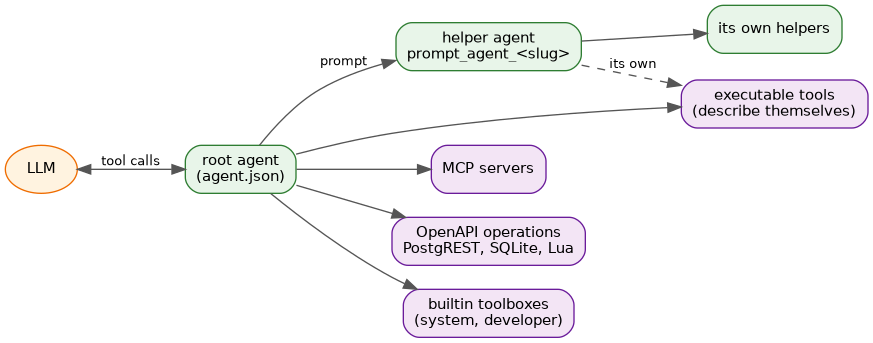
The tool system provides agents with the ability to execute external commands, call APIs, and interact with other agents. Tools are dynamically registered and exposed to the LLM via the OpenAI function calling API.
Overview
┌────────────────────────────────────────────────────────────────┐
│                       Tool System                               │
├────────────────────────────────────────────────────────────────┤
│  ┌─────────────┐  ┌─────────────┐  ┌─────────────┐            │
│  │ Bash Tools  │  │  MCP Tools  │  │ OpenAPI     │            │
│  │ (scripts)   │  │ (servers)   │  │ (REST APIs) │            │
│  └──────┬──────┘  └──────┬──────┘  └──────┬──────┘            │
│         │                │                │                    │
│         └────────────────┴────────────────┘                    │
│                          │                                      │
│                   ┌──────▼──────┐                              │
│                   │  Toolbox    │                              │
│                   │  (merging)  │                              │
│                   └──────┬──────┘                              │
│                          │                                      │
│                   ┌──────▼──────┐                              │
│                   │ ToolRegistration│                           │
│                   │ (LLM schema) │                              │
│                   └─────────────┘                              │
└────────────────────────────────────────────────────────────────┘
Tool Types
The framework supports multiple tool types:
| Tool Type | Description | Use Case |
|---|---|---|
| Bash Tools | Executable scripts | External commands, system integration |
| MCP Tools | MCP servers | Standardized tool protocols |
| OpenAPI Tools | REST APIs | API integrations |
| PostgREST Tools | Database endpoints | Database queries |
| SQLite Tools | SQLite databases | Local SQL queries |
| System Tools | System information | Runtime context, session introspection, command execution |
| Developer Tools | Development utilities | File editing with multi-turn sessions, agent validation/creation |
| IO Tools | Haskell functions | In-process operations |
| Lua Tools | Lua scripts | Embedded scripting |
| Skills | Progressive disclosure | Procedural knowledge |
Media Types and Multi-Modal Support
The framework supports media attachments and multi-modal responses for LLM interactions.
Media Type Classification
-- System.Agents.Media.Types
data MediaType
    = MediaImage ImageType
    | MediaAudio AudioType
    | MediaVideo VideoType
    | MediaApplication ApplicationType
    | MediaText TextSubtype

data ImageType = ImagePNG | ImageJPEG | ImageGIF | ImageWebP | ImageSVG
data AudioType = AudioMPEG | AudioWAV | AudioOGG | AudioMP3 | AudioAAC | AudioFLAC
data VideoType = VideoMP4 | VideoWebM | VideoOGG | VideoAVI | VideoMOV
data ApplicationType = AppPDF | AppJSON | AppXML | AppOctetStream | AppZip
data TextSubtype = TextPlain | TextHTML | TextCSS | TextCSV | TextMarkdown
Media Attachments
data MediaAttachment = MediaAttachment
    { mediaMimeType :: Text        -- e.g., "image/png"
    , mediaBase64Data :: Text      -- Base64-encoded content
    , mediaFilename :: Maybe Text  -- Optional filename
    }
Content Parts for Mixed Responses
data ContentPart
    = TextPart Text
    | MediaPart MediaAttachment
Declaring Media Output in Scripts
Tools can declare their output media type in the describe output:
#!/bin/bash

if [ "$1" == "describe" ]; then
    echo '{
        "slug": "generate_chart",
        "description": "Generates a chart image",
        "args": [...],
        "output-media-type": "image/png"
    }'
    exit 0
fi

# Generate and output PNG image to stdout
./generate-chart "$@"
Supported media types:
- Images:
image/png,image/jpeg,image/gif,image/webp,image/svg+xml - Audio:
audio/mpeg,audio/wav,audio/ogg,audio/mp3,audio/aac,audio/flac - Video:
video/mp4,video/webm,video/ogg,video/avi,video/quicktime - Documents:
application/pdf,application/json,application/xml,application/zip - Generic:
application/octet-stream
Tool Result Types with Media
data CallResult call
    = -- | Successful execution with optional media type hint
      BlobToolSuccess call ByteString (Maybe MediaType)
    | -- ... other constructors

data UserToolResponse
    = TextResponse Text                    -- Plain UTF-8 text
    | JsonResponse Aeson.Value             -- Structured JSON data
    | MediaResponse MediaAttachment        -- Single binary media
    | MixedResponse [ContentPart]          -- Multi-modal content
Tool Registration
All tools are registered using the ToolRegistration type:
data ToolRegistration = ToolRegistration
    { innerTool :: Tool ()
    , declareTool :: OpenAI.Tool
    , findTool :: OpenAI.ToolCall -> Maybe (Tool OpenAI.ToolCall)
    }
Registration Flow
- Tool sources (bash, MCP, OpenAPI, System, Developer) generate
ToolRegistrationvalues - Registrations are combined into a single list
- The list is passed to the LLM API as available functions
- When the LLM calls a function, the executor is invoked
Bash Tools
Bash tools are executable scripts stored in the agent’s tool directory.
Script Requirements
Scripts must support a describe subcommand that outputs JSON:
#!/bin/bash

if [ "$1" == "describe" ]; then
    echo '{
        "slug": "my-tool",
        "description": "What this tool does",
        "args": [
            {
                "name": "input",
                "description": "Input parameter",
                "type": "string",
                "backing_type": "string",
                "arity": "single",
                "mode": "dashdashspace"
            }
        ],
        "empty-result": {"tag": "AddMessage", "contents": "No results"}
    }'
    exit 0
fi

# Main execution
input="$1"
echo "Result for: $input"
ScriptInfo Schema
data ScriptInfo = ScriptInfo
    { scriptArgs :: [ScriptArg]
    , scriptSlug :: Text
    , scriptDescription :: Text
    , scriptEmptyResultBehavior :: Maybe EmptyResultBehavior
    , scriptOutputMediaType :: Maybe Text  -- NEW: Media type for binary output
    }

data ScriptArg = ScriptArg
    { argName :: Text
    , argDescription :: Text
    , argType :: Text
    , argBackingType :: Text
    , argArity :: Text  -- "single", "optional", "multiple"
    , argMode :: Text   -- "dashdashspace", "space", etc.
    }
Environment Variables
When a bash tool runs, it receives context via environment variables:
| Variable | Description |
|---|---|
AGENT_SESSION_ID | Current session UUID |
AGENT_CONVERSATION_ID | Conversation UUID |
AGENT_TURN_ID | Current turn UUID |
AGENT_AGENT_ID | Agent UUID (if available) |
AGENT_SESSION_JSON | Full session as JSON |
A FileSystemDirectory/SingleTool toolbox description can also carry a
Bindings list, tying an argument to a fixed value or to an agent
parameter — the argument disappears from the tool’s schema entirely, and
the model never sees or chooses the value. A parameter’s value can also be
passed as an environment variable only ("mode": "env"), the one way to
bind a secret parameter safely. See
Parameters, Bindings & Narrowing Sub-Agents.
Bash Toolbox
The BashToolbox module manages script discovery and execution:
data Toolbox = Toolbox
    { tools :: BackgroundVal [ToolRegistration]
    , triggerReload :: STM Bool
    }

initializeBackroundToolbox ::
    Tracer IO Trace ->
    FilePath ->
    IO (Either ToolboxError Toolbox)
Features:
- Hot reloading: File changes trigger automatic reload
- Background thread: Non-blocking tool discovery
- Error isolation: Failed scripts don’t break other tools
MCP Tools
Model Context Protocol (MCP) tools connect to external servers that provide dynamic tool listings.
MCP Server Types
data McpServerDescription
    = McpSimpleBinary McpSimpleBinaryConfiguration

data McpSimpleBinaryConfiguration = McpSimpleBinaryConfiguration
    { name :: Text
    , executable :: FilePath
    , args :: [Text]
    }
MCP Client Runtime
data Runtime = Runtime
    { procHandle :: ProcessHandle
    , stdinHandle :: Handle
    , stdoutHandle :: Handle
    , toolsList :: TVar [ToolDescription]
    , callResults :: TVar (Map CallId Value)
    }
MCP Tool Flow
1. Start MCP server process
2. Initialize connection
3. Query available tools
4. Register tools with LLM
5. On LLM call:
   a. Send tool_call message to MCP server
   b. Wait for response
   c. Return result to LLM
MCP Protocol Messages
// Tool list request
{"jsonrpc": "2.0", "method": "tools/list", "id": 1}

// Tool list response
{"jsonrpc": "2.0", "result":
  {"tools": [
    {"name": "read_file",
     "description": "Read a file",
     "inputSchema": {...}}
  ]},
  "id": 1}

// Tool call
{"jsonrpc": "2.0",
 "method": "tools/call",
 "params": {"name": "read_file", "arguments": {"path": "/tmp/foo"}},
 "id": 2}
OpenAPI Tools
OpenAPI tools convert REST API specifications into LLM-callable tools.
OpenAPI Server Configuration
{
  "mcpServers": [...],
  "openApiToolboxes": [
    {
      "tag": "OpenAPIServer",
      "contents": {
        "SpecUrl": "https://api.example.com/openapi.json",
        "BaseUrl": "https://api.example.com",
        "Headers": {"X-API-Version": "v1"},
        "Token": "${API_TOKEN}"
      }
    }
  ]
}
This description can also carry a Bindings list, same as a bash toolbox —
see Parameters, Bindings & Narrowing Sub-Agents.
Conversion Process
-- Load and parse OpenAPI spec
convertOpenAPIToTools :: OpenAPISpec -> [OpenAPITool]

-- Convert operation to tool
convertOperation :: Path -> Method -> Operation -> OpenAPITool

-- Build tool parameters from OpenAPI parameters
buildToolParameters :: Operation -> ToolParameters

-- Convert to OpenAI tool format
toOpenAITool :: OpenAPITool -> OpenAI.Tool
Schema Resolution
The OpenAPI module handles $ref references:
resolveSchema :: Schema -> Components -> Schema
dereferenceSpec :: OpenAPISpec -> OpenAPISpec
Supports:
- Internal references (
#/components/schemas/Foo) - Nested references
- Array item references
- anyOf/allOf compositions
- Circular reference detection
Name Normalization
OpenAPI operation IDs are normalized for LLM compatibility:
-- Original: "pets.getById"
-- Normalized: "pets_getById"

-- Original: "/users/{id}/posts"
-- Normalized: "_users__id__posts"
The NameMapping type tracks bidirectional mapping:
data NameMapping = NameMapping
    { nmOriginal :: Text
    , nmNormalized :: Text
    }
PostgREST Tools
PostgREST tools generate database query tools from PostgREST APIs.
Configuration
{
  "postgrestToolboxes": [
    {
      "tag": "PostgRESTServer",
      "contents": {
        "SpecUrl": "http://localhost:3000/",
        "BaseUrl": "http://localhost:3000"
      }
    }
  ]
}
This description can also carry a Bindings list, same as a bash toolbox —
see Parameters, Bindings & Narrowing Sub-Agents.
Generated Tools
For each table endpoint, the following tools are generated:
| HTTP Method | Tool Name Pattern | Purpose |
|---|---|---|
| GET | postgrest_{name}_get_{table} | Query with filters |
| POST | postgrest_{name}_post_{table} | Insert rows |
| PUT | postgrest_{name}_put_{table} | Update rows |
| PATCH | postgrest_{name}_patch_{table} | Partial update |
| DELETE | postgrest_{name}_delete_{table} | Delete rows |
Tool Parameters
PostgREST tools use structured parameter groups:
{
  "filters": {
    "column_name": "filter_value"
  },
  "subset": {
    "limit": 10,
    "offset": 0,
    "columns": "id,name,email"
  },
  "ranking": {
    "order": "created_at.desc"
  },
  "body": {
    "name": "New Item",
    "value": 42
  }
}
SQLite Tools
SQLite tools provide SQL query capabilities against SQLite databases.
Configuration
{
  "builtinToolboxes": [
    {
      "tag": "SqliteToolbox",
      "contents": {
        "Name": "analytics",
        "Description": "Analytics database",
        "Versioning": {"tag": "SqliteReadOnly", "path": "./analytics.db"}
      }
    }
  ]
}
Tool Interface
Each SQLite toolbox exposes a single sqlite_{name}_query tool:
{
  "sql": "SELECT * FROM users WHERE active = 1 LIMIT 10"
}
Parameters:
sql(string, required): SQL query to execute
Security:
- Read-only queries are encouraged
- Write operations are allowed but logged
- No DDL by default (configurable)
File Sandbox System
The file sandbox system provides secure, configurable file access control for tools that need to read from or write to the filesystem. It is used by the System Toolbox (for attach-file), Developer Toolbox (for read-file-range, write-file-range, patch-file), and Lua Toolbox (for the fs module).
Overview
┌─────────────────────────────────────────────────────────────────┐
│                    File Sandbox System                           │
├─────────────────────────────────────────────────────────────────┤
│  ┌─────────────┐  ┌─────────────┐  ┌─────────────┐             │
│  │ SystemToolbox│  │DeveloperToolbox│  │ LuaToolbox │             │
│  │ (attach-file)│  │(read/write/   │  │ (fs.*)     │             │
│  │              │  │ patch-file)   │  │            │             │
│  └──────┬───────┘  └──────┬───────┘  └──────┬───────┘             │
│         │                 │                  │                    │
│         └─────────────────┼──────────────────┘                    │
│                           │                                       │
│                    ┌──────▼──────┐                                │
│                    │ FileSandbox │                                │
│                    │  (validate) │                                │
│                    └──────┬──────┘                                │
│                           │                                       │
│                    ┌──────▼──────┐                                │
│                    │PathPredicate│                                │
│                    │  (access)   │                                │
│                    └─────────────┘                                │
└─────────────────────────────────────────────────────────────────┘
FileSandboxConfig
Each sandboxed toolbox accepts an optional FileSandbox configuration, either
inline (below) or as a reference to a named sandbox:
data FileSandboxConfig = FileSandboxConfig
    { fsbPredicate :: PathPredicate     -- Defines allowed file paths
    , fsbMaxFileSize :: Maybe Integer   -- Max file size in bytes (Nothing = no limit)
    , fsbName :: Maybe Text             -- Human-readable name for the sandbox
    }
Default Configuration (Secure by Default):
defaultFileSandboxConfig :: FileSandboxConfig
defaultFileSandboxConfig = FileSandboxConfig
    { fsbPredicate = AlwaysDeny          -- Deny all access by default
    , fsbMaxFileSize = Just (50 * 1024 * 1024)  -- 50MB default limit
    , fsbName = Nothing
    }
Named Sandboxes
A sandbox can be written once, under a name, in the agent’s fileSandboxes
map, and referenced from any builtin toolbox of that agent with
{"ref": "<name>"} in place of the inline definition:
{
  "tag": "OpenAIAgentDescription",
  "contents": {
    "slug": "coder",
    "fileSandboxes": {
      "project": {
        "fsbPredicate": {"tag": "DirectoryRecursive", "contents": "./src"},
        "fsbMaxFileSize": 10485760
      },
      "scratch": {
        "fsbPredicate": {"tag": "DirectoryRecursive", "contents": "/tmp/scratch"}
      }
    },
    "builtinToolboxes": [
      {"tag": "DeveloperToolbox", "contents": {
        "Name": "dev", "Description": "Development tools",
        "Capabilities": ["read-file-range", "patch-file"],
        "FileSandbox": {"ref": "project"}}},
      {"tag": "LuaToolbox", "contents": {
        "Name": "lua", "Description": "Lua orchestration",
        "MaxMemoryMB": 256, "MaxExecutionTimeSeconds": 300,
        "AllowedTools": [], "AllowedHosts": [],
        "FileSandbox": {"ref": "project"}}},
      {"tag": "SystemToolbox", "contents": {
        "Name": "system", "Description": "System context",
        "Capabilities": ["attach-file"],
        "FileSandbox": {"ref": "scratch"}}}
    ]
  }
}
The value of FileSandbox is therefore one of two things:
| Form | JSON | Meaning |
|---|---|---|
| Inline | {"fsbPredicate": ..., "fsbMaxFileSize": ..., "fsbName": ...} | The sandbox itself, as before. Existing agent files need no change. |
| Reference | {"ref": "project"} | The sandbox declared as project in this agent's fileSandboxes. |
Rules:
- Resolution happens when the agent’s toolboxes are loaded. Each reference is replaced by the named definition, and the toolbox then behaves exactly as if the definition had been written inline.
- An undeclared name is an error, not an empty sandbox: the agent fails to
load with a message naming the toolbox and the missing sandbox, and
validate-agentreports it too. refstands alone. An object carrying bothrefand inline fields is refused, so that a sandbox is never silently widened or narrowed at the place it is used.- The name is the default
fsbName. A referenced sandbox that sets nofsbNameis named after its key infileSandboxes. - Each toolbox gets its own sandbox instance built from the shared definition: the rules are shared, nothing else is.
fileSandboxesis optional; an agent without it loads as before.
What this does and does not do. Naming a sandbox changes where the rules
are written, not what is enforced. The enforcement is the one described in
this section: a path predicate and a size limit checked by the builtin tools
that take a FileSandbox (attach-file and list-directory in the System
Toolbox, the file capabilities of the Developer Toolbox, the Lua fs module).
It is not an operating-system sandbox: bash tools, MCP servers,
execute-command and build-command run as ordinary processes and are not
confined by it.
Scope. fileSandboxes belongs to one agent file; a name declared in one
agent is not visible from another, including its sub-agents. To share one
definition across several agent files, use an agent template
library: define the sandbox once there and either pass it inline to each
toolbox or put it in the fileSandboxes of each agent.
PathPredicate DSL
The PathPredicate DSL provides a rich, composable language for defining file access permissions:
data PathPredicate
    = FileExactly FilePath              -- Exact file match
    | DirectoryExactly FilePath         -- Exact directory match (contents not included)
    | DirectoryRecursive FilePath       -- Directory and all subdirectories
    | DirectoryShallow FilePath         -- Directory contents only (not subdirectories)
    | FilePattern String                -- Glob pattern on filename (*, ? wildcards)
    | FileExtension [String]            -- File extension whitelist (no leading dot)
    | FileSizeLessThan Integer          -- Maximum file size in bytes
    | ChildOf FilePath                  -- Path within a parent directory
    | And PathPredicate PathPredicate   -- Logical AND
    | Or PathPredicate PathPredicate    -- Logical OR
    | Not PathPredicate                 -- Logical NOT
    | Any [PathPredicate]               -- OR of all predicates
    | All [PathPredicate]               -- AND of all predicates
    | AlwaysAllow                       -- Allow all (use sparingly)
    | AlwaysDeny                        -- Deny all (secure default)
Predicate Examples
Allow specific files and directories:
{
  "fsbPredicate": {
    "tag": "Any",
    "contents": [
      {"tag": "DirectoryRecursive", "contents": "./src"},
      {"tag": "FileExactly", "contents": "./package.yaml"},
      {"tag": "FileExactly", "contents": "./README.md"}
    ]
  }
}
Allow only Haskell source files under 1MB:
{
  "fsbPredicate": {
    "tag": "And",
    "contents": [
      {"tag": "DirectoryRecursive", "contents": "./src"},
      {"tag": "FileExtension", "contents": ["hs", "lhs"]},
      {"tag": "FileSizeLessThan", "contents": 1048576}
    ]
  }
}
Allow any file in project except build artifacts:
{
  "fsbPredicate": {
    "tag": "And",
    "contents": [
      {"tag": "DirectoryRecursive", "contents": "./my-project"},
      {"tag": "Not", "contents": {"tag": "DirectoryRecursive", "contents": "./my-project/dist"}}
    ]
  }
}
Glob pattern matching:
{
  "fsbPredicate": {
    "tag": "Any",
    "contents": [
      {"tag": "FilePattern", "contents": "*.md"},
      {"tag": "FilePattern", "contents": "test-*.json"}
    ]
  }
}
Path Handling
All paths are canonicalized before validation:
- Symlinks are resolved - The predicate is applied to the canonical path
- Relative paths are resolved - Relative paths in predicates are resolved relative to the current working directory
- Path normalization -
..and.components are resolved, duplicate slashes removed
Important: The predicate applies to the canonical path, not the symlink path. This prevents symlink traversal attacks where a symlink inside an allowed directory points outside the sandbox.
Security Features
| Feature | Description |
|---|---|
| Default Deny | All access is denied unless explicitly allowed (AlwaysDeny is default) |
| Immutable | Sandboxes cannot be modified after creation |
| Canonicalization | All paths are canonicalized before validation (resolves symlinks, .., etc.) |
| Size Limits | Optional file size limits prevent resource exhaustion |
| Composable | Predicates can be combined with logical operators for complex rules |
System Toolbox (Builtin)
The System Toolbox provides agents with contextual information about the running system through a configurable set of capabilities.
The get-tool-call-status, list-running-tool-calls, cancel-tool-call and
send-to-tool-call capabilities only do something for agents that run tool calls in the
background; see async-tool-calls.md.
Capabilities
| Capability | Description |
|---|---|
date | Current UTC/local time and timezone info |
operating-system | OS name, version, kernel, architecture |
env-vars | Filtered environment variables |
running-user | Username, UID, GID, home, shell |
hostname | Machine hostname |
working-directory | Current working directory |
process-info | Process ID, parent PID, process name |
uptime | System uptime |
attach-file | Attach a file to the conversation |
list-directory | List directory contents with metadata |
execute-command | Execute shell commands with optional filter approval |
get-tool-call-status | Status, progress and result of one of the agent's own tool calls |
list-running-tool-calls | Tool calls still running in the background |
cancel-tool-call | Stop a running background tool call |
send-to-tool-call | Send a message to the sub-agent a running prompt_agent_<slug> call started |
list-sessions | List accessible sessions (requires session introspection config) |
search-sessions | Full-text search across sessions (requires session introspection config) |
read-session | Read session content (requires session introspection config) |
get-session-stats | Get session statistics (requires session introspection config) |
Configuration
{
  "builtinToolboxes": [
    {
      "tag": "SystemToolbox",
      "contents": {
        "Name": "system",
        "Description": "System context and information",
        "Capabilities": ["date", "operating-system", "running-user", "hostname", "attach-file", "list-directory", "execute-command"],
        "EnvVarFilter": null,
        "FileSandbox": {
          "fsbPredicate": {"tag": "DirectoryRecursive", "contents": "./project"},
          "fsbMaxFileSize": 52428800,
          "fsbName": "system-sandbox"
        },
        "CommandFilter": "/path/to/approval-script.sh"
      }
    }
  ]
}
Attach-File Capability
The attach-file capability allows the agent to attach files to the conversation for multi-modal LLM interactions:
-- Tool accepts:
{
  "capability": "attach-file",
  "filepath": "/path/to/image.png"
}

-- Returns:
-- MediaAttachment with base64-encoded content
Supported file types:
- Images: PNG, JPEG, GIF, WEBP, SVG
- Audio: MP3, WAV, OGG, AAC, FLAC
- Video: MP4, WEBM, MOV, AVI
- Documents: PDF, JSON, XML
- Generic: Any file (as octet-stream)
Limits:
- Maximum file size: 50MB
Sandbox Behavior:
When attach-file is enabled, a file sandbox must be configured to specify which files can be attached. If no sandbox is configured, the capability will deny all file access.
List-Directory Capability
The list-directory capability lists directory contents with metadata:
// Input:
{
  "capability": "list-directory",
  "path": "./src",
  "recursive": false,
  "include_hidden": false
}

// Output:
{
  "path": "./src",
  "entries": [
    {"name": "Main.hs", "type": "file", "size": 1234, "modified": "2024-01-15T10:30:00Z"},
    {"name": "Utils", "type": "directory", "size": 0, "modified": "2024-01-14T08:00:00Z"}
  ],
  "total": 2
}
Execute-Command Capability
The execute-command capability allows the agent to execute arbitrary shell commands with an optional approval filter:
// Input:
{
  "capability": "execute-command",
  "command": "ls -la"
}

// Output:
{
  "command": "ls -la",
  "exitCode": 0,
  "stdout": "...",
  "stderr": "",
  "duration": 0.123
}
Command Filter:
When CommandFilter is configured, every command is first passed to the filter on stdin. The filter must output a JSON acceptance object:
// Allowed:
{"acceptance": "allowed", "note": "Safe command"}

// Refused:
{"acceptance": "refused", "note": "Command contains dangerous operations"}
Any non-JSON output, missing fields, or non-zero exit code rejects the command.
Session Introspection Capabilities
The System Toolbox supports session introspection capabilities that allow agents to query, search, and read other sessions from the session store. This enables cross-session analysis and context sharing.
Session Introspection Scope
Access control is managed through SessionIntrospectionScope:
| Scope | Description |
|---|---|
parents-only | Can only see parent sessions (ancestors via forkedFromSessionId) |
children-only | Can only see child sessions (descendants) |
subtree | Parents + current + children (default) |
all | All sessions (requires explicit opt-in) |
Configuration with Session Introspection
{
  "tag": "SystemToolbox",
  "contents": {
    "Name": "system",
    "Description": "System information and session memory",
    "Capabilities": [
      "date",
      "hostname",
      "list-sessions",
      "search-sessions",
      "read-session",
      "get-session-stats"
    ],
    "SessionIntrospectionScope": "subtree",
    "SessionIntrospectionMaxResults": 50,
    "SessionIntrospectionIncludeToolOutputs": false
  }
}
list-sessions
Lists accessible sessions based on the configured scope.
Input:
{
  "capability": "list-sessions"
}
Output:
{
  "sessions": [
    {
      "sessionId": "uuid",
      "conversationId": "uuid",
      "modificationTime": "2024-01-15T10:30:00Z",
      "turnCount": 15,
      "isParent": false,
      "isChild": true,
      "isLocked": false,
      "status": "idle"
    }
  ],
  "totalAccessible": 42
}
search-sessions
Performs full-text search across accessible sessions.
Input:
{
  "capability": "search-sessions",
  "query": "error handling pattern"
}
Output:
{
  "query": "error handling pattern",
  "results": [
    {
      "sessionId": "uuid",
      "conversationId": "uuid",
      "turnCount": 15,
      "preview": "...context around match...",
      "matchType": "content"
    }
  ],
  "totalMatches": 5,
  "scope": "subtree"
}
read-session
Reads session content with optional slicing and filtering.
Input:
{
  "capability": "read-session",
  "session_id": "target-session-uuid",
  "take_n": 10,
  "include_thinking": false,
  "include_tool_responses": true
}
Parameters:
session_id(string, required): Session UUID to readtake_n(number, optional): Take last N turns (alternative to offset/limit)drop_n(number, optional): Drop first N turnsoffset(number, optional): Starting turn index (0-based)limit(number, optional): Max turns to returninclude_thinking(boolean, optional): Include LLM thinking/reasoning (default: false)include_tool_responses(boolean, optional): Include tool call responses (default: false)
Output:
{
  "sessionId": "target-session-uuid",
  "conversationId": "uuid",
  "totalTurns": 25,
  "returnedTurns": 10,
  "content": "Turn 1: [User] ...\nTurn 2: [LLM] ...",
  "format": "condensed-text",
  "scope": "subtree",
  "access": "granted"
}
get-session-stats
Returns aggregate statistics about accessible sessions.
Input:
{
  "capability": "get-session-stats"
}
Output:
{
  "totalSessions": 42,
  "totalTurnsAcrossAllSessions": 850,
  "scope": "subtree",
  "note": "Use SessionPrint.calculateStatistics for detailed per-session stats"
}
Configuration Fields
| Field | Type | Description |
|---|---|---|
Name | string | Unique name for this toolbox instance |
Description | string | Human-readable description |
Capabilities | [string] | List of enabled capabilities |
EnvVarFilter | string? | Optional substring filter for env vars |
SessionIntrospectionScope | string? | Scope of accessible sessions (default: "subtree") |
SessionIntrospectionMaxResults | number? | Max sessions to return (default: 50) |
SessionIntrospectionIncludeToolOutputs | boolean? | Include tool outputs in read operations (default: true) |
FileSandbox | object? | File sandbox for attach-file/list-directory capabilities (default: deny all); inline or {"ref": name} |
CommandFilter | string? | Optional command approval filter for execute-command |
Security Considerations
- Capability-based access: Only enabled capabilities are exposed
- Session scope enforcement: Strict access control via
SessionIntrospectionScope - ScopeAll requires explicit opt-in: Must be explicitly configured, never default
- Env var filtering: Use
EnvVarFilterto limit variable exposure - Read-only: System tools gather information but cannot modify the system
- Command filtering: Use
CommandFilterto control command execution - Linux-focused: Initial implementation targets Linux systems
LLM Tool Interface
The system toolbox exposes a single tool named system_{name}_system_info with:
- Parameter:
capability(string) - Which system info to retrieve - Additional parameters: Vary by capability (see individual capability documentation)
- Returns: JSON object with the requested information
Example tool call:
{
  "capability": "date"
}
Example response:
{
  "capability": "date",
  "data": {
    "utc": "2024-01-15T10:30:00.123456Z",
    "local": "2024-01-15T11:30:00.123456",
    "timezone": "CET",
    "timezoneOffset": "+0100"
  },
  "executionTime": 0.001
}
Developer Toolbox
The Developer Toolbox provides utilities for writing and validating agents and tools, with advanced file editing capabilities including multi-turn edit sessions.
Capabilities
| Capability | Description |
|---|---|
show-spec | Displays specification documentation |
validate-agent | Validates an agent JSON configuration file |
create-agent | Creates a new agent configuration |
create-tool | Creates a new tool script |
show-spec | Displays specification documentation |
read-file-range | Reads specific line ranges from a file (supports session reads and metadata-only) |
write-file-range | Replaces line ranges with multi-turn session support |
patch-file | Applies a unified diff patch to a file with rich error context |
Configuration
{
  "builtinToolboxes": [
    {
      "tag": "DeveloperToolbox",
      "contents": {
        "Name": "dev",
        "Description": "Development utilities",
        "Capabilities": ["show-spec", "validate-agent", "create-agent", "create-tool", "read-file-range", "write-file-range", "patch-file"],
        "FileSandbox": {
          "fsbPredicate": {"tag": "DirectoryRecursive", "contents": "./src"},
          "fsbMaxFileSize": null,
          "fsbName": "developer-sandbox"
        }
      }
    }
  ]
}
File Sandbox for Developer Tools
The read-file-range, write-file-range, and patch-file capabilities require a file sandbox to be configured. These capabilities operate on file content and need explicit permission to access the filesystem.
Example: Allow editing source files only:
{
  "FileSandbox": {
    "fsbPredicate": {
      "tag": "Any",
      "contents": [
        {"tag": "DirectoryRecursive", "contents": "./src"},
        {"tag": "DirectoryRecursive", "contents": "./test"},
        {"tag": "FileExactly", "contents": "./package.yaml"}
      ]
    },
    "fsbMaxFileSize": 10485760
  }
}
Security Note: The write capabilities (write-file-range, patch-file) validate write access against the sandbox. For new files, the parent directory must be within the sandbox. For existing files, the file itself must be within the sandbox.
Tool Interface
The developer toolbox exposes a single tool named developer_{name}_developer_tools with:
- Parameter:
capability(string) - Which operation to perform - Additional parameters vary by capability
show-spec
{
  "capability": "show-spec",
  "spec_name": "bash-tools"
}
Specs: bash-tools
Response: Returns the embedded specification documentation as text.
read-file-range
Reads specific line ranges from a file and returns them with line numbers. Supports reading from staged sessions and metadata-only queries.
Parameters:
{
  "capability": "read-file-range",
  "path": "/path/to/file",
  "ranges": "1-10,20-30",
  "session_id": "sess-abc",
  "metadata_only": false
}| Parameter | Type | Required | Description |
|---|---|---|---|
path | string | Yes | Path to the file to read |
ranges | string | No | Line ranges (e.g., "1-10", "5", "head", "tail", "1-5,20-30"). Omit to read entire file. |
session_id | string | No | Read from an in-progress write-file-range session's staged buffer |
metadata_only | boolean | No | Return only metadata (path, line counts, snapshot ref) without content |
Range Formats:
- Single line:
"5"- Reads line 5 - Line range:
"1-10"- Reads lines 1 through 10 - Multiple ranges:
"1-5,20-30"- Reads lines 1-5 and 20-30 - Head:
"head"- Reads from beginning (no-op for read) - Tail:
"tail"- Reads to end (no-op for read)
Returns (full content):
{
  "path": "/path/to/file",
  "content": "1\tdef hello():\n2\t    print('Hello, World!')\n3\t    return True\n",
  "linesRead": 3,
  "totalLineCount": 50,
  "totalFileSize": 1234,
  "rangesParsed": ["1-3"],
  "snapshotRef": "a1b2c3d4..."
}
Returns (metadata_only: true):
{
  "path": "/path/to/file",
  "content": "",
  "linesRead": 0,
  "totalLineCount": 50,
  "totalFileSize": 1234,
  "rangesParsed": [],
  "snapshotRef": "a1b2c3d4...",
  "metadataOnly": true
}
The content includes line numbers prepended with a tab separator in the format {line_num}\t{line_content}.
Reading from Staged Sessions:
When session_id is provided, the read is served from the session’s in-memory buffer rather than disk. This allows inspecting pending edits before committing:
{
  "capability": "read-file-range",
  "path": "./src/File.hs",
  "session_id": "sess-abc"
}
write-file-range
Replaces specific lines in a file with new content. Supports multi-turn edit sessions for complex multi-step edits.
Parameters:
{
  "capability": "write-file-range",
  "path": "/path/to/file",
  "ranges": "1-2,5-6",
  "contentBlocks": ["new content for lines 1-2", "new content for lines 5-6"],
  "session_id": "sess-abc",
  "expected_snapshot_ref": "a1b2c3d4...",
  "commit": true
}| Parameter | Type | Required | Description |
|---|---|---|---|
path | string | Yes | Path to the file to modify |
ranges | string | Yes | Range specs: N replace line N, N-M replace lines N-M, N+ insert after line N, head prepend, tail append, whole overwrite file |
contentBlocks | array[string] | Yes | Array of content blocks, one per range. Use empty strings to delete lines. |
session_id | string | No | Continue an existing edit session |
expected_snapshot_ref | string | No | Optimistic locking: only proceed if file matches this snapshot |
commit | boolean | No | If true, write to disk and close session. If false, stage changes. |
Range Formats:
N- Replace line N (e.g.,5replaces line 5)N-M- Replace lines N through M (e.g.,1-10replaces lines 1-10)N+- Insert after line N (e.g.,54+inserts after line 54)head- Prepend content before line 1 (use this to create new files)tail- Append content after the last linewhole- Replace the entire file
Warning:
NandN+are not interchangeable. Use54+to insert after line 54; using54will replace line 54.
Multi-Turn Edit Sessions:
For complex edits, use sessions to stage changes across multiple turns before committing:
Turn 1 (start session):
  {
    "capability": "write-file-range",
    "path": "./src/File.hs",
    "ranges": "10-20",
    "contentBlocks": ["new code..."],
    "commit": false
  }
  -> returns sessionId: "sess-abc", sessionStatus: "staged"

Turn 2 (continue, still using ORIGINAL line numbers):
  {
    "capability": "write-file-range",
    "path": "./src/File.hs",
    "session_id": "sess-abc",
    "ranges": "100-110",
    "contentBlocks": ["more code..."],
    "commit": false
  }
  -> sessionStatus: "staged"

Turn N (commit to disk):
  {
    "capability": "write-file-range",
    "path": "./src/File.hs",
    "session_id": "sess-abc",
    "ranges": "200-210",
    "contentBlocks": ["final code..."],
    "commit": true
  }
  -> writes to disk, sessionStatus: "committed"
Session Rules:
- Sessions expire after 1 hour of inactivity
- Edits within a session must not overlap (in original coordinates)
wholerange not supported while session is open- Commit fails if file changed on disk since session started
- Reusing a
session_idafter commit returns an “already committed” error
Optimistic Locking:
Use expected_snapshot_ref to prevent conflicts:
{
  "capability": "write-file-range",
  "path": "./src/File.hs",
  "ranges": "1-10",
  "contentBlocks": ["new content"],
  "expected_snapshot_ref": "a1b2c3d4...",
  "commit": true
}
The operation fails if the file’s current snapshot doesn’t match, allowing retry with fresh content.
Returns:
{
  "path": "/path/to/file",
  "rangesModified": 2,
  "linesWritten": 6,
  "beforeSnapshotRef": "a1b2c3d4...",
  "afterSnapshotRef": "e5f6g7h8...",
  "sessionId": "sess-abc",
  "sessionNetDelta": 2,
  "sessionCommitted": true,
  "sessionStatus": "committed"
}
patch-file
Applies a unified diff patch to a file atomically with context validation and rich error reporting.
Parameters:
{
  "capability": "patch-file",
  "path": "/path/to/file",
  "patch": "--- a/src/File.hs\n+++ b/src/File.hs\n@@ -10,5 +10,6 @@ import Foo\n+import Data.Text (Text)\n@@ -100,5 +101,5 @@ func1 x =\n-  oldBody\n+  newBody",
  "expected_snapshot_ref": "a1b2c3d4..."
}| Parameter | Type | Required | Description |
|---|---|---|---|
path | string | Yes | Path to the file to patch |
patch | string | Yes | Unified diff patch content |
expected_snapshot_ref | string | No | Optimistic locking: only proceed if file matches |
Patch Format: Follows standard unified diff format:
- File headers (
---and+++lines) are ignored - Hunk headers start with
@@(e.g.,@@ -10,5 +11,6 @@) - Context lines have no prefix
- Removed lines start with
- - Added lines start with
+
Features:
- Atomic application: All hunks are validated before any changes are applied
- Context validation: Each hunk’s context lines must match exactly
- Overlap detection: Hunks that would overlap are rejected
- Bottom-to-top application: Hunks are applied in descending line order to avoid line number shifts
- Rich errors: Context-mismatch errors include expected/actual lines for debugging
Rich Error Context: When a context mismatch occurs, the error includes both expected and actual lines:
{
  "error": "Context mismatch at line 100",
  "expected": ["import Foo", "import Bar"],
  "actual": ["import Foo", "import Baz"],
  "message": "Context doesn't match"
}
Returns:
{
  "path": "/path/to/file",
  "hunksApplied": 2,
  "hunksRejected": 0,
  "linesChanged": 3,
  "beforeSnapshotRef": "a1b2c3d4...",
  "afterSnapshotRef": "e5f6g7h8..."
}
Error Responses:
{
  "error": "Context mismatch at line 100: Context doesn't match",
  "expected": ["context line 1", "context line 2"],
  "actual": ["different line 1", "different line 2"]
}
Range Specification Types
-- | Range specification for file operations.
data RangeSpec
    = Lines (Int, Int)  -- ^ 1-based, inclusive line range (start, end)
    | Head              -- ^ Before line 1 (prepend)
    | Tail              -- ^ After last line (append)
    deriving (Show, Eq)

-- | Result of a read file range operation.
data ReadFileRangeResult = ReadFileRangeResult
    { readFilePath :: FilePath
    , readFileContent :: Text
    , readFileLinesRead :: Int
    , readFileTotalLines :: Int
    , readFileTotalSize :: Int
    , readFileRangesParsed :: [Text]
    , readFileSnapshotRef :: Maybe SnapshotRef
    , readFileSessionId :: Maybe Text
    , readFileMetadataOnly :: Bool
    }

-- | Result of a write file range operation.
data WriteFileRangeResult = WriteFileRangeResult
    { writeFilePath :: FilePath
    , writeFileRangesModified :: Int
    , writeFileLinesWritten :: Int
    , writeFileBeforeSnapshotRef :: Maybe SnapshotRef
    , writeFileAfterSnapshotRef :: Maybe SnapshotRef
    , writeFileSessionId :: Maybe Text
    , writeFileSessionNetDelta :: Maybe Int
    , writeFileSessionCommitted :: Bool
    , writeFileSessionStatus :: Text  -- "staged" or "committed"
    }

-- | Result of a patch file operation.
data PatchResult = PatchResult
    { patchFilePath :: FilePath
    , patchHunksApplied :: Int
    , patchHunksRejected :: Int
    , patchLinesChanged :: Int
    , patchBeforeSnapshotRef :: Maybe SnapshotRef
    , patchAfterSnapshotRef :: Maybe SnapshotRef
    }

-- | Patch error with rich context.
data PatchError
    = PatchParseError Text
    | PatchContextMismatch
        { patchMismatchLine :: Int
        , patchMismatchMessage :: Text
        , patchMismatchExpected :: [Text]
        , patchMismatchActual :: [Text]
        }
    | PatchHunkOverlap Int Int
    | PatchFileNotFound FilePath
    | PatchInvalidLineNumber Int
Snapshot System
The Developer Toolbox uses a snapshot system for optimistic locking and file restoration:
-- | Snapshot reference (MD5 hash of content).
newtype SnapshotRef = SnapshotRef { unSnapshotRef :: Text }
    deriving (Show, Eq, Ord)

-- | Snapshot with metadata.
data Snapshot = Snapshot
    { snapshotContent :: ByteString
    , snapshotCreatedAt :: UTCTime
    }

-- | Create snapshot from content.
makeSnapshot :: ByteString -> Snapshot

-- | Get reference for a snapshot.
snapshotRef :: Snapshot -> SnapshotRef
Snapshots are automatically taken during read operations and returned in results. Use expected_snapshot_ref for optimistic locking in write operations.
Generated Templates
Bash Tool Template
#!/bin/bash
# my-tool - A bash tool for agents-exe

set -euo pipefail

case "${1:-}" in
  describe)
    cat <<'DESCRIBE_EOF'
{
  "slug": "my-tool",
  "description": "Tool my-tool - describe what this tool does",
  "args": [],
  "empty-result": {
    "tag": "AddMessage",
    "contents": "--no output--"
  }
}
DESCRIBE_EOF
    ;;
  run)
    # TODO: Implement tool logic
    echo "Tool my-tool executed"
    ;;
  *)
    echo "Usage: my-tool <describe|run>" >&2
    exit 1
    ;;
esac
Python Tool Template
#!/usr/bin/env python3
import json
import sys
import os

def describe():
    return {
        "slug": "my-tool",
        "description": "Tool my-tool - describe what this tool does",
        "args": [],
        "empty-result": {
            "tag": "AddMessage",
            "contents": "--no output--"
        }
    }

def run():
    # TODO: Implement tool logic
    print("Tool my-tool executed")

def main():
    if len(sys.argv) < 2:
        print(f"Usage: {sys.argv[0]} <describe|run>", file=sys.stderr)
        return 1

    command = sys.argv[1]
    if command == "describe":
        print(json.dumps(describe()))
        return 0
    elif command == "run":
        run()
        return 0
    else:
        print(f"Unknown command: {command}", file=sys.stderr)
        return 1

if __name__ == "__main__":
    sys.exit(main())
Lua Tools
Lua tools provide embedded scripting capabilities through a sandboxed Lua interpreter. This enables agents to orchestrate complex workflows by combining multiple tools through Lua scripts.
Recursive Language Models (LRM) with Lua
The Lua toolbox enables a powerful pattern called Recursive Language Models (LRM). By configuring an agent to reference itself in extraAgents and granting the Lua toolbox permission to call the resulting io_prompt_agent_{slug} tool, you create an agent that can recursively invoke itself for complex reasoning tasks.
Configuration
{
  "tag": "OpenAIAgentDescription",
  "contents": {
    "slug": "local_lrmlua",
    "flavor": "KimiV1",
    "modelUrl": "https://api.moonshot.ai/v1",
    "apiKeyId": "kimi",
    "modelName": "kimi-k2.5",
    "announce": "The main agent, capable of reasoning.",
    "systemPrompt": [
      "You are a helpful software agent trying to solve user requests"
    ],
    "extraAgents": [
      {
        "slug": "local_lrmlua",
        "path": "kimi-10.lrmlua.json"
      }
    ],
    "bashToolboxes": [
      {
        "tag": "SingleTool",
        "contents": {"Path": "./tools/askuser/ask-user.bash"}
      }
    ],
    "builtinToolboxes": [
      {
        "tag": "LuaToolbox",
        "contents": {
          "Name": "lua",
          "Description": "Sandboxed Lua interpreter",
          "MaxMemoryMB": 256,
          "MaxExecutionTimeSeconds": 300,
          "AllowedTools": [
            "bash_ask_user",
            "io_prompt_agent_local_lrmlua",
            "sqlite_shared_working_memory_query"
          ],
          "AllowedHosts": [
            "localhost",
            "127.0.0.1"
          ],
          "FileSandbox": {
            "fsbPredicate": {
              "tag": "Any",
              "contents": [
                {"tag": "DirectoryRecursive", "contents": "./repro-cases"},
                {"tag": "FileExactly", "contents": "./README.md"}
              ]
            },
            "fsbMaxFileSize": 10485760,
            "fsbName": "lua-fs-sandbox"
          }
        }
      },
      {
        "tag": "SqliteToolbox",
        "contents": {
          "Name": "shared_working_memory",
          "Description": "A base to help you coordinate large works.",
          "Versioning": {"tag": "SqliteReadWrite", "path": "./dev-memory.db"}
        }
      }
    ]
  }
}
LuaToolbox Configuration Fields
| Field | Type | Description |
|---|---|---|
Name | string | Unique name for this toolbox instance (used as tool prefix) |
Description | string | Human-readable description |
MaxMemoryMB | integer | Maximum Lua heap memory in megabytes |
MaxExecutionTimeSeconds | integer | Maximum script execution time in seconds |
AllowedTools | [string] | Whitelist of tool names Lua scripts can call via the portal |
AllowedHosts | [string] | Whitelist of network hosts accessible to Lua HTTP module |
FileSandbox | object? | File sandbox configuration for Lua fs module; inline or {"ref": name} |
File Sandbox for Lua
The Lua fs module uses the unified file sandbox system. When FileSandbox is configured, all filesystem operations (fs.read, fs.write, fs.list, etc.) are validated against the sandbox.
Migration from allowedPaths:
The legacy allowedPaths field no longer exists and is ignored if present.
Use FileSandbox instead:
// Old (removed, ignored)
{
  "allowedPaths": ["./data", "./scripts"]
}

// New
{
  "FileSandbox": {
    "fsbPredicate": {
      "tag": "Any",
      "contents": [
        {"tag": "DirectoryRecursive", "contents": "./data"},
        {"tag": "DirectoryRecursive", "contents": "./scripts"}
      ]
    }
  }
}
Security Features
The Lua toolbox provides a sandboxed execution environment:
- Memory limits: a script whose Lua heap grows past
MaxMemoryMBfails with a memory-limit error (0disables the limit) - Timeout enforcement: Scripts that exceed
MaxExecutionTimeSecondsare terminated - Path sandboxing: Filesystem access restricted to
FileSandboxconfiguration - Host whitelisting: HTTP requests limited to
allowedHosts - Tool whitelist: Only tools in
allowedToolscan be called through the portal - Dangerous functions removed:
os.execute,io.popen,loadfile,dofile, etc. are removed - Empty whitelist = no access: Secure defaults - empty lists mean no access
Lua Standard Library Modules
All modules are pre-registered as global variables - no require() needed.
Simply use the module name directly (e.g., json.encode(), text.split()).
| Module | Functions | Description |
|---|---|---|
json | json.encode, json.decode | JSON manipulation |
http | http.get, http.post, http.request | HTTP requests (host-restricted) |
time | time.now, time.sleep, time.format, time.diff | Time utilities |
fs | fs.read, fs.write, fs.list, fs.exists | File system (sandboxed) |
text | text.split, text.trim, text.upper, text.lower, text.find, text.gsub, text.startswith, text.endswith, text.len, text.sub | String utilities |
tools | tools.call, tools.list | Tool portal integration |
fs Module and Sandbox
The fs module respects the file sandbox configuration:
-- These operations are validated against the fileSandbox
local content = fs.read("./data/file.txt")      -- Must be in sandbox
fs.write("./output/result.txt", "data")          -- Must be in sandbox
local files = fs.list("./scripts")               -- Must be in sandbox
local exists = fs.exists("./README.md")          -- Must be in sandbox
Sandbox Validation:
fs.read: Validates read permission viavalidateFileReadfs.write: Validates write permission viavalidateFileWritefs.list,fs.exists,fs.isdir,fs.isfile: Validates access permissionfs.mkdir: Validates write permission on parent directoryfs.patch: Validates write permission on the file
Example Lua Script
-- Modules are pre-loaded as globals and available via require()

-- Read a file (validated against fileSandbox)
local content = fs.read("./repro-cases/input.json")
if not content then
    return {error = "Failed to read file"}
end

-- Call the recursive agent for complex reasoning
local reasoning_result = tools.call("io_prompt_agent_local_lrmlua", {
    what = "Analyze this codebase structure and identify potential refactoring opportunities"
})

-- Process the result
if reasoning_result.status == "ok" then
    local analysis = json.decode(reasoning_result.result_txt)

    -- Query the shared working memory
    local db_result = tools.call("sqlite_shared_working_memory_query", {
        sql = "INSERT INTO analysis_results (content) VALUES ('" .. analysis.summary .. "')"
    })

    -- Write results (validated against fileSandbox)
    fs.write("./repro-cases/output.json", json.encode(analysis))

    return {
        success = true,
        analysis = analysis,
        stored = db_result.status == "ok"
    }
else
    return {
        success = false,
        error = reasoning_result.error
    }
end
Tool Naming
The Lua toolbox exposes a single tool named lua_{name}_execute:
{
  "script": "return json.encode({status='ok'})",
  "timeout": 60
}
Note: Modules (json, text, time, fs, http, tools) are available as pre-loaded global variables.
Error Handling
Lua script errors are captured and returned to the LLM:
data ScriptError
    = LuaRuntimeError [Aeson.Value]      -- Syntax or runtime error
    | TimeoutError Int                   -- Script exceeded time limit
    | MemoryError Int                    -- Script exceeded memory limit
    | SandboxError Text                  -- Attempted sandbox violation
    | ToolInvocationError Text           -- Error calling another tool
    | InitializationError Text           -- Failed to initialize Lua state
Skills System
The Skills system provides procedural knowledge and executable capabilities via progressive disclosure, following the agentskills.io specification.
Overview
Skills are packages of related functionality that can be dynamically enabled/disabled during a session. They implement progressive disclosure:
- Initially: Only metadata tools are visible (describe, enable, disable, list)
- After enable: Script tools become available for execution
Session Start
      │
      ▼
┌─────────────┐
│ skill_list  │  ← Always available
│ skill_desc  │  ← Always available
│ skill_enable│  ← Always available
└──────┬──────┘
       │
       ▼ (user calls skill_enable_pdf-processing)
┌─────────────┐
│ skill_list  │
│ skill_desc  │
│ skill_enable│
│ skill_pdf_* │  ← NEW: Script tools now visible
└─────────────┘
Skill Structure
A skill directory contains:
skill-directory/
├── SKILL.md          # Frontmatter + instructions
├── scripts/          # Executable scripts
│   ├── extract-text.sh
│   └── convert.sh
└── references/       # Documentation (optional)
    └── api-docs.md
SKILL.md Format
---
name: pdf-processing
description: Extract and manipulate PDF files
license: MIT
compatibility: Linux, macOS
metadata:
  author: team-pdf
  version: "1.0"
---

# PDF Processing

This skill provides tools for working with PDF documents.

## Usage

Enable the skill, then use the available script tools...
Skill Types (System.Agents.Tools.Skills.Types)
-- | Validated skill name (1-64 chars, lowercase, digits, hyphens)
newtype SkillName = SkillName { unSkillName :: Text }

-- | Complete skill with metadata, instructions, scripts, and references
data Skill = Skill
    { skillMetadata :: SkillMetadata
    , skillInstructions :: Text
    , skillPath :: FilePath
    , skillScripts :: [ScriptInfo]
    , skillReferences :: [ReferenceInfo]
    }

-- | Metadata from SKILL.md frontmatter
data SkillMetadata = SkillMetadata
    { smName :: SkillName
    , smDescription :: Text
    , smLicense :: Maybe Text
    , smCompatibility :: Maybe Text
    , smMetadata :: Map Text Text
    }

-- | Script following the describe/run protocol
data ScriptInfo = ScriptInfo
    { siName :: ScriptName
    , siPath :: FilePath
    , siDescription :: Maybe Text
    , siArgs :: [ScriptArgInfo]
    }
Skill State
-- | Session state tracking which skills and scripts are enabled
newtype SkillsSessionState = SkillsSessionState
    { sssActiveSkills :: Map SkillName SkillScriptsState
    }

-- | Script state within a skill
type SkillScriptsState = Map ScriptName ScriptState
data ScriptState = Enabled | Disabled

-- | Monoid instance for folding over session turns
instance Monoid SkillsSessionState where
    mempty = SkillsSessionState Map.empty
    -- Later state overrides earlier state
Toolbox Integration (System.Agents.Tools.Skills.Toolbox)
-- | Compute all available skill tools from session state
computeSkillTools :: SkillsStore -> Session -> [ToolRegistration]
computeSkillTools store session =
    let state = foldSession session
        -- Always available
        metaTools = concatMap makeMetaTools (allSkills store)
        -- Available only when enabled
        scriptTools =
            concatMap (makeScriptToolsForSkill state store)
                      (sssActiveSkills state)
     in listTool ++ metaTools ++ scriptTools

-- Tool naming convention
skill2LLMName :: Text -> SkillName -> ToolName
-- skill_describe_pdf-processing
-- skill_enable_pdf-processing
-- skill_pdf-processing_extract-text
Generated Tools
For each skill, these tools are generated:
| Tool | Purpose | Always Available |
|---|---|---|
skill_list | List all skills | Yes |
skill_describe_{name} | Get skill metadata | Yes |
skill_enable_{name} | Enable skill scripts | Yes |
skill_disable_{name} | Disable skill scripts | Yes |
skill_{name}_{script} | Execute script | No (requires enable) |
Skill Sources
Skills can be loaded from:
data SkillSource
    = SkillDirectory FilePath           -- Local directory
    | SkillGitRepo GitUrl (Maybe Subdirectory)  -- Git repository
Configuration:
{
  "skillSources": [
    { "tag": "SkillDirectory", "contents": "./skills" },
    { "tag": "SkillGitRepo",
      "contents": {
        "url": "https://github.com/org/skills-repo",
        "subdir": "pdf-tools"
      }
    }
  ],
  "autoEnableSkills": ["core-utils"]
}
Progressive Disclosure Benefits
- Reduced context window: Only relevant tools visible
- Discoverability: Users learn about skills organically
- Modularity: Skills are self-contained packages
- Safety: Scripts only accessible after explicit enable
- Auditability: State changes tracked in session
Tool Validation (System.Agents.Tools.Validation)
Tool input validation helps LLMs self-correct when they make incorrect tool calls.
Validation Types
-- | Single validation error with context
data ValidationError = ValidationError
    { errorPath :: Text       -- JSON path (e.g., "user.name")
    , errorMessage :: Text    -- Human-readable description
    }

-- | Validation configuration
data ValidationConfig = ValidationConfig
    { allowExtraProperties :: Bool
    , strictMode :: Bool
    }
Validation Function
-- | Validate tool input against its schema
validateToolInput ::
    [ParamProperty] ->  -- Tool schema
    Aeson.Value ->      -- Input value
    [ValidationError]   -- Empty if valid

-- Example usage:
let errors = validateToolInput toolSchema inputValue
case errors of
    [] -> proceedWithToolCall
    errs -> returnValidationErrors errs
Supported Validations
| Check | Description |
|---|---|
| Required fields | Ensures required properties are present |
| Type checking | Validates string, number, boolean, enum, object |
| Enum values | Checks string is in allowed values list |
| Nested objects | Recursively validates nested structures |
| Extra properties | Optionally rejects unknown properties |
CLI: check-tool-call
# Validate a tool call payload
echo '{"filepath": "/path/to/file"}' | \
    agents-exe check-tool-call --tool ./tools/read-file.sh

# Example output (invalid):
# Tool call validation failed for 'read-file' with 2 errors:
# 1. filepath: Required property missing
# 2. content: Required property missing
#
# Please correct these issues and try again.
Error Formatting
formatValidationErrors :: Text -> [ValidationError] -> Text
-- Produces:
-- Tool call validation failed for 'tool-name' with 2 errors:
--
-- 1. filters.status: Invalid enum value: pending. Allowed: active, inactive
-- 2. user.age: Expected number but got string
--
-- Please correct these issues and try again.
Tool Portal (System.Agents.ToolPortal)
The Tool Portal enables inter-toolbox communication, allowing tools to invoke other tools through a controlled callback mechanism.
Use Cases
- Lua scripts calling other tools via
tools.call() - Orchestration tools that coordinate multiple operations
- Composite tools that build on existing tools
Portal Types
-- | Tool portal callback type
type ToolPortal = ToolCall -> IO ToolResult

-- | Portal execution errors
data PortalError
    = PortalToolNotFound Text
    | PortalToolNotAllowed Text [Text]
    | PortalInvalidArguments Text
    | PortalExecutionError Text
Creating a Portal
import System.Agents.ToolPortal

-- Create portal from registered tools
let portal = makeToolPortal tracer registrations

-- Create context with portal
let ctx = mkPortalContext
        sessId convId turnId mAgentId mSession
        callStack maxDepth (Just portal) allowedTools
Lua Integration
Lua scripts can call tools through the portal:
local tools = require("tools")

-- Call another tool
local result = tools.call("read_file", {
    filepath = "/path/to/file"
})

-- Access result
print(result.data)
print(result.duration)
Security
- Tool whitelist: Only allowed tools can be called
- No nested portals: Prevents infinite recursion
- Execution tracking: Each portal call is timed and logged
- Minimal context: Portal tools execute without their own portal
Portal Result
data ToolResult = ToolResult
    { resultData :: Aeson.Value
    , resultDuration :: NominalDiffTime
    , resultTraceId :: Text
    }
IO Tools
IO tools are Haskell functions that run within the agent process.
Definition
type IOToolBuilder = AgentSlug -> AgentId -> ToolRegistration

exampleTool :: IOToolBuilder
exampleTool slug agentId = ToolRegistration
    { innerTool = ...
    , declareTool = OpenAI.Tool
        { toolName = "example"
        , toolDescription = "An example tool"
        , toolParamProperties = [...]
        }
    , findTool = \call -> ...
    }
Use Cases
- Agent-to-agent calls (via
turnAgentRuntimeIntoIOTool) - Direct system integration
- Performance-critical operations
- Stateful operations
IO Tool with Context
ioTool ::
    (Aeson.FromJSON llmArg) =>
    IOTools.IOScript llmArg ByteString ->
    Tool ()

data IOScript arg result = IOScript
    { description :: IOScriptDescription
    , ioRun :: ToolExecutionContext -> arg -> IO result
    }
Tool Execution Context
Tools receive execution context for recursion tracking:
data ToolExecutionContext = ToolExecutionContext
    { ctxSessionId :: SessionId
    , ctxConversationId :: ConversationId
    , ctxTurnId :: TurnId
    , ctxAgentId :: Maybe AgentId
    , ctxFullSession :: Maybe Session
    , ctxCallStack :: [CallStackEntry]
    , ctxMaxDepth :: Maybe Int
    , ctxToolPortal :: Maybe ToolPortal
    , ctxAllowedTools :: [Text]
    }

data CallStackEntry = CallStackEntry
    { callAgentSlug :: AgentSlug
    , callConversationId :: ConversationId
    , callDepth :: Int
    }
Recursion Control
pushAgentContext ::
    AgentSlug ->
    ConversationId ->
    ToolExecutionContext ->
    Either RecursionError ToolExecutionContext
Prevents infinite loops by tracking call depth and failing when maxDepth is exceeded.
OS Integration (Subcall Visibility)
For TUI visibility of subcall conversations, the context includes OS integration fields:
data ToolExecutionContext = ToolExecutionContext
    { -- ... existing fields ...
    , ctxWorld :: Maybe World
    -- ^ OS World for ECS operations. Enables subcall conversations
    -- to be tracked as first-class entities in the OS.
    , ctxEventQueue :: Maybe (TQueue OSEvent)
    -- ^ Event queue for OS event emission. Enables the TUI to receive
    -- notifications about subcall lifecycle (start, progress, completion).
    , ctxParentConversation :: Maybe ConversationId
    -- ^ Parent conversation ID for nested agent calls.
    }
Helper Functions:
-- | Create a nested context for subcall execution.
mkSubcallContext ::
    ToolExecutionContext ->
    Maybe World ->
    Maybe (TQueue OSEvent) ->
    ConversationId ->
    ToolExecutionContext

-- | Get the subcall depth (0 for root conversations).
getSubcallDepth :: ToolExecutionContext -> Int

-- | Check if this context is for a subcall.
isSubcallContext :: ToolExecutionContext -> Bool
Tool Result Types
data CallResult call
    = BlobToolSuccess call ByteString (Maybe MediaType)
    | JsonToolSuccess call Aeson.Value
    | ToolSkipped call
    | BashToolError call BashError
    | IOToolError call IOToolError
    | McpToolError call Text
    | OpenAPIToolError call String
    | PostgRESToolError call String
    | SqliteToolError call SqliteError
    | SystemToolError call SystemInfoError
    | DeveloperToolError call ValidationError
    | McpToolResult call McpToolResult
    | OpenAPIToolResult call OpenAI.ToolResult
    | PostgRESToolResult call OpenAI.ToolResult
    | SqliteToolResult call SqliteQueryResult
    | SystemToolResult call SystemQueryResult
    | DeveloperToolResult call ValidationResult
    | DeveloperToolSpecResult call Text
    | DeveloperToolAgentValidationResult call AgentValidationResult
    | DeveloperToolCreateResult call CreateResult
    | DeveloperToolReadFileRangeResult call ReadFileRangeResult
    | DeveloperToolWriteFileRangeResult call WriteFileRangeResult
    | DeveloperToolPatchResult call PatchResult
    | LuaToolResult call Aeson.Value
    | LuaToolError call Text
Tool Schema
Tools expose JSON Schema for LLM function calling:
data ParamProperty = ParamProperty
    { propertyKey :: Text
    , propertyType :: ParamType
    , propertyDescription :: Text
    , propertyRequired :: Bool
    }

data ParamType
    = NullParamType
    | StringParamType
    | BoolParamType
    | NumberParamType
    | EnumParamType [Text]
    | OpaqueParamType Text
    | MultipleParamType Text
    | ObjectParamType [ParamProperty]
Example JSON Schema:
{
  "type": "object",
  "properties": {
    "filename": {
      "type": "string",
      "description": "Name of the file to read"
    },
    "lines": {
      "type": "integer",
      "description": "Number of lines to read"
    }
  },
  "required": ["filename"]
}
Naming Conventions
Tools are named according to their type and toolbox:
| Tool Type | Naming Pattern | Example |
|---|---|---|
| Bash | bash_{slug} | bash_read_file |
| MCP | mcp_{toolbox}_{name} | mcp_filesystem_read_file |
| OpenAPI | openapi_{toolbox}_{operation} | openapi_pets_getById |
| PostgREST | postgrest_{toolbox}_{method}_{table} | postgrest_mydb_get_users |
| SQLite | sqlite_{toolbox}_query | sqlite_analytics_query |
| System | system_{toolbox}_system_info | system_system_system_info |
| Developer | developer_{toolbox}_developer_tools | developer_dev_developer_tools |
| Lua | lua_{toolbox}_execute | lua_utils_execute |
| IO | io_{slug} | io_calculator |
| IO (Agent) | io_prompt_agent_{slug} | io_prompt_agent_helper |
| Skill (meta) | skill_{action}_{name} | skill_describe_pdf-processing |
| Skill (script) | skill_{name}_{script} | skill_pdf-processing_extract-text |
Combining Tool Sources
The runtime merges tools from all sources:
newRuntime :: ... -> IO (Either String Runtime)
newRuntime ... = do
    -- Bash tools from tool directory
    bashTools <- BashToolbox.initializeBackroundToolbox ...

    -- IO tools from code
    let ioTools = [mk slug uid | mk <- mkIoTools]

    -- MCP tools from configured servers
    mcpTools <- mapM initializeMcpToolbox mcpConfigs

    -- OpenAPI tools from specs
    openApiTools <- mapM loadOpenApiTools openApiConfigs

    -- PostgREST tools
    postgrestTools <- mapM loadPostgRESTools prConfigs

    -- SQLite tools from builtin toolboxes
    sqliteTools <- readSqliteToolsRegistrations tracer sqliteToolboxes

    -- System tools from builtin toolboxes
    systemTools <- readSystemToolsRegistrations tracer systemToolboxes

    -- Developer tools from builtin toolboxes
    devTools <- readDeveloperToolsRegistrations tracer devToolboxes

    -- Lua tools from builtin toolboxes
    luaTools <- readLuaToolsRegistrations tracer luaToolboxes

    -- Skills tools from skill sources
    skillsStore <- loadSkillsFromSources skillSources
    let skillsTools = computeSkillTools skillsStore session

    -- Combine all
    let allTools = ioTools ++ bashTools ++ mcpTools ++ openApiTools ++
                   postgrestTools ++ sqliteTools ++ systemTools ++
                   devTools ++ luaTools ++ skillsTools
Error Handling
Bash Tool Errors
data ToolboxError
    = ToolboxDirectoryNotFound FilePath
    | ScriptParseError FilePath String
    | ScriptExecutionError FilePath Int String
MCP Errors
data McpError
    = ProcessStartError Text
    | ProtocolError Text
    | ToolCallError Text
OpenAPI Errors
data OpenAPIError
    = SpecParseError String
    | SchemaResolutionError Text
    | ReferenceError RefPath
System Toolbox Errors
data QueryError
    = CapabilityNotEnabledError Text
    | SystemInfoError Text
    | FileNotFoundError FilePath
    | FileTooLargeError FilePath Int
    | UnsupportedFileTypeError FilePath Text
    | SessionStoreNotConfiguredError
    | SessionNotFoundError Text
    | InvalidSessionIdError Text
    | SessionAccessDeniedError Text SessionIntrospectionScope
    | MissingParameterError Text
    | CommandRefusedError Text
    | InvalidFilterOutputError Text
Developer Toolbox Errors
data DeveloperToolError
    = CapabilityNotEnabledError Text
    | ValidationError Text
    | FileExistsError FilePath
    | InvalidTemplateError Text
    | InvalidRangeError Text
    | RangeOutOfBoundsError Text
    | PermissionError Text
    | PatchValidationError PatchError
    | SessionNotFoundError Text
    | SessionExpiredError Text
    | SessionAlreadyCommittedError Text
    | RangeOverlapError Text
Patch Errors
data PatchError
    = PatchParseError Text
    | PatchContextMismatch
        { patchMismatchLine :: Int
        , patchMismatchMessage :: Text
        , patchMismatchExpected :: [Text]
        , patchMismatchActual :: [Text]
        }
    | PatchHunkOverlap Int Int
    | PatchFileNotFound FilePath
    | PatchInvalidLineNumber Int
Validation Errors
data ValidationError = ValidationError
    { errorPath :: Text
    , errorMessage :: Text
    }
Portal Errors
data PortalError
    = PortalToolNotFound Text
    | PortalToolNotAllowed Text [Text]
    | PortalInvalidArguments Text
    | PortalExecutionError Text
Best Practices
- Idempotency: Tools should be safe to call multiple times
- Clear descriptions: Help the LLM understand when to use each tool
- Validation: Validate inputs before execution
- Timeouts: Set reasonable timeouts for external calls
- Logging: Use the tracer for observability
- Error messages: Return clear error messages for LLM consumption
- Parameter naming: Use descriptive parameter names
- Required vs Optional: Mark truly required parameters as required
- Progressive disclosure: Use Skills for complex tool suites
- Portal safety: Always whitelist tools for portal access
- Recursive agents: When using LRM pattern, set appropriate maxDepth to prevent infinite recursion
- Lua security: Always specify allowedTools, allowedPaths, and allowedHosts - empty means no access
- Media output: Declare
output-media-typefor tools that produce binary content - Mixed responses: Use
MixedResponsefor rich multi-modal tool outputs - File range operations: Use
read-file-rangeandwrite-file-rangefor precise file editing rather than reading/writing entire files - Line numbers: When using
read-file-range, the output includes line numbers to help LLMs understand file structure - Range formatting: Always use 1-based line numbers for ranges (e.g., “1-10” for lines 1 through 10)
- Atomic file edits: For complex multi-range edits, use
write-file-rangewith contentBlocks array - Patch for context validation: Use
patch-filewhen context validation is needed before applying changes - Session introspection: Enable session introspection capabilities in SystemToolbox for cross-session analysis
- File sandbox configuration: Always configure
FileSandboxfor SystemToolbox (attach-file), DeveloperToolbox (read/write/patch), and LuaToolbox (fs module) - Secure by default: The default file sandbox denies all access (
AlwaysDeny). Explicitly configure allowed paths. - Path canonicalization: The file sandbox canonicalizes all paths, so predicates apply to resolved paths (not symlink paths)
- Multi-turn edit sessions: Use
commit: falsefor staging multiple edits, thencommit: trueto finalize - Optimistic locking: Use
expected_snapshot_refto prevent conflicts when multiple agents edit the same file - Rich patch errors: Patch context mismatches now include expected/actual lines for easier debugging
- Command filtering: Use
CommandFilterin SystemToolbox to control arbitrary command execution
Example: Complete Tool Configuration
{
  "slug": "file-agent",
  "apiKeyId": "openai",
  "flavor": "openai",
  "modelUrl": "https://api.openai.com/v1",
  "modelName": "gpt-4o",
  "announce": "A file management assistant with vision",
  "systemPrompt": ["You help users manage and analyze files."],
  "toolDirectory": "tools",
  "bashToolboxes": [
    {"tag": "FileSystemDirectory", "contents": {"Path": "./extra-tools"}}
  ],
  "mcpServers": [
    {
      "tag": "McpSimpleBinary",
      "contents": {
        "name": "filesystem",
        "executable": "/usr/bin/mcp-filesystem",
        "args": ["--root", "/home/user"]
      }
    }
  ],
  "openApiToolboxes": [
    {
      "tag": "OpenAPIServer",
      "contents": {
        "SpecUrl": "https://api.github.com/openapi.json",
        "BaseUrl": "https://api.github.com",
        "Token": "${GITHUB_TOKEN}"
      }
    }
  ],
  "postgrestToolboxes": [
    {
      "tag": "PostgRESTServer",
      "contents": {
        "SpecUrl": "http://localhost:3000/",
        "BaseUrl": "http://localhost:3000"
      }
    }
  ],
  "builtinToolboxes": [
    {
      "tag": "SqliteToolbox",
      "contents": {
        "Name": "analytics",
        "Description": "Analytics database",
        "Versioning": {"tag": "SqliteReadOnly", "path": "./analytics.db"}
      }
    },
    {
      "tag": "SystemToolbox",
      "contents": {
        "Name": "system",
        "Description": "System context and session memory",
        "Capabilities": ["date", "hostname", "working-directory", "attach-file", "list-directory", "execute-command", "list-sessions", "search-sessions"],
        "EnvVarFilter": null,
        "SessionIntrospectionScope": "subtree",
        "SessionIntrospectionMaxResults": 50,
        "SessionIntrospectionIncludeToolOutputs": false,
        "FileSandbox": {
          "fsbPredicate": {"tag": "DirectoryRecursive", "contents": "./project"},
          "fsbMaxFileSize": 52428800,
          "fsbName": "system-sandbox"
        },
        "CommandFilter": "/path/to/approval-script.sh"
      }
    },
    {
      "tag": "DeveloperToolbox",
      "contents": {
        "Name": "dev",
        "Description": "Development utilities",
        "Capabilities": ["show-spec", "validate-agent", "create-agent", "create-tool", "read-file-range", "write-file-range", "patch-file"],
        "FileSandbox": {
          "fsbPredicate": {
            "tag": "Any",
            "contents": [
              {"tag": "DirectoryRecursive", "contents": "./src"},
              {"tag": "DirectoryRecursive", "contents": "./test"},
              {"tag": "FileExactly", "contents": "./package.yaml"}
            ]
          },
          "fsbMaxFileSize": 10485760,
          "fsbName": "developer-sandbox"
        }
      }
    },
    {
      "tag": "LuaToolbox",
      "contents": {
        "Name": "lua",
        "Description": "Lua scripting tools",
        "MaxMemoryMB": 256,
        "MaxExecutionTimeSeconds": 300,
        "AllowedTools": ["bash_read_file", "sqlite_analytics_query", "system_system_attach_file"],
        "AllowedHosts": ["localhost"],
        "FileSandbox": {
          "fsbPredicate": {"tag": "DirectoryRecursive", "contents": "./scripts"},
          "fsbMaxFileSize": 10485760,
          "fsbName": "lua-sandbox"
        }
      }
    }
  ],
  "skillSources": [
    { "tag": "SkillDirectory", "contents": "./skills" }
  ],
  "autoEnableSkills": ["core-utils"],
  "extraAgents": [
    {"slug": "helper", "path": "./helper.json"}
  ]
}
Related Modules
| Module | Purpose |
|---|---|
System.Agents.Media.Types | Media types for multi-modal support |
System.Agents.Tools.Base | Core tool types |
System.Agents.Tools.Context | Tool execution context |
System.Agents.Tools.Bash | Bash script execution |
System.Agents.Tools.BashToolbox | Bash tool management |
System.Agents.Tools.McpToolbox | MCP server integration |
System.Agents.Tools.OpenAPIToolbox | OpenAPI conversion |
System.Agents.Tools.SqliteToolbox | SQLite tools |
System.Agents.Tools.SystemToolbox | System information, session introspection, command execution |
System.Agents.Tools.SystemToolbox.Directory | Directory listing |
System.Agents.Tools.SystemToolbox.Execute | Command execution |
System.Agents.Tools.DeveloperToolbox | Development utilities, file editing |
System.Agents.Tools.DeveloperToolbox.Read | File reading with sessions |
System.Agents.Tools.DeveloperToolbox.Write | File writing with sessions |
System.Agents.Tools.DeveloperToolbox.Patch | Patch application |
System.Agents.Tools.LuaToolbox | Lua scripting |
System.Agents.Tools.Skills.Toolbox | Skills system |
System.Agents.Tools.Skills.Types | Skill types |
System.Agents.Tools.Validation | Input validation |
System.Agents.ToolPortal | Inter-tool communication |
System.Agents.ToolRegistration | Tool registration |
System.Agents.ToolSchema | Schema definitions |
System.Agents.FileSandbox | File sandbox resource management |
System.Agents.FileSandbox.Predicate | Path predicate DSL |
System.Agents.OS.Events | OS event types for subcall visibility |