Getting started with tramaj
On Thu, 10 Sep 2026, by @lucasdicioccio, 570 words, 10 code snippets, 14 links, 1images.
Getting started with tramaj
This is a practical walkthrough. For the language’s core ideas, see the overview on the home page; for the full grammar, see the Reference.
A template can be run in four places, and each section below covers one:
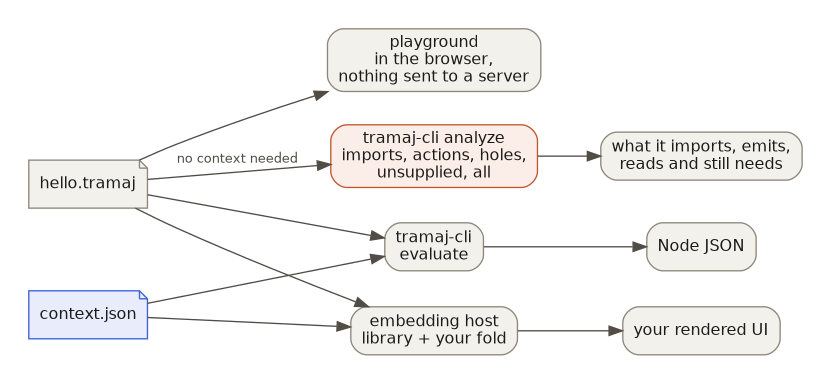
The fastest way in: the playground
Before installing anything, try the playground — it runs entirely in the browser, needs no setup, and shows the same panels described below (evaluated AST, rendered HTML, action log).
Installing the toolchain
tramaj’s PureScript packages are one Spago
workspace. You need purs and spago on your PATH:
npm install -g purescript spagoAnything that bundles a browser or Node bundle — the playground and the CLI —
also needs esbuild, which is a devDependency of the repo root:
git clone https://github.com/lucasdicioccio/tramaj.git
cd tramaj
npm install
export PATH="$PWD/node_modules/.bin:$PATH"
Writing a first template
Create hello.tramaj:
@n=cardinality($ctx.items)
.p("there are `$n` item(s)")
and a context to evaluate it against, hello.json:
{"items": ["a", "b", "c"]}Running it
spago run -p tramaj-cli --args "hello.tramaj hello.json"This prints the evaluated Node AST as JSON — a p element wrapping the
text there are 3 item(s). See node-json.md
for what that JSON shape means, or fold it into real HTML by rendering it
through a host like tramaj-halogen.
Computing with numbers
A number is an integer or a float, decided by how it is written: 3 is an
integer, 3.0 and 3e0 are floats. That holds for a literal in the template
and for a number in the context file. The two types do not mix: eq(3, 3.0)
is false, and gt(1.5, 0) is an error that gt(1.5, 0.0) fixes.
There are no operators. Arithmetic is ten named builtins: sum, product,
negate, quotient, inverse, floor-quotient, modulo, floor, real
and round. Create bill.tramaj:
@subtotal = sum($ctx.compute, $ctx.storage, negate($ctx.credit))
@share    = branch(0, gt($ctx.total, 0),
                   floor-quotient(product(100, $ctx.used), $ctx.total))
.p("subtotal `$subtotal`, `$share`% used")
and bill.json:
{"compute": 120, "storage": 30, "credit": 25, "used": 3, "total": 8}Arithmetic is a profile the host turns on. With the CLI that is the
--arithmetic flag:
spago run -p tramaj-cli --args "--arithmetic bill.tramaj bill.json"The result is a p element with the text subtotal 125, 37% used. Without
the flag the ten names are unbound, and the CLI says which ones the template
uses. sum and product take all integers or all floats, never a mix;
real(x) and floor(x) convert, and each accepts both types.
The playground runs with arithmetic on and has an
arithmetic-demo tab. Numbers used to be a single type: if you have
templates written before the split, read
Migrating to integers and floats.
The split and arithmetic are in all six implementations (PureScript,
Haskell, TypeScript, Rust, Go and Python), and so are sort-by,
sort-by-descending and format-number, which need no flag. All of it is on
the main branch and in no release yet.
Splitting a template into libraries
A template can import(...) another template as a library. Pass each one
with --lib name=path:
spago run -p tramaj-cli --args "--lib greeter=greeter.tramaj hello.tramaj hello.json"Repeat --lib for as many libraries as the template’s imports need.
Inspecting a template without running it
Because imports, action keys, and context reads are all static positions (see Properties), the CLI can answer questions about a template without a context file at all:
node tramaj-cli/dist/tramaj-cli.js analyze imports hello.tramaj
node tramaj-cli/dist/tramaj-cli.js analyze actions hello.tramaj
node tramaj-cli/dist/tramaj-cli.js analyze holes hello.tramaj
node tramaj-cli/dist/tramaj-cli.js analyze unsupplied hello.tramaj
node tramaj-cli/dist/tramaj-cli.js analyze arithmetic bill.tramaj
node tramaj-cli/dist/tramaj-cli.js analyze all hello.tramaj
(These need a bundled CLI first: spago bundle -p tramaj-cli --platform node --outfile dist/tramaj-cli.js, run from tramaj-cli/.)
Embedding in a real host
Running templates from the command line is one thing; wiring them into an actual application is another — see Integrating tramaj for the four paths (PureScript, Haskell, JavaScript, or any other language) and what each one actually looks like.
Where to go next
- Use cases for where this fits alongside other templating approaches.
- Reference for the full grammar, builtins, and the v3/v4 extensions.
- Integrating tramaj for embedding it in a host application.
- Migrating to integers and floats if you have templates or a host written before numbers became two types.
- For coding agents if you’re setting an LLM loose on tramaj templates rather than writing them by hand.