Session Management
On Tue, 06 Oct 2026, by @lucasdicioccio, 1019 words, 49 code snippets, 0 links, 1images.
Generated from documentation/sessions.md, the repository is the canonical source and may be ahead of this page.
Session Management
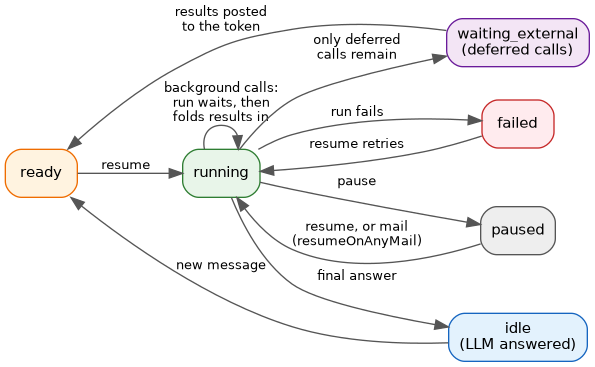
Session management provides persistent storage and retrieval of agent conversations, enabling conversation resumption, history analysis, and multi-modal content support. Sessions can now be stored across multiple locations with a unified read view.
Overview
Sessions represent complete conversations between users and agents, including:
- Session metadata: IDs, timestamps, agent references, version info
- Turn history: Complete conversation turns
- Tool calls: Records of tool invocations and results
- Media attachments: Base64-encoded images, documents, audio, video
- Context: Full conversation state for resumption
The SessionStore now supports multi-location storage:
- Write location: Single directory where new sessions are written
- Read locations: Multiple directories searched for existing sessions
- Deduplication: First location wins when sessions exist in multiple places
- Tilde expansion: Paths like
~/.config/agents-exe/sessions/are resolved automatically
┌─────────────────────────────────────────────────────────────┐
│                       Session                                │
├─────────────────────────────────────────────────────────────┤
│  SessionId: "uuid"                                          │
│  ConversationId: "uuid"                                     │
│  AgentSlug: "my-agent"                                      │
│  SessionVersion: 1                                          │
├─────────────────────────────────────────────────────────────┤
│  Turns:                                                      │
│  ┌─────────────────────────────────────────────────────┐   │
│  │ Turn 1                                              │   │
│  │   User: "Hello!"                                    │   │
│  │   [📎 image.png]                                    │   │
│  │   Assistant: "Hi there!"                            │   │
│  └─────────────────────────────────────────────────────┘   │
│  ┌─────────────────────────────────────────────────────┐   │
│  │ Turn 2                                              │   │
│  │   User: "List files"                                │   │
│  │   Tool: list_files -> ["a.txt", "b.txt"]            │   │
│  │   [📎 screenshot.png]                               │   │
│  │   Assistant: "Found 2 files..."                     │   │
│  └─────────────────────────────────────────────────────┘   │
└─────────────────────────────────────────────────────────────┘

┌─────────────────────────────────────────────────────────────┐
│                  Multi-Location SessionStore                 │
├─────────────────────────────────────────────────────────────┤
│  Write Location: ./sessions/                                 │
│  Read Locations:                                             │
│    1. ./sessions/           (primary, write location)       │
│    2. ./.agents-sessions/   (project-local archive)         │
│    3. ~/.config/agents-exe/sessions/  (global storage)      │
├─────────────────────────────────────────────────────────────┤
│  Deduplication: First location wins by ConversationId       │
│  Priority: ./sessions/ > ./.agents-sessions/ > ~/.config/   │
└─────────────────────────────────────────────────────────────┘
Core Types
Session Types (System.Agents.Session.Types)
newtype SessionId = SessionId UUID
newtype TurnId = TurnId UUID

-- | User query - can include text and media attachments.
data UserQuery = UserQuery
    { queryText :: Text
    -- ^ The text query/prompt
    , queryMedia :: [MediaAttachment]
    -- ^ Optional media attachments (images, audio, video, etc.)
    }

-- | Tool response from the user/agent system to the LLM.
data UserToolResponse
    = TextResponse Text                    -- Plain UTF-8 text
    | JsonResponse Aeson.Value             -- Structured JSON data
    | MediaResponse MediaAttachment        -- Single binary media (base64-encoded)
    | MixedResponse [ContentPart]          -- Multi-modal: alternating text and media

-- | Individual part of a mixed multi-modal response.
data ContentPart
    = TextPart Text
    | MediaPart MediaAttachment

-- | A media attachment containing base64-encoded binary data.
data MediaAttachment = MediaAttachment
    { mediaMimeType :: Text        -- ^ MIME type (e.g., "image/png")
    , mediaBase64Data :: Text      -- ^ Base64-encoded content
    , mediaFilename :: Maybe Text  -- ^ Optional filename
    }

-- | Session with versioning for backwards compatibility.
data Session = Session
    { sessionId :: SessionId
    , forkedFromSessionId :: Maybe SessionId  -- ^ For conversation forking
    , turnId :: TurnId
    , turns :: [Turn]
    , sessionVersion :: Maybe Int
    -- ^ Optional session version:
    --   Nothing = legacy (pre-media)
    --   Just 1 = media support enabled
    }

-- | User turn content including possible media.
data UserTurnContent = UserTurnContent
    { userPrompt :: SystemPrompt
    , userTools :: [SystemTool]
    , userQuery :: Maybe UserQuery
    -- ^ Query with optional media attachments
    , userToolResponses :: [(LlmToolCall, UserToolResponse)]
    -- ^ Tool responses with multi-modal support
    }

data Turn
    = UserTurn UserTurnContent (Maybe StepByteUsage)
    | LlmTurn LlmTurnContent (Maybe StepByteUsage)
Media Types (System.Agents.Media.Types)
-- | High-level media type classification.
data MediaType
    = MediaImage ImageType
    | MediaAudio AudioType
    | MediaVideo VideoType
    | MediaApplication ApplicationType
    | MediaText TextSubtype

data ImageType = ImagePNG | ImageJPEG | ImageGIF | ImageWebP | ImageSVG
data AudioType = AudioMPEG | AudioWAV | AudioOGG | AudioMP3 | AudioAAC | AudioFLAC
data VideoType = VideoMP4 | VideoWebM | VideoOGG | VideoAVI | VideoMOV
data ApplicationType = AppPDF | AppJSON | AppXML | AppOctetStream | AppZip
data TextSubtype = TextPlain | TextHTML | TextCSS | TextCSV | TextMarkdown
Session Versioning
Sessions include a version field for backwards compatibility:
| Version | Description |
|---|---|
Nothing / missing | Legacy session (pre-media support) |
Just 1 | Full media support enabled |
Backwards Compatibility
-- JSON serialization handles both old and new formats
instance FromJSON Session where
    parseJSON = Aeson.withObject "Session" $ \v -> do
        mVersion <- v .:? "sessionVersion"
        Session
            <$> v .: "turns"
            <*> v .: "sessionId"
            <*> v .:? "forkedFromSessionId"
            <*> v .: "turnId"
            <*> pure mVersion

instance ToJSON Session where
    toJSON s = Aeson.object $
        [ "turns" .= s.turns
        , "sessionId" .= s.sessionId
        , "forkedFromSessionId" .= s.forkedFromSessionId
        , "turnId" .= s.turnId
        ]
        ++ ["sessionVersion" .= v | Just v <- [s.sessionVersion]]
Media Attachments
Supported Media Types
| Category | Extensions | MIME Types |
|---|---|---|
| Images | .png, .jpg, .jpeg, .gif, .webp, .svg | image/png, image/jpeg, image/gif, image/webp, image/svg+xml |
| Documents | .pdf, .txt, .md, .json, .xml | application/pdf, text/plain, text/markdown, application/json, application/xml |
| Audio | .mp3, .wav, .ogg, .aac, .flac | audio/mp3, audio/wav, audio/ogg, audio/aac, audio/flac |
| Video | .mp4, .webm, .mov, .avi | video/mp4, video/webm, video/quicktime, video/avi |
Creating Media Attachments
import qualified Data.ByteString.Base64 as B64
import qualified Data.Text.Encoding as Text

-- Create a media attachment from file
createMediaAttachment :: FilePath -> IO (Either String MediaAttachment)
createMediaAttachment path = do
    content <- BS.readFile path
    let mimeType = detectMimeType path
    let base64Data = Text.decodeUtf8 $ B64.encode content
    return $ Right $ MediaAttachment
        { mediaMimeType = mimeType
        , mediaBase64Data = base64Data
        , mediaFilename = Just $ Text.pack $ takeFileName path
        }

-- Detect MIME type from file extension
detectMimeType :: FilePath -> Text
detectMimeType path = case takeExtension path of
    ".png" -> "image/png"
    ".jpg" -> "image/jpeg"
    ".jpeg" -> "image/jpeg"
    ".pdf" -> "application/pdf"
    -- ... etc
Using Media in Queries
-- Create a query with media attachments
let query = UserQuery
        { queryText = "Describe this image"
        , queryMedia = [imageAttachment, documentAttachment]
        }

-- The query is sent to the LLM with media included
Tool Responses with Media
Tools can return media responses:
-- Tool returns an image
let toolResponse = MediaResponse $ MediaAttachment
        { mediaMimeType = "image/png"
        , mediaBase64Data = base64EncodedImageData
        , mediaFilename = Just "chart.png"
        }

-- Tool returns mixed text and media
let toolResponse = MixedResponse
        [ TextPart "Here's the analysis chart:"
        , MediaPart chartAttachment
        , TextPart "As you can see, the trend is increasing."
        ]
Session Store
The SessionStore module provides persistent storage with multi-location support:
data SessionStore = SessionStore
    { sessionWritePrefix :: FilePath
    -- ^ Directory where new sessions are written
    , sessionReadPrefixes :: [FilePath]
    -- ^ Directories to search for existing sessions, in priority order
    }
Creating a SessionStore
import System.Agents.SessionStore

-- Create with separate write and read locations
store <- mkSessionStore
    "./sessions/"                              -- Write location
    ["./sessions/", "~/.config/agents-exe/sessions/"]  -- Read locations

-- Create simple single-location store (backwards compatible)
simpleStore <- mkSimpleSessionStore "./sessions/"

-- Resolve tilde paths automatically
resolvedPath <- resolveSessionPath "~/.config/agents-exe/sessions/"
-- Returns: "/home/user/.config/agents-exe/sessions/"
Key Behaviors
-
Write Location: All new sessions are written to
sessionWritePrefix -
Read Locations: When reading sessions, all
sessionReadPrefixesare searched in order -
Auto-prepending: If write location is not in read locations, it’s automatically prepended to ensure newly written sessions are immediately readable
-
Deduplication: When listing sessions, if the same session ID exists in multiple locations, the first occurrence (highest priority) is kept
-
Tilde Expansion: Paths starting with
~are automatically expanded to the user’s home directory
Configuration
Configure multi-location session storage in agents-exe.cfg.json:
{
  "agentsConfigDir": "~/.config/agents-exe",
  "agentsFiles": [],
  "sessions": {
    "writeLocation": "./sessions/",
    "readLocations": [
      "./sessions/",
      "./.agents-sessions/",
      "./task-sessions/",
      "~/.config/agents-exe/sessions/"
    ]
  }
}
Configuration Fields:
| Field | Type | Required | Description |
|---|---|---|---|
sessions.writeLocation | FilePath | Yes | Directory where new sessions are written |
sessions.readLocations | [FilePath] | Yes | Directories to search for existing sessions |
Backwards Compatibility:
- If
sessionssection is missing, falls back toagentsLogs.logSessionsJsonPrefix(deprecated) - If no prefix is configured, uses
~/.config/agents-exe/sessions/as default
Use Cases
Personal + Project Sessions
{
  "sessions": {
    "writeLocation": "./sessions/",
    "readLocations": [
      "./sessions/",
      "~/.config/agents-exe/sessions/"
    ]
  }
}- New sessions go to
./sessions/ - Can access personal history from home directory
- Project sessions take precedence if ID conflicts
Task-Based Organization
{
  "sessions": {
    "writeLocation": "./task-sessions/current/",
    "readLocations": [
      "./task-sessions/current/",
      "./task-sessions/archive/",
      "./sessions/"
    ]
  }
}- Current task sessions in
current/ - Archived tasks still searchable
- General project sessions as fallback
Team Shared Sessions
{
  "sessions": {
    "writeLocation": "./my-sessions/",
    "readLocations": [
      "./my-sessions/",
      "./shared-sessions/",
      "~/.config/agents-exe/sessions/"
    ]
  }
}- Personal work in
my-sessions/ - Team-shared sessions in
shared-sessions/ - Personal history available
File Naming
Sessions are stored with the pattern conv.<uuid>.json:
sessions/
├── conv.550e8400-e29b-41d4-a716-446655440000.json
├── conv.6ba7b810-9dad-11d1-80b4-00c04fd430c8.json
└── conv.6ba7b811-9dad-11d1-80b4-00c04fd430c8.json
Session Store Operations
-- Store a session (always writes to sessionWritePrefix)
storeSession :: SessionStore -> ConversationId -> Session -> IO ()

-- Read a session (searches all read locations in order)
readSession :: SessionStore -> ConversationId -> IO (Maybe Session)

-- List all sessions (aggregates from all read locations, deduplicated)
listSessions :: SessionStore -> IO [(FilePath, Maybe Session, ConversationId)]

-- Generate file path for a session
sessionFilePath :: SessionStore -> ConversationId -> FilePath
sessionWritePath :: SessionStore -> ConversationId -> FilePath
Session Lifecycle
Creating a Session
newSession :: AgentSlug -> IO Session
newSession slug = do
    sid <- SessionId <$> UUID.nextRandom
    cid <- ConversationId <$> UUID.nextRandom
    tid <- TurnId <$> UUID.nextRandom
    return Session
        { sessionId = sid
        , forkedFromSessionId = Nothing
        , turnId = tid
        , turns = []
        , sessionVersion = Just 1  -- New sessions use version 1
        }
Adding a Turn
addUserTurn :: Session -> UserQuery -> [ToolCallRecord] -> IO Session
addUserTurn session query calls = do
    let userContent = UserTurnContent
            { userPrompt = currentPrompt
            , userTools = availableTools
            , userQuery = Just query
            , userToolResponses = calls
            }
    let turn = UserTurn userContent Nothing
    return session { turns = turns session ++ [turn] }
Conversation Loop
conversationLoop ::
    SessionStore ->
    Runtime ->
    Session ->
    IO ()
conversationLoop store runtime session = do
    -- Get user input (possibly with media)
    (input, media) <- getUserInput
    let query = UserQuery input media

    -- Call LLM with session context and media
    let messages = sessionToMessages session
    response <- callLLM runtime messages query

    -- Execute any tool calls
    toolResults <- executeToolCalls runtime (toolCalls response)

    -- Update session
    newSession <- addTurn session query toolResults

    -- Persist (always writes to write location)
    storeSession store (conversationId newSession) newSession

    -- Continue
    conversationLoop store runtime newSession
Session Serialization
JSON Format
{
  "sessionId": "550e8400-e29b-41d4-a716-446655440000",
  "turnId": "6ba7b810-9dad-11d1-80b4-00c04fd430c8",
  "forkedFromSessionId": null,
  "turns": [
    {
      "tag": "UserTurn",
      "contents": {
        "userPrompt": {"systemPrompt": "You are helpful..."},
        "userTools": [...],
        "userQuery": {
          "text": "What's in this image?",
          "media": [
            {
              "mimeType": "image/png",
              "base64Data": "iVBORw0KGgoAAAANSUhEUgAA...",
              "filename": "screenshot.png"
            }
          ]
        },
        "userToolResponses": []
      },
      "byteUsage": {
        "inputBytes": 1234,
        "outputBytes": 567,
        "reasoningBytes": 0,
        "totalBytes": 1801
      }
    },
    {
      "tag": "LlmTurn",
      "contents": {
        "llmResponse": "I can see a chart showing...",
        "llmThinking": null,
        "llmToolCalls": []
      }
    }
  ],
  "sessionVersion": 1
}
UserToolResponse JSON Formats
// TextResponse
{
  "type": "text",
  "content": "The file contains..."
}

// JsonResponse
{
  "type": "json",
  "content": {"status": "ok", "count": 42}
}

// MediaResponse
{
  "type": "media",
  "mimeType": "image/png",
  "base64Data": "iVBORw0KGgoAAAANSUhEUgAA...",
  "filename": "chart.png"
}

// MixedResponse
{
  "type": "mixed",
  "parts": [
    {"type": "text", "text": "Here's the chart:"},
    {"type": "media", "mimeType": "image/png", "base64Data": "..."},
    {"type": "text", "text": "As you can see..."}
  ]
}
Session Operations
Resuming a Session
# Start with existing session
agents-exe run --agent-file agent.json --session-file session.json
mainOneShot ::
SessionStore ->
Maybe FilePath -> -- Session file path
Maybe Session -> -- Pre-loaded session
Props ->
Text -> -- Prompt
[MediaAttachment] -> -- Media attachments
IO ()
mainOneShot store mPath mSession props prompt media = do
-- Load or create session
session <- case mSession of
Just s -> return s
Nothing -> case mPath of
Just path -> fromMaybe (newSession props.agentSlug)
<$> readSessionFromFile path
Nothing -> newSession props.agentSlug
-- Create query with media
let query = UserQuery prompt media
-- Run conversation
...
-- Save session (to write location)
writeSession store updatedSessionSession Printing (System.Agents.SessionPrint)
The SessionPrint module provides rich markdown formatting for session files, including statistics visualization and configurable content display with media support.
Session Print Types
-- | Preference for ordering session steps.
data OrderPreference
    = Chronological      -- Oldest first
    | Antichronological  -- Newest first

-- | Amount of content to print (lines or characters).
data PrintAmount
    = Lines Int
    | Chars Int

-- | Visibility preference for displaying content.
data PrintVisibility
    = Hidden                    -- Don't show content
    | Elided PrintAmount PrintAmount  -- Show leading/trailing, elide middle
    | ShownFull                 -- Show complete content

-- | Options for controlling session print output.
data SessionPrintOptions = SessionPrintOptions
    { sessionPrintFile :: FilePath
    , showToolCallResults :: PrintVisibility
    , showToolCallArguments :: PrintVisibility
    , nTurns :: Maybe Int
    , repeatSystemPrompt :: Bool
    , repeatTools :: Bool
    , orderPreference :: OrderPreference
    , noFunnyStamp :: Bool
    }

-- | Statistics about a session.
data SessionStatistics = SessionStatistics
    { statTotalTurns :: Int
    , statUserTurns :: Int
    , statLlmTurns :: Int
    , statTotalToolCalls :: Int
    , statToolCallsByName :: Map Text Int
    , statInputBytes :: Int
    , statOutputBytes :: Int
    , statReasoningBytes :: Int
    , statTotalBytes :: Int
    , statMediaAttachments :: Int  -- NEW: Count of media attachments
    }
CLI: session-print Command
# Print full session
agents-exe session-print session.json

# Print with tool call results visible
agents-exe session-print --show-tool-call-results shown session.json

# Show tool call arguments too
agents-exe session-print \
    --show-tool-call-results shown \
    --show-tool-call-arguments shown \
    session.json

# Elide long outputs (show first/last 10 lines)
agents-exe session-print --show-tool-call-results elided session.json

# Limit to N turns
agents-exe session-print --n-turns 5 session.json

# Reverse chronological order
agents-exe session-print --antichronological session.json

# Show system prompts and tools each turn
agents-exe session-print --repeat-system-prompt --repeat-tools session.json

# Skip the ASCII art logo
agents-exe session-print --no-funny-stamp session.json
Formatting Media Attachments
formatToolResponse :: UserToolResponse -> Text
formatToolResponse (TextResponse txt) = txt
formatToolResponse (JsonResponse val) =
    Text.decodeUtf8 $ LByteString.toStrict $ Aeson.encodePretty val
formatToolResponse (MediaResponse media) =
    "[Media: " <> media.mediaMimeType <>
    maybe "" (", " <>) media.mediaFilename <>
    ", " <> formatBytes (Text.length media.mediaBase64Data `div` 4 * 3) <> "]"
formatToolResponse (MixedResponse parts) =
    Text.intercalate "\n" $ map formatContentPart parts
  where
    formatContentPart (TextPart t) = t
    formatContentPart (MediaPart m) = formatToolResponse (MediaResponse m)
Content Elision
The elideDocument function intelligently handles content that’s too long:
-- | Elide a document by keeping leading and trailing portions.
elideDocument :: PrintAmount -> PrintAmount -> Text -> Text

-- Examples:
elideDocument (Lines 3) (Lines 3) "line1\nline2\n...\nline7"
-- Shows all 7 lines (no overlap)

elideDocument (Lines 2) (Lines 2) "line1\nline2\nline3\nline4\nline5"
-- "line1\nline2\n... (1 line elided) ...\nline4\nline5"
Statistics Visualization
Session print includes visual bar charts for:
- Tool usage: Bar chart showing which tools were called most
- Byte usage: Input, output, and reasoning token breakdown
- Media attachments: Count and types of media
📊 Statistics

### 🔧 Tool Calls

Total Tool Calls: 15

`read-file`         8   ████████████████████████████████████████
`write-file`        4   ████████████████████
`grep-files`        3   ███████████████

### 💾 Byte Usage

`Input    `      2 KiB   ████████████████████████
`Output   `      5 KiB   ████████████████████████████████████████████████
`Reasoning`      1 KiB   ████████████

`Media    `     50 KiB   ████████████████████████████████████████████████████████████████████████████████████████████████████

Total: 58 KiB
Session Content Injection (System.Agents.SessionPrint.Inject)
The SessionInject module allows injecting session content into prompts with various verbosity levels.
Injection Verbosity Levels
data SessionInjectMode
    = SessionXS   -- Minimal: queries/responses only, skips tool-only turns
    | SessionS    -- Low: +thinking, +tool names
    | SessionM    -- Medium: +statistics
    | SessionL    -- High: +tool call results
    | SessionXL   -- Maximum: complete session
CLI: Session Injection Options
# Inject session at minimal verbosity
agents-exe run --session-xs previous-session.json --prompt "Continue..."

# Inject at low verbosity
agents-exe run --session-s previous-session.json --prompt "Continue..."

# Inject at medium verbosity
agents-exe run --session-m previous-session.json --prompt "Continue..."

# Inject at high verbosity (includes tool results)
agents-exe run --session-l previous-session.json --prompt "Continue..."

# Maximum verbosity
agents-exe run --session-xl previous-session.json --prompt "Continue..."
Programmatic Usage
import System.Agents.SessionPrint.Inject

-- Load session content at specific verbosity
loadSessionForPrompt :: SessionInjectMode -> Session -> Text
loadSessionForPrompt mode session = case mode of
    SessionXS -> formatMinimal session   -- Just user queries and LLM responses
    SessionS  -> formatLow session       -- + thinking process
    SessionM  -> formatMedium session    -- + statistics
    SessionL  -> formatHigh session      -- + tool call results
    SessionXL -> formatComplete session  -- Everything
Session Edit
The SessionEdit module provides operations for modifying session files.
CLI: session-edit Command
# Take first N turns
agents-exe session-edit --take --count 10 session.json < input.json > output.json

# Take last N turns
agents-exe session-edit --take-tail --count 5 session.json < input.json > output.json

# Drop first N turns
agents-exe session-edit --drop --count 2 session.json < input.json > output.json

# Drop last N turns
agents-exe session-edit --drop-tail --count 1 session.json < input.json > output.json

# Remove all tool calls
agents-exe session-edit --censor-tool-calls session.json < input.json > output.json

# Remove thinking content
agents-exe session-edit --censor-thinking session.json < input.json > output.json
Edit Operations
data SessionEditOp
    = SessionEditTake Int       -- Take first N turns
    | SessionEditTakeTail Int   -- Take last N turns
    | SessionEditDrop Int       -- Drop first N turns
    | SessionEditDropTail Int   -- Drop last N turns
    | SessionEditCensorToolCalls  -- Remove tool calls
    | SessionEditCensorThinking   -- Remove thinking content

applyEdit :: SessionEditOp -> Session -> Session
applyEdit (SessionEditTake n) session =
    session { turns = take n (turns session) }
applyEdit (SessionEditDrop n) session =
    session { turns = drop n (turns session) }
applyEdit SessionEditCensorToolCalls session =
    session { turns = map removeToolCalls (turns session) }
-- etc.
Session Search (System.Agents.Session.Search)
The Session Search subsystem provides fast fuzzy text search across session files using SQLite FTS5. It enables searching through conversation history with trigram-based fuzzy matching and metadata filtering.
Architecture
┌─────────────────────────────────────────────────────────────┐
│                    Session Search                            │
├─────────────────────────────────────────────────────────────┤
│  ┌─────────────┐  ┌─────────────┐  ┌─────────────┐         │
│  │    Types    │  │    Index    │  │    Query    │         │
│  │  (config)   │  │  (SQLite)   │  │  (search)   │         │
│  └─────────────┘  └─────────────┘  └─────────────┘         │
│        ▲                ▲                ▲                  │
│        └────────────────┴────────────────┘                  │
│                    CLI Handlers                              │
│              (session-index, session-search)                 │
└─────────────────────────────────────────────────────────────┘
Core Types (System.Agents.Session.Search.Types)
-- | Configuration for the search index.
data SearchIndexConfig = SearchIndexConfig
    { indexDbPath :: FilePath
    -- ^ Path to the SQLite index database (default: .agents-search.db)
    , indexSessionStore :: SessionStore
    -- ^ Session store to index (supports multi-location stores)
    , indexIncludeToolOutputs :: Bool
    -- ^ Whether to include tool outputs in the index
    }

-- | Options for session search queries.
data SearchOptions = SearchOptions
    { searchQuery :: Text
    -- ^ Fuzzy search query text
    , searchDateFilter :: Maybe DateFilter
    -- ^ Optional date filter
    , searchTools :: [Text]
    -- ^ Filter by tools used (any of these)
    , searchAgent :: Maybe Text
    -- ^ Filter by agent slug
    , searchIncludeToolOutputs :: Bool
    -- ^ Include tool outputs in search
    , searchJsonOutput :: Bool
    -- ^ Output results as JSON
    , searchPreviewLines :: Int
    -- ^ Number of context lines to show
    , searchLimit :: Maybe Int
    -- ^ Maximum number of results
    , searchAutoUpdate :: Bool
    -- ^ Auto-update index if stale before searching
    }

-- | Date filter for search queries.
data DateFilter
    = AfterDate UTCTime
    | BeforeDate UTCTime
    | BetweenDates UTCTime UTCTime

-- | Status of the search index.
data SearchIndexStatus
    = IndexCurrent
    | IndexStale Int Int  -- (stale sessions, total sessions)
    | IndexMissing
    | IndexError Text
Search Result Types
-- | Complete search results.
data SearchResult = SearchResult
    { resultItems :: [SearchResultItem]
    , resultTotalMatches :: Int
    , resultQueryTimeMs :: Double
    , resultIndexWasUpdated :: Bool
    }

-- | A single search result item.
data SearchResultItem = SearchResultItem
    { resultMetadata :: SearchResultMetadata
    , resultPreview :: Maybe Text
    , resultMatchedTerms :: [Text]
    }

-- | Metadata about a search result.
data SearchResultMetadata = SearchResultMetadata
    { resultSessionId :: Text
    , resultFilePath :: FilePath
    , resultAgentSlug :: Maybe Text
    , resultTurnCount :: Int
    , resultFirstTurnAt :: Maybe UTCTime
    , resultLastTurnAt :: Maybe UTCTime
    , resultRank :: Double
    }
Index Schema (System.Agents.Session.Search.Index)
The search index uses SQLite with FTS5 (Full-Text Search version 5):
-- Session metadata cache
CREATE TABLE session_index (
    session_id TEXT PRIMARY KEY,
    file_path TEXT NOT NULL,
    mtime INTEGER NOT NULL,
    agent_slug TEXT,
    turn_count INTEGER,
    first_turn_at TIMESTAMP,
    last_turn_at TIMESTAMP
);

-- FTS5 virtual table for trigram search
CREATE VIRTUAL TABLE search_content USING fts5(
    session_id,
    content,
    tokenize='trigram'
);

-- Tool call index for filtering
CREATE TABLE tool_index (
    session_id TEXT REFERENCES session_index(session_id),
    tool_name TEXT NOT NULL,
    call_count INTEGER DEFAULT 1,
    PRIMARY KEY (session_id, tool_name)
);

-- Index metadata
CREATE TABLE index_metadata (
    key TEXT PRIMARY KEY,
    value TEXT
);
Index Operations
-- | Create a new search index, replacing any existing index.
-- Indexes sessions from ALL read locations in the SessionStore.
createSearchIndex :: SearchIndexConfig -> IO ()

-- | Incrementally update the search index.
updateSearchIndex :: SearchIndexConfig -> IO ()

-- | Check the status of the search index.
checkIndexStatus :: SearchIndexConfig -> IO SearchIndexStatus

-- | Remove the search index.
removeSearchIndex :: SearchIndexConfig -> IO ()
Search Execution (System.Agents.Session.Search.Query)
-- | Execute a search query with the given options.
-- Searches across all indexed sessions from all locations.
executeSearchWithOptions :: SearchIndexConfig -> SearchOptions -> IO SearchResult

-- | Execute a search query against the index.
executeSearch :: SearchIndexConfig -> SearchOptions -> IO SearchResult

-- | Format search results for display.
formatResults :: SearchOptions -> SearchResult -> IO ()
Fuzzy Matching
The search uses SQLite FTS5 with trigram tokenization:
- Trigram tokenization: Breaks text into 3-character sequences
- Fuzzy matching: “error” matches “errors”, “erroring”, “terror”
- Prefix matching: “data” matches “database”, “datagram”
- Typo tolerance: Small changes in query still find matches
Example:
-- Find sessions with fuzzy match to "error"
SELECT session_id, rank
FROM search_content
WHERE content MATCH 'error'
ORDER BY rank;
CLI: session-index Command
# Build the search index (includes all read locations)
agents-exe session-index --build

# Check index status
agents-exe session-index --status

# Update index incrementally
agents-exe session-index --update

# Remove the index
agents-exe session-index --clean

# Build with tool outputs included
agents-exe session-index --build --include-tool-outputs
CLI: session-search Command
# Basic fuzzy search
agents-exe session-search "database error"

# Search with auto-update
agents-exe session-search "migration" --auto

# Include tool outputs in search
agents-exe session-search "config.yaml" --include-tool-outputs

# Filter by date and tool
agents-exe session-search "auth" --after 2024-01-01 --tool write-file

# Filter by agent
agents-exe session-search "refactor" --agent my-coder

# JSON output for scripting
agents-exe session-search "TODO" --json

# Show context lines
agents-exe session-search "deploy" --preview 5

# Combined filters
agents-exe session-search "fix" \
  --after 2024-01-01 \
  --before 2024-12-31 \
  --tool bash_write-file \
  --json
Search Workflow Example
# 1. Build the initial index (aggregates all locations)
agents-exe session-index --build

# 2. Search for sessions about errors
agents-exe session-search "error" --json | jq '.resultItems[] | .resultMetadata.resultFilePath'

# 3. Find sessions using specific tools
agents-exe session-search "database" --tool write-file --tool read-file

# 4. Update index after new sessions
agents-exe session-index --update

# 5. Search with date filter
agents-exe session-search "config" --after 2024-06-01 --preview 3
Context Window Management
Sessions track context size for LLM limits:
estimateTokens :: Session -> Int
estimateTokens session =
    sum [estimateMessageTokens m | turn <- turns session
                                 , m <- [userMessage turn, assistantMessage turn]]

manageContext :: Int -> Session -> Session
manageContext maxTokens session
    | estimateTokens session <= maxTokens = session
    | otherwise = manageContext maxTokens (pruneOldestTurn session)
Byte Usage Tracking
Sessions track byte usage for monitoring:
-- | Calculate bytes for all response types
userToolResponseBytes :: UserToolResponse -> Int
userToolResponseBytes (TextResponse txt) =
    Text.length txt * 4  -- UTF-8 max bytes per char
userToolResponseBytes (JsonResponse val) =
    fromIntegral $ LByteString.length $ Aeson.encode val
userToolResponseBytes (MediaResponse media) =
    Text.length media.mediaBase64Data  -- Already base64 = ASCII
userToolResponseBytes (MixedResponse parts) =
    sum (map contentPartBytes parts)

contentPartBytes :: ContentPart -> Int
contentPartBytes (TextPart txt) = Text.length txt * 4
contentPartBytes (MediaPart media) = Text.length media.mediaBase64Data
Tool Execution Context
Sessions provide context for tool execution:
data ToolExecutionContext = ToolExecutionContext
    { ctxSessionId :: SessionId
    , ctxConversationId :: ConversationId
    , ctxTurnId :: TurnId
    , ctxFullSession :: Maybe Session
    , ...
    }
This allows tools to:
- Access conversation history
- Store tool-specific state
- Make context-aware decisions
- Return media responses
Session Store Backends
File Store (Default)
fileSessionStore :: FilePath -> [FilePath] -> SessionStore
fileSessionStore writePrefix readPrefixes = SessionStore
    { sessionWritePrefix = writePrefix
    , sessionReadPrefixes =
        if writePrefix `elem` readPrefixes
            then readPrefixes
            else writePrefix : readPrefixes
    , readSession = \sid -> do
        -- Search through read prefixes in order
        let paths = map (</> sessionFileName sid) sessionReadPrefixes
        findFirstExisting paths
    , writeSession = \sess -> do
        -- Always write to write prefix
        let path = sessionWritePrefix </> sessionFileName (sessionId sess)
        encodeFile path sess
    , listSessions = do
        -- Aggregate from all read prefixes, deduplicate
        allSessions <- concat <$> mapM listSessionsInDir sessionReadPrefixes
        let deduplicated = dedupeBy sessionId allSessions
        sortOn modificationTime deduplicated
    , ...
    }
Memory Store (Testing)
memorySessionStore :: IO SessionStore
memorySessionStore = do
    ref <- newIORef Map.empty
    return SessionStore
        { readSession = \sid -> Map.lookup sid <$> readIORef ref
        , writeSession = \sess ->
            modifyIORef ref (Map.insert (sessionId sess) sess)
        , ...
        }
Best Practices
Session Hygiene
- Regular cleanup: Delete old sessions to save space
- Sensitive data: Be careful with sessions containing secrets
- Backup: Sessions are JSON files - back them up
- Versioning: Handle schema migrations for old sessions
Conversation Design
- Clear turn boundaries: Each user input = one turn
- Tool call recording: Always record for reproducibility
- Error capture: Record tool failures in the session
- Timestamps: Useful for debugging and auditing
Performance
- Lazy loading: Don’t load full history unless needed
- Pagination: For long sessions, load turns in chunks
- Compression: Consider gzip for large session files
- Search indexing: Build index periodically for fast searching
Search Best Practices
- Regular index updates: Run
session-index --updateperiodically - Include tool outputs: Use
--include-tool-outputsfor comprehensive search - Use filters: Combine text search with
--tool,--agent, or date filters - JSON output: Use
--jsonfor scripting and automation - Auto-update: Use
--autoflag to ensure fresh results
Multi-Location Best Practices
- Write location priority: Keep write location first in read locations for best performance
- Archive old sessions: Move old sessions to archive directories instead of deleting
- Shared sessions: Use shared directories for team collaboration
- Tilde expansion: Use
~for portable home directory references - Deduplication awareness: Understand that first location wins for duplicate IDs
Media Best Practices
- Size limits: Keep media attachments under 50MB
- MIME types: Always declare correct MIME types
- Base64 encoding: Use proper encoding for binary data
- Mixed responses: Use
MixedResponsefor rich multi-modal output
Example: Session Analysis
-- Count tool usage
toolUsageStats :: Session -> Map Text Int
toolUsageStats session =
    Map.fromListWith (+)
        [(toolName tc, 1) | turn <- turns session
                          , tc <- toolCalls turn]

-- Average response time
averageResponseTime :: Session -> NominalDiffTime
averageResponseTime session =
    sum [toolDuration tc | turn <- turns session
                         , tc <- toolCalls turn]
    / fromIntegral (length $ concatMap toolCalls $ turns session)

-- Find turns with errors
errorTurns :: Session -> [Turn]
errorTurns session =
    [turn | turn <- turns session
          , any (isLeft . toolOutput) (toolCalls turn)]

-- Count media attachments
mediaAttachmentStats :: Session -> (Int, Map Text Int)
mediaAttachmentStats session =
    let attachments = collectAttachments session
        byType = Map.fromListWith (+)
            [(mediaMimeType m, 1) | m <- attachments]
    in (length attachments, byType)
Example: Search Integration
import System.Agents.Session.Search.Types
import System.Agents.Session.Search.Index
import System.Agents.Session.Search.Query

-- Search for sessions with specific patterns
searchSessions :: Text -> IO SearchResult
searchSessions query = do
    -- Create store with multi-location support
    store <- mkSessionStore
        "./sessions/"
        ["./sessions/", "~/.config/agents-exe/sessions/"]

    let config = defaultSearchIndexConfig store
    let opts = (defaultSearchOptions query)
            { searchJsonOutput = False
            , searchPreviewLines = 3
            , searchLimit = Just 20
            }
    executeSearchWithOptions config opts

-- Find sessions that used specific tools
findToolUsage :: [Text] -> IO SearchResult
findToolUsage tools = do
    store <- mkSimpleSessionStore "./sessions/"
    let config = defaultSearchIndexConfig store
    let opts = (defaultSearchOptions "")
            { searchTools = tools
            , searchJsonOutput = True
            }
    executeSearchWithOptions config opts
Related Modules
| Module | Purpose |
|---|---|
System.Agents.Media.Types | Media type definitions |
System.Agents.Session.Types | Core session types |
System.Agents.Session.Base | Session operations |
System.Agents.Session.Loop | Conversation loop |
System.Agents.Session.Step | Single turn execution |
System.Agents.Session.Edit | Session editing operations |
System.Agents.Session.OpenAI | OpenAI-specific session handling |
System.Agents.Session.Compat | Backwards compatibility |
System.Agents.Session.Search.Types | Search configuration types |
System.Agents.Session.Search.Index | Index building and maintenance |
System.Agents.Session.Search.Query | Search query execution |
System.Agents.SessionStore | Persistent storage with multi-location support |
System.Agents.SessionPrint | Markdown printing and statistics |
System.Agents.SessionPrint.Inject | Session content injection |