Getting started with agents-exe
On Fri, 25 Sep 2026, by @lucasdicioccio, 392 words, 6 code snippets, 11 links, 1images.
Getting started with agents-exe
agents-exe is a command-line tool, and a Haskell library underneath it. This page gets you from a checkout to an agent answering a prompt in each of the modes it supports.
Build
git clone https://github.com/lucasdicioccio/agents-exe
cd agents-exe
cabal build
cabal install exe:agents-exe exe:agents-server    # into ~/.cabal/bin
cabal test agents-tests                           # the main test suite
The repository is one cabal package: the agents library, the agents-exe
executable, agents-server (the HTTP server, see
agents-server), agq (a query tool over stored
sessions) and durable-workflow-demo, which runs without any API key:
cabal run durable-workflow-demo
Write a first agent
agents-exe init
walks you through writing an agent.json and its tools directory. The
result looks like this:
{
  "slug": "my-agent",
  "apiKeyId": "openai",
  "flavor": "openai",
  "modelUrl": "https://api.openai.com/v1",
  "modelName": "gpt-4",
  "announce": "A helpful assistant",
  "systemPrompt": ["You are a helpful assistant."],
  "toolDirectory": "tools",
  "mcpServers": [],
  "extraAgents": []
}
An agent is a repeatable, parameterized LLM: an endpoint, a model, a system
prompt, a directory of command-line tools, MCP servers, and helper agents it
can prompt. Tools and helpers are both exposed to the model as functions;
when the model asks for several at once, agents-exe runs them concurrently.
Tools explains how an executable describes itself, and
the command reference lists what init and the other
commands accept.
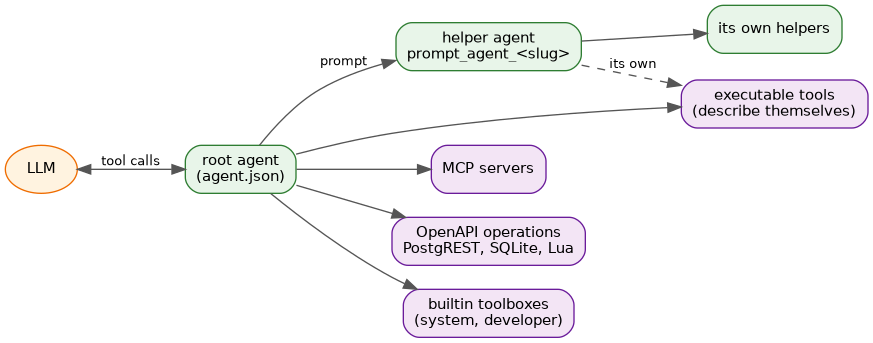
Whatever the tool’s origin, the model sees a function to call; a helper agent’s answer comes back as that function’s result, and helpers can have tools and helpers of their own.
Store an API key
Agents authenticate against their LLM endpoint with a key looked up by id in
~/.config/agents-exe/secret-keys (or the file given with --api-keys):
{
  "keys": [
    {
      "id": "openai",
      "value": "XXXXXXXXXXXXXXXXXXXXXXXXXXXXXXXX"
    }
  ]
}
The id must match the agent’s apiKeyId.
Run it
agents-exe check --agent-file agent.json                     # validate the agent, its tools and helpers
agents-exe run --agent-file agent.json --prompt "Hello!"     # one shot, answer on stdout
agents-exe tui --agent-file agent.json                       # the terminal UI
agents-exe mcp-server --agent-file agent.json                # a stdio MCP server exposing the agent as a tool
agents-exe serve --agent-file agent.json                     # sessions over HTTP, with a chat page
--agent-file can be given several times, and is auto-discovered from
agent.json when omitted; a project can also list its agents in
agents-exe.cfg.json (see advanced configuration).
Where next
- The TUI: keys, views, and how it shows tool calls and helper agents at work.
- agents-server: the HTTP API, durable sessions, event streams and running it as a service.
- Sessions and asynchronous tool calls: what a session stores, and how a run stops on a deferred or background call and resumes.
- Parameters, bindings and narrowing: pre-bound arguments, operator- and client-supplied parameters, and narrowed helpers for sub-agents.
- Docs: every guide and reference, and Specs for the design documents.